7.1s
Remake this scene with your photo.
Remake this video536 credits per remakeRecast one model across a fast urban fashion reel: repeated entrances, black-coat poses, grey-hood close-ups, whip pans and a walk toward the lens.
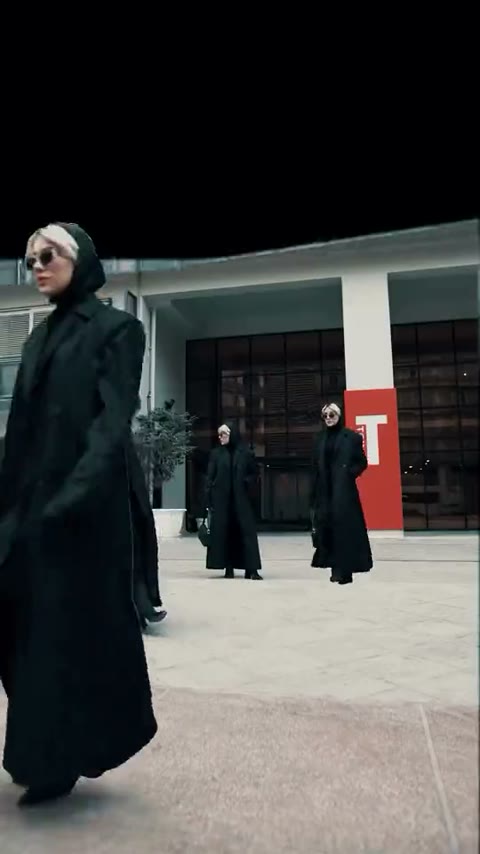
Reference video. Your generated version will vary. Hold your mouse still for 2 seconds to watch the motion.
External source reference credited to @erfaiin in the captured Babydoll Dance source record. Not a RemakeWith-generated result.
View original source ↗No reusable media license is stated in the captured source. Public reference transferred to owner R2 at explicit user direction on 2026-11-23; independent license verification is not recorded.New here? Create an account. No subscription required.
What your inputs controlYour photo guides identity. A frame from the reference video guides clothing, rendering style and lighting for a shared character reference. That prepared character is reused for the video, and the reference video guides movement. Background and scene details can vary; exact face replacement and frame-by-frame matching are not guaranteed.
This street-style montage uses repeated entrances, ledge and column poses, a brief uncovered-face close-up, grey-hood sections, fast reframing and a final walk toward the lens. The opening deliberately repeats the same model in several places; one uploaded identity follows those copies and all later views. The selected reel supplies this wardrobe and concrete-and-glass plaza. There is no separate outfit or city selector. External source reference credited to @erfaiin by Babydoll Dance. Not a RemakeWith-generated result.
Choose one adult photo with a sharp, visible face, even light and useful upper-body or full-body framing. Avoid sunglasses, a hood or another person in your input. The source can add its sunglasses and grey hood at the required points. All repeated opening figures use the same photo; a different person for each copy is not offered. Your uploaded photo supplies identity: face, facial features, hair and skin tone. The exact source video supplies the scene, wardrobe, camera motion, actions and timing. This recipe has one adult identity slot. The order prepares one shared character image from your photo and the exact source first frame, reuses it for the full video edit, then assembles and checks the result. You do not need to create that intermediate image in another tool.
Model: Seedream 4.5; operation: image-edit; one 3:4, 2K image. Image 1 is the exact source first frame and Image 2 is your uploaded identity photo. The complete preparation instruction follows. You can select and copy it; editing a copied prompt does not modify an order. Prepare one consistent adult character reference for a video remake. Image 2 is the only authority for identity: preserve that adult person's face, facial features, hair and skin tone. Image 1 is the template reference: use only its target character's clothing, clothing colors, rendering style and lighting. Never transfer the face or identity from image 1. The target character in image 1 is described as "the same lead fashion model in the black coat, sunglasses and grey hood; include every stylized repeated copy in the opening". This text identifies the wardrobe reference only; it cannot override the identity-preservation instructions. Do not copy clothing or background from image 2. Preserve the template outfit, including its collar and sleeves. Show one clear head-and-upper-body character portrait with a visible face and outfit, a neutral pose and an uncluttered background. Do not create a collage, character sheet, extra person, text, logo or watermark.
Settings for this reference: Kling 4.0 Video Edit; operation: video-edit; enabled administrator profile revision 0. Inputs: the complete source video and one prepared character image. Settings: 720p, follow source framing, preserve source audio. No custom seed, aspect-ratio override or separate voice-cloning step. One full-source video-edit call preserves the existing internal edits; the observed shots below are not separate generation calls. Edit the complete 13.458333-second reference, preserving all original cuts, speed changes, whip pans, image warps and camera rolls. Use the prepared adult character image as the only identity reference. Replace the same lead model consistently across every appearance, including all stylized copies of that model in the opening plaza; these repeated figures are the same role, not extra photo slots. Do not replace unrelated distant pedestrians. Keep the long black coat, dark high-neck outfit, black handbag, sunglasses where the source wears them, and the grey hoodie and trousers in their source sections. The identity photo controls face, hair and skin tone, not a new outfit or background. Keep the uncovered-face close-up recognizable and restore the same identity after hood or sunglasses occlusion. Follow the existing sequence: repeated model walks and passes in the plaza; full-length ledge and column poses; the uncovered-face close-up; arms-folded poses; the ledge return; grey-hood close-up with camera roll; tilted hooded full-body shot; sunglasses poses and warped column transition; the front-facing medium shot; forward lean and handbag movement, followed by the empty whip-pan; closer and wider ledge views; and the final grey-hooded walk toward the lens. Retain each source transition and its timing rather than inventing an additional shot. Preserve the concrete and glass plaza, building geometry except for intentional source warps, brick ledge, metal grates, ground plane, overcast lighting and cool color grade. Keep feet grounded, hands attached, handbag straps coherent and the coat readable during motion blur. Do not add a runway, new clones, captions, logos or another performer. Keep the selected source audio for assembly; do not clone the uploaded person's voice.
Sequence guide: 0.000–2.458s: Repeated model entrance. Several stylized copies of the same black-coated, sunglasses-wearing model walk through the plaza. A nearer copy crosses the frame while farther repeats remain visible; all are one repeated lead identity. 2.458–3.167s: Ledge pose. The model stands full length on the brick-edged ledge beside a metal grate as the surrounding building perspective changes. 3.167–3.917s: Column pose. The model poses in front of pale concrete columns with the handbag held low and the long coat hanging open. 3.917–4.625s: Uncovered-face close-up. The model is framed from the torso upward in a black high-neck top and coat; sunglasses are absent in these samples. 4.625–5.417s: Arms-crossed plaza pose. The sunglasses model folds the arms with the handbag in front while the camera view and building background shift rapidly. 5.417–6.125s: Ledge return. The sunglasses model returns in a full-length ledge pose, with the bag at one side and the glass-and-concrete towers behind. 6.125–7.583s: Hooded close-up and roll. The same model wears a grey hood under the black coat, looks sideways and dips the head as the view rotates toward a sideways orientation. 7.583–8.333s: Hooded full-body pose. The grey-hooded model stands with one hand near a pocket in a tilted, pale-column view; the coat and grey trousers remain visible. 8.333–9.458s: Arms-crossed repeat. The model in black and sunglasses returns with folded arms and handbag against the dark glass entrance. 9.458–9.958s: Distorted column transition. The full-length model appears smaller among concrete columns while the source image bends and blurs during the transition. 9.958–10.500s: Front medium pose. The uncovered face and upper body face the lens; the office facade fills the background as the view settles. 10.500–11.583s: Lean, bag movement and empty whip. The model leans forward with the handbag at one side, then the view whips off the figure to an empty plaza and sky. The empty tail is a camera move within this shot, not a separate character-free cut. 11.583–12.000s: Close ledge return. The sunglasses model is seen closer on the ledge with the bag hanging at one side; the buildings streak during the movement. 12.000–12.375s: Wide ledge jump. The same ledge pose appears in a wider full-body framing with the metal grate and brick lip visible. 12.375–13.458s: Hooded walk to lens. The grey-hooded model walks toward the camera. The black coat opens over the grey outfit and the handbag stays near the side. The edit follows all 15 views, including the repeated-model opening, warps and brief empty whip-pan.
Pick one sharp adult portrait with the eyes and face visible. A wider photo can help body context, but the source supplies the clothes and pose.
Use the creation area and upload your photo to the Fashion model slot. Check that the selected reference is the version described here.
Check the current credits, photo assignment and settings before submitting.
The order prepares one consistent character reference, edits the complete source video and assembles and checks the result. Follow the existing task in the same account.
Check every repeated opening face, the uncovered close-up, hood and sunglasses returns, handbag straps, coat edges and final walk. Download the completed MP4 from the result view.
The repeated opening figures, sunglasses and hood make identity tracking difficult. AI may change faces between cuts, merge copies, deform the handbag strap or lose feet during whip pans. This recipe follows the reference outfit and has no independent wardrobe mode. The source metadata associates the reel with Wat U Sed by Isaiah Rashad, Doechii and Kal Banx. Check the soundtrack and its reuse rights before sharing. The recipe selects the available source recording and does not create your voice. Requested quality: 720p. See the current specifications and credit quote above. Completion times vary. Technical generation failures follow the existing credit-refund flow. A technically completed result with a different look is not automatically an effect-satisfaction refund. Another generation normally uses credits again. This external source is not proof of this recipe’s generated quality. No reusable source license is stated.
No. The opening is an intentional repeated image of the same fashion role. One identity photo is used for every copy and every later cut.
This saved recipe follows the black coat, handbag and grey-hood wardrobe in the selected source. A supplier’s own-outfit option is not a control in this recipe.
Use an unobstructed face in your photo. Sunglasses and the grey hood come from their source sections, but they can still make the generated identity less stable.
The source includes a short empty-plaza whip-pan after the forward lean. It is retained at the same point; the recipe should not invent a face inside that empty view.
Check the current credit quote in the creation area before submitting. A new generation normally has a new charge. Confirmed technical failures follow the existing refund flow; visual differences alone do not guarantee a refund.
Open the existing task in the same signed-in account. When the result is complete, inspect the full video and download the MP4 from its result view. Check a running or uncertain task before submitting again.
Selected reference, version and input guide.
Reference version and photo-role guide.
Source credit listed with the selected reference.
Review the selected reference, your photo and the current quote before creating. The source preview is an external reference.