26.4s
Remake this scene with 2 photos.
Remake this video595 credits per remakePlace two adult identities into a 15-second white-studio keyboard duet: one performer taps a mini keyboard beside a laptop while the other reacts, leans into the lens and joins a wide run-dance finish. The source is an external reference, not a RemakeWith result.
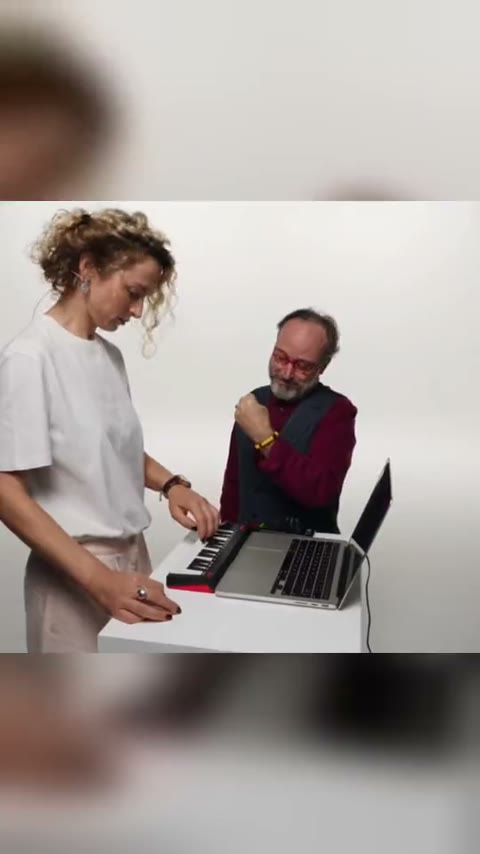
Reference video. Your generated version will vary. Hold your mouse still for 2 seconds to watch the motion.
External source reference credited to @martaegianluca, supplied through Babydoll Dance / MakeViral. This is not a RemakeWith generated result.
View original source ↗External reference transferred at the user's direction on 2026-11-24. Public access and attribution are recorded; a separate media/model-use license has not been established.New here? Create an account. No subscription required.
What your inputs controlYour photo guides identity. A frame from the reference video guides clothing, rendering style and lighting for a shared character reference. That prepared character is reused for the video, and the reference video guides movement. Background and scene details can vary; exact face replacement and frame-by-frame matching are not guaranteed.
The 15-second vertical reference opens on a woman tapping a compact keyboard beside an open laptop while a bearded man reacts at the table. He then leans into the lens, and the clip widens to a two-person run-dance finish in the same bright white studio. This is an external reference, not a RemakeWith result.
Upload two clear adult portraits in order. Photo 1 supplies the adult at the compact keyboard and laptop. Photo 2 supplies the bearded adult who reacts beside the table, leans toward the camera and joins the final dance. Use sharp, well-lit photos with the face and hairline visible; avoid masks and heavy occlusion. The source video supplies the studio, table, laptop, keyboard, clothing direction, timing and camera changes. This recipe does not offer a pet mode, a third identity slot or a background editor. Results can vary and exact face replacement is not guaranteed.
Recipe setup: Kling 4.0 video-edit, profile revision 0; 720p; preserve source audio; two uploaded adult photos; complete 15-second source. The current server quote and execution readiness must be read after authenticated validation. This draft has not been paid-tested and has no RemakeWith generated example. Edit the complete 15-second vertical source with two uploaded adult identities. Use @Image1 for the adult woman at the compact keyboard and @Image2 for the bearded adult who reacts beside the laptop, leans into the lens and joins the final run-dance. Preserve both identities as distinct people throughout. 0.00–6.17s: preserve the medium two-shot in the bright white studio; keep the woman tapping the compact red-and-black keyboard beside the open silver laptop while the second adult reacts from the right side of the table. 6.17–10.00s: preserve the second adult's quick lean into the right foreground and the keyboard performer's smile and approving thumbs-up while the keyboard and laptop remain behind them. 10.00–15.00s: widen to show both full bodies moving toward the camera with the source rhythm, then finish with the pair together facing each other. Preserve the white table, clean studio, clothing continuity, source framing and camera changes. Keep natural hands, faces, limbs and role separation. Preserve source audio; its content has not been independently listened to. Do not add a third person, pet, caption, logo or watermark. Exact identity continuity, beat timing and generated quality are not guaranteed. Changing copied text does not change a saved recipe.
0.00–6.17s: medium two-shot; the keyboard performer taps beside the laptop while the second performer reacts at the table. 6.17–10.00s: the second performer leans into the right foreground while the keyboard performer smiles and gives a thumbs-up behind him. 10.00–15.00s: the frame widens to both full bodies moving toward the camera, followed by a shared finish. The scene-change boundaries were proposed by FFmpeg and reviewed at start, middle and end frames; exact beat timing and camera micro-movements are not asserted. An AAC track is present but has not been listened to.
Choose one clear portrait for the keyboard performer and one for the reacting performer. Keep faces and hairlines visible and use photos with even light.
Open the creation area, sign in and upload Photo 1 to the keyboard-performer role, then Photo 2 to the reacting-performer role. Do not swap the role order.
Review the current server quote, source assignment and available credit packs after the recipe is validated. The final credit amount is dynamic and is not hard-coded in this page.
Check the keyboard, laptop, two distinct faces, foreground lean-in, full-body run-dance, hands and white studio continuity across all 15 seconds.
Use My Remakes to follow the accepted task and inspect the complete result before downloading it. A new order costs credits again.
The reference contains an AAC audio stream, but it has not been independently listened to, so no music, speech or exact beat-sync claim is made. The proposed recipe preserves source audio for the selected operation. Two-person identity continuity, hands, faces, clothing, foreground occlusion, dance timing and the wide finish can vary. A technical generation failure follows the site's credit-refund process; an output that differs from preference is not automatically a technical failure or satisfaction refund. This recipe has not been paid-tested.
The compact keyboard and laptop establish the first performance beat, the fast foreground reaction supplies the joke, and the wide two-person approach gives the short clip a clear finish. The white studio keeps both named performers readable. The reference is a visual guide, not proof of a RemakeWith result.
Two clear adult portraits: Photo 1 for the keyboard performer and Photo 2 for the reacting performer. The order determines the identity roles.
Not in this recipe. Supplier pages show other variants, but this RemakeWith draft exposes two adult identity slots only.
It provides the white studio, table, keyboard, laptop, clothing direction, reaction timing, foreground lean-in and wide two-person finish. Your photos supply the two named identities.
No exact likeness or frame-by-frame continuity is guaranteed. Review both identities, hands, role separation and the wide finish in the complete output.
No. It is the credited external reference video. No paid generation test has been run for this draft.
The creation area shows the current server quote after validation. Use My Remakes to follow an accepted task and download a completed result.
Selected source page and stored human reference variant.
Original public reference credited with the human two-person source.
Supplier reference used to compare human and pet variants; those variants do not define RemakeWith capability.
Return to the creation area after the recipe is validated to check both identity roles and the current quote.