14s
Remake this scene with 2 photos.
Remake this video849 credits per remakePlace two adult identities into a 15-second 16:9 music-video-style Bandit performance across a night lawn, cyan studio and golden grass. The reference is an external AI-made source, not a RemakeWith result.
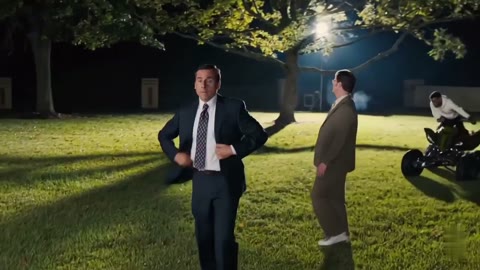
Reference video. Your generated version will vary. Hold your mouse still for 2 seconds to watch the motion.
External AI-made reference credited through Babydoll Dance / MakeViral. This is not a RemakeWith generated result.
View original source ↗External reference copied at the user direction on 2026-11-24. Attribution and public access are recorded; a separate media/model-use license has not been established.New here? Create an account. No subscription required.
What your inputs controlYour photo guides identity. A frame from the reference video guides clothing, rendering style and lighting for a shared character reference. That prepared character is reused for the video, and the reference video guides movement. Background and scene details can vary; exact face replacement and frame-by-frame matching are not guaranteed.
The 15-second horizontal reference moves between a night lawn, a cyan-blue studio, a golden-grass performance and tight rapper close-ups. It is an external AI-made reference, not a RemakeWith result.
Upload two clear adult portraits, one per person. Photo 1 guides the dark-suited lead performer. Photo 2 guides the tan-suited partner. Use chest-up or closer portraits with a clear face, good light and one person per photo. The source supplies the lawn, studio, grass, wardrobe roles, background riders and timing. The quad-bike riders are not identity slots. Exact face replacement, mouth movement and continuity can vary.
Recipe setup: Kling 4.0 video-edit, profile revision 0; 720p; 15 seconds; two adult portraits; preserve source audio requested; one source segment is reused for the unrelated quad-rider insert. The source audio is present but has not been independently listened to. This recipe has not been paid-tested and no generated example is provided. Edit the complete 15-second 16:9 source music-video montage with two uploaded adult identities. Use @Image1 for the dark-suited lead performer and @Image2 for the tan-suited partner performer. Keep those identities distinct through the night lawn, cyan studio, golden-grass and close-performance sections. Preserve the source wardrobe roles, suit colors, tie and camera framing. Preserve the brief quad-bike rider insert as source/background material; do not replace or copy the riders with either uploaded identity. Preserve source audio if supported; the AAC track is present but has not been independently listened to, so do not claim lyrics, dialogue or exact lip-sync. Do not add a pet, child, extra person, text, logo or watermark. The source is an external AI-made reference and exact likeness, mouth movement and background continuity are not guaranteed. s01 · 0.000000–3.250000s · Night lawn duo opening Edit this night-lawn opening. Replace the dark-suited lead with @Image1 and the tan-suited partner with @Image2. Preserve the tree, hard backlight, parked motorcycles/quad bikes and the two-person walking/hand-performance blocking. Do not replace background riders. s02 · 3.250000–5.541667s · Cyan studio duo Edit this cyan-blue studio performance. Keep @Image1 as the dark-suited lead in front and @Image2 as the tan-suited partner behind/alongside. Preserve the vertical light panels, suits, 16:9 medium framing and performance gestures. s03 · 5.541667–7.125000s · Cyan studio lead close-up Edit this lead close-up with @Image1 as the dark-suited performer. Preserve the cyan studio, tie, lapels and close performance framing. Keep @Image2 only if visible in the source; do not invent a new person. s04 · 7.125000–8.291667s · Quad-rider source insert Reuse the original source insert. Preserve the unrelated quad-bike riders, vehicle and night lawn exactly as source material. Do not assign either uploaded identity to the riders. s05 · 8.291667–11.291667s · Golden grass lead performance Edit the golden-grass performance with @Image1 as the dark-suited lead. Preserve the warm tall grass, hand gesture, suit and close performance framing. Do not add the partner if the source keeps him off-frame. s06 · 11.291667–13.500000s · Golden grass duet close Edit the close golden-grass duet with @Image1 as the foreground lead and @Image2 as the tan-suited partner behind/nearby. Maintain role separation, gesture timing and warm field background. s07 · 13.500000–15.000000s · Final cyan studio lead Edit the final cyan-studio close-up with @Image1 as the dark-suited lead. Preserve the final timing, blue light panels, tie and upper-body performance. Do not invent text or a third person.
0.000–3.250s: two suited adults perform on a night lawn with motorcycles/quad bikes in the background. 3.250–5.542s: the pair perform in a cyan-blue studio. 5.542–7.125s: the dark-suited lead fills a studio close-up. 7.125–8.292s: a short quad-bike rider insert is reused as source material. 8.292–11.292s: the dark-suited lead performs in tall golden grass. 11.292–13.500s: the lead remains foregrounded with the tan-suited partner behind. 13.500–15.000s: the lead finishes in a cyan studio close-up. Cut points are based on the reviewed start/mid/end evidence; the AAC track is present but has not been listened to.
Use one sharp, well-lit portrait for each adult. Keep faces visible and avoid masks or sunglasses.
Upload Photo 1 to the dark-suited lead slot and Photo 2 to the tan-suited partner slot. Do not assign either photo to the quad-bike riders.
Read the live server quote, 720p output and role assignments in the creation area before submitting. The quote comes from the saved recipe and current credit packages.
Review the complete result for lead/partner separation across lawn, studio and grass sections. Background riders remain source material and are not expected to match either upload.
Use My Remakes to follow the accepted task and inspect the complete MP4 before downloading. A new generation is charged separately.
The AAC source track is present but has not been independently listened to, so no lyric, dialogue, beat-sync or exact lip-sync claim is made. The recipe requests source-audio retention. Face likeness, mouth movement, hand anatomy, wardrobe, background riders and studio/grass continuity can vary. The source reference does not establish a separate media/model-use license. A technical generation failure follows the site credit-refund process; an output that differs from preference is not automatically a satisfaction refund. This recipe has not been paid-tested.
The visual identity comes from role contrast: a dark-suited lead holds the foreground in the cyan studio and close performance shots while a tan-suited partner appears beside him in the lawn, studio and grass sections. Reusing the quad-rider insert keeps an unrelated background action from becoming a false identity slot.
Two clear adult portraits: one for the dark-suited lead and one for the tan-suited partner.
No. The short quad-rider insert is reused as source material; neither uploaded portrait is assigned to those riders.
No exact lip-sync or lyric timing is guaranteed. The source audio is present but has not been independently listened to.
The night lawn, cyan studio, golden grass, suit roles, background riders, framing, cut timing and requested source audio remain source-controlled.
Not in this recipe. It exposes two adult identity slots and does not offer a pet mode.
Read the current server quote in the creation area before submitting. Follow the accepted task in My Remakes and download the completed MP4 there.
Selected captured source page and horizontal reference version.
Role/photo guidance and reference description; not proof of RemakeWith capability.
Return to the creation area to review the two role assignments and current quote.