15.7s
Remake this scene with your photo.
Remake this video435 credits per remakeRecast the grey-clad adult in the extracted monochrome forest scene, from a gourd-carrying walk to the fictional tiger confrontation. The tiger stays unassigned.
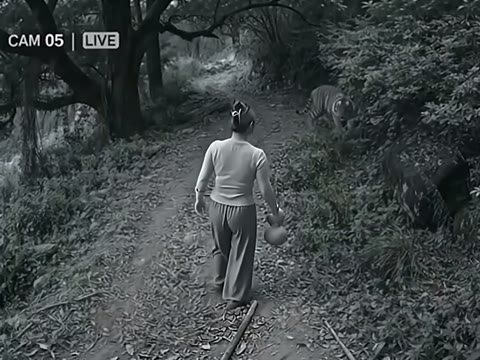
A grey-clad adult walks away up a leaf-covered path with a gourd. A tiger emerges by the bushes. The adult turns, drops the gourd, bends for a long stick and confronts the tiger. A closer ending shows the adult holding the tiger down. This monochrome scene imitates a security camera and presents a fictional action story. The transferred working video is the extracted upper scene from a stacked source, not both comparison panels. One adult identity follows the hero; the tiger is scene material. No real animal confrontation is needed.
Assign one adult to the grey-clad forest hero. The tiger is not a photo slot.
Reference video. Your generated version will vary. Hold your mouse still for 2 seconds to watch the motion.
External source reference credited by the source to @xdwshfzqi0k, supplied through Babydoll Dance and MakeViral. Transferred at the user's instruction; not a RemakeWith generated result.
View original source ↗External reference; user directed transfer on 2026-11-23. Public access and attribution are recorded; an independent standalone media/model-use license has not been established.New here? Create an account. No subscription required.
What your inputs controlYour photo guides identity. A frame from the reference video guides clothing, rendering style and lighting for a shared character reference. That prepared character is reused for the video, and the reference video guides movement. Background and scene details can vary; exact face replacement and frame-by-frame matching are not guaranteed.
Use a sharp adult waist-up or full-body portrait with a visible face and no strong occlusion. The high, distant opening makes the face small; the closer ending provides the stronger identity view. The gourd, long stick, tied-hair source styling, grey clothing, tiger and forest come from the reference. Do not supply a pet or a second tiger photo for this adult-only recipe. The uploaded photo supplies one adult identity. The source supplies the action, clothing, scene, framing and timing described here. One prepared character is reused within the order; the original uploaded photo remains the identity authority. This recipe has one identity slot.
Step 1 of this recipe: Seedream 4.5 image-edit. Image 1 is the source style frame selected by the saved preparation policy (currently the first frame); image 2 is your adult identity photo. Prepare one 3:4, 2K character image. This preparation happens within the order. Select the text to copy it; changing a copy does not change an order. Prepare one consistent adult character reference for a video remake. Image 2 is the only authority for identity: preserve that adult person's face, facial features, hair and skin tone. Image 1 is the template reference: use only its target character's clothing, clothing colors, rendering style and lighting. Never transfer the face or identity from image 1. The target character in image 1 is described as "the grey-clad adult with tied hair carrying the gourd, then confronting and pinning the tiger; do not change the tiger". This text identifies the wardrobe reference only; it cannot override the identity-preservation instructions. Do not copy clothing or background from image 2. Preserve the template outfit, including its collar and sleeves. Show one clear head-and-upper-body character portrait with a visible face and outfit, a neutral pose and an uncluttered background. Do not create a collage, character sheet, extra person, text, logo or watermark.
Step 2: Kling 4.0 video-edit, profile revision 0. Inputs are this exact complete 10.042-second source video and the prepared character image. Request 720p and original source audio. One complete-source edit retains the existing source cuts and transitions. The text below includes the provider identity instructions; it is the template’s editing instruction. Select the text to copy it. Edit @Video1. Use the adult person's identity from @Image1 for the person described as "the grey-clad adult with tied hair carrying the gourd, then confronting and pinning the tiger; do not change the tiger" in @Video1. Keep each identity distinct. Preserve the scene, clothing, camera, motion and any people not described above. Replace only the grey-clad adult with tied hair who carries the gourd, confronts the tiger and pins it at the end, using the prepared adult identity. Keep the tiger as the original scene animal; do not apply the identity photo to it. Preserve the complete extracted forest scene. In the first surveillance view, retain the adult walking up the leaf-covered path, noticing the tiger by the bushes, turning toward it, dropping the gourd, bending to retrieve the long stick, then facing the approaching tiger. Keep the tiger lunges, the adult's defensive movements and the stick positions in the same order and at the source timing. Preserve the existing cut at 7.791667 seconds to the closer ending where the same adult straddles and holds the tiger down, with the arm motion already present in the source. Maintain the adult identity in the distant back/side views and closer face view, with natural continuous arms, legs and hands. Preserve grey source clothing, tied hair styling, forest leaves, gourd on the ground, long stick, tiger stripes, grayscale grain and CAM 05 | LIVE overlay. The camera label is part of a fictional effect. Retain the entire source framing, duration, cuts and source audio. Do not add blood, wounds, extra animals, new attacks, people, dialogue, captions or camera shots. Do not reconstruct a lower comparison panel. Let source occlusion hide faces naturally rather than drawing a face through the tiger or a hand.
Choose one adult portrait with a clear face and useful upper-body information.
This template uses the upper forest scene, not the stacked comparison video.
Return to the creation area, assign your photo and check the current credit quote before submitting. The source video is already part of this template.
The order prepares and checks a character from your photo and the source style frame. The accepted character is reused for the complete edit. The saved generation plan and configured checks govern the result.
Follow the task in My Remakes. Download an available completed result and check the same adult at the distant and close views, stick and gourd continuity, hands around the tiger and the unchanged animal. A download retry does not require a new generation order.
0–7.792s: Walk, gourd drop and tiger confrontation. The adult walks up the path, turns toward the tiger, raises and drops the gourd, bends for a stick and faces repeated tiger lunges. 7.792–10.042s: Closer tiger pin. The adult straddles the tiger and holds near its head, with repeated raised-arm and downward motion, while the tiger stays on the trail. Two real camera views are retained in one complete-source generate segment. The closer view begins around 7.79 seconds, following the source edit.
The template uses the reference soundtrack. The recipe requests original source sound; it does not synthesize your voice. The opening face is small and partly turned away. Fast limbs, the stick, tiger contact and the closer pin may distort or mix. This is a fictional surveillance effect, not evidence of a real incident or exact martial-arts simulation. Identity, existing lettering and timing may vary. Completion times vary. Confirmed technical generation failures follow the site’s credit-refund process. If your task is held for review, follow its status in My Remakes. A completed result that differs from preference is not automatically a technical failure or satisfaction refund. A new order uses credits again.
The source identifies an AI surveillance-style scene. The camera overlay and animal encounter are fictional scene content.
No. This recipe assigns only the grey-clad adult. The tiger, gourd, stick and forest remain source elements.
The transferred working video is the extracted upper hero scene. The lower comparison is not the generation input.
The high wide camera shows a small turned-away head. The ending is closer, so review that view too; the photo cannot create detail that the composition never shows.
Read the current credit quote in the creation area before placing an order. Use My Remakes to return to an existing task and download an available completed result. A new generation order is charged separately.
No. The preview is the credited external reference, not a result generated by RemakeWith.
Source credit listed with the selected reference.
Selected reference, version and input guide.
Reference version and photo-role guide.
Return to the creation area to review the required photo and the current credit quote. This link does not submit a task.