14s
Remake this scene with your photo.
Remake this video502 credits per remakeRecast one adult in the complete warm portrait edit with falling petals, hair gestures and monochrome-to-gold flashes. The preview is an external source reference.
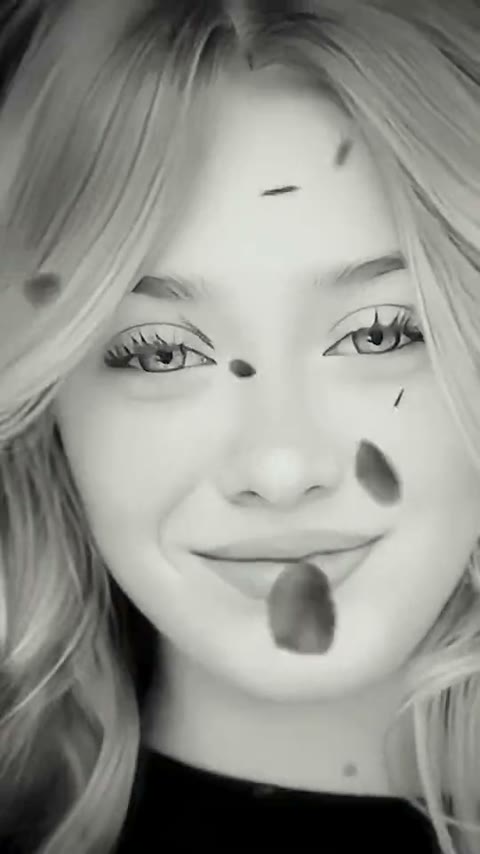
Reference video. Your generated version will vary. Hold your mouse still for 2 seconds to watch the motion.
External source reference credited to @1nymaria, supplied via Babydoll Dance / MakeViral. User-directed transfer on 2026-11-23; not a RemakeWith generated result.
View original source ↗External reference copied at the user's direction on 2026-11-23. Attribution and public access are recorded; a separate media/model-use license has not been established.New here? Create an account. No subscription required.
What your inputs controlYour photo guides identity. A frame from the reference video guides clothing, rendering style and lighting for a shared character reference. That prepared character is reused for the video, and the reference video guides movement. Background and scene details can vary; exact face replacement and frame-by-frame matching are not guaranteed.
One light-haired adult in a black top smiles, tilts the head and moves a hand through the hair. Falling petals cross the close-up while golden color accents alternate with monochrome. This version uses the warm source, not the separately supplied night edit. The preview is an external reference, not a RemakeWith result.
Use one sharp adult head-and-shoulders portrait. Keep eyes, hairline and both sides of the face readable; avoid a phone or hand covering the face. The source already adds hair and petal occlusion. Upload one clear consenting adult identity photo, with one person and an unobstructed face. The photo supplies identity; the exact source clip supplies action, wardrobe, scenery, edit timing and visual treatment. Other people and props stay in their source roles. This entry has one identity slot and no pet, multi-person, object or background editor. One consistent character is prepared from your photo and a source style frame, checked, then reused within this order.
Preparation: Seedream 4.5 image-edit; source first frame as Image 1 and the uploaded adult photo as Image 2; one 3:4 2K character image. Preparation is part of the order, not a separate task you must perform. Prepare one consistent adult character reference for a video remake. Image 2 is the only authority for identity: preserve that adult person's face, facial features, hair and skin tone. Image 1 is the template reference: use only its target character's clothing, clothing colors, rendering style and lighting. Never transfer the face or identity from image 1. The target character in image 1 is described as "the single light-haired adult in the black top throughout the warm portrait with falling rose petals and monochrome-to-gold flashes". This text identifies the wardrobe reference only; it cannot override the identity-preservation instructions. Do not copy clothing or background from image 2. Preserve the template outfit, including its collar and sleeves. Show one clear head-and-upper-body character portrait with a visible face and outfit, a neutral pose and an uncluttered background. Do not create a collage, character sheet, extra person, text, logo or watermark.
Route: Kling 4.0 video-edit, profile revision 0; 720p; source-audio preservation requested. Inputs: this exact 12.004-second source and the prepared character. The complete source is edited in one request, retaining its existing cuts; the observations below describe source shots, not extra generation calls. Select and copy this text. Changing a copy does not alter the saved RemakeWith recipe. Edit @Video1. Use the adult person's identity from @Image1 for the person described as "the single light-haired adult in the black top throughout the warm portrait with falling rose petals and monochrome-to-gold flashes" in @Video1. Keep each identity distinct. Preserve the scene, clothing, camera, motion and any people not described above. Recast only the single light-haired adult in the black top across this complete warm portrait reference. Use the prepared adult character for identity; retain the source black clothing, dark background, close framing and hair gesture sequence. This is the warm monochrome-to-gold source, not the separate night version. Preserve the opening soft smile and small head turns as rose petals pass in front of the face. Keep the hand rising into the hair, the upward glance, the brief mouth movement and changing expression. Continue into the closer head tilts and final face near the lens, retaining all of the original ending. Preserve the recurring warm golden color accents and monochrome intervals in their source timing; these are edit effects within the portrait, not invitations to create new scenes. Maintain a coherent face through the hair movement, mouth shapes, changing distance and passing petals. Keep hands anatomically separate from the hair and face. Preserve the source lens perspective, existing framing, motion, black backdrop, petals, duration and original audio. Do not add a duet, voice cloning, new spoken lines, text, logos or watermark. The uploaded adult photo is the identity authority; retain its distinguishing face and hair while matching the source lighting and visual treatment.
One continuous portrait scene runs from 0 to 12.004 seconds. The first section has a small smile and head turn; the middle includes hands in the hair and an upward glance; later views come closer with changing mouth shapes and a final head tilt. Golden and monochrome intervals are effects, not new hard-cut scenes. The source guides the motion and transitions.
Use one sharp adult head-and-shoulders portrait. Keep eyes, hairline and both sides of the face readable; avoid a phone or hand covering the face. The source already adds hair and petal occlusion.
Open the creation area, sign in, and upload the one intended adult photo to the named role.
Review the source reference, photo assignment and credit quote before submitting. The current quote and available credit packs are shown by the site.
The order prepares and checks a common character reference, then edits the full source with that character. Any saved source cuts remain within the complete edit; no identity image is shared between customers.
Use My Remakes to check progress or resume viewing an existing task. When a completed result is available, inspect the whole video and download it.
The template uses the reference soundtrack. It keeps source audio; exact lip or beat synchronization is not guaranteed. No new speech or voice cloning is requested. Inspect hands crossing the hair, facial features behind petals and the closest final framing. The recipe does not promise exact petals, beat synchronization, lips matching your voice or a live camera filter. Kling 4.0 video editing is experimental. Appearance, anatomy, props, scene details and edit timing can change. Exact likeness and frame-for-frame matching are not guaranteed. Completion times vary. Confirmed technical generation failures follow the site’s credit-refund process. If your task is held for review, follow its status in My Remakes. A completed output that differs from preference is not automatically a technical failure or satisfaction refund. A new order costs credits again; check the existing task before ordering another.
The recognizable treatment combines a portrait performance, falling petals and alternating warm color/monochrome. The title is a supplied music-edit label. The soundtrack title is not verified by listening in this template, and this recipe does not select a new song.
No. It creates a video task from one adult photo and the exact moving portrait reference.
This prepared recipe uses the warm portrait source only. A night version has different lighting and must use its own reviewed reference.
No voice cloning or new speech is requested. The recipe requests the source audio; listening and synchronization remain unreviewed.
A hand moves into the hair and petals pass over the face. A sharp input helps judge whether identity stays consistent through those occlusions.
No. It is the credited external reference, not a RemakeWith result.
Read the current credit quote in the creation area before ordering. Use My Remakes to return to the existing task and download an available completed result. A new order is charged again.
Selected reference, version and input guide.
Source credit listed with the selected reference.
Return to the creation area to check the identity role and current quote.