15.7s
Remake this scene with your photo.
Remake this video368 credits per remakeRecast the single walker through a snowy slip and the source’s existing grayscale wasted-screen ending. The preview is an external source reference.
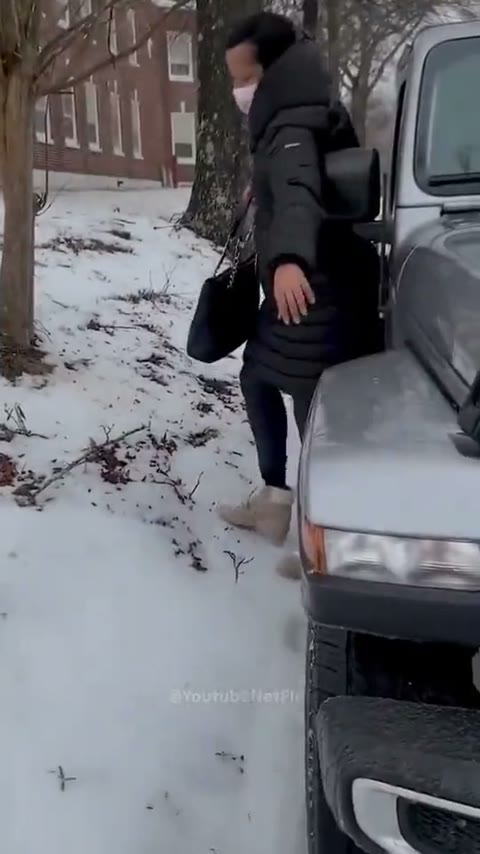
Reference video. Your generated version will vary. Hold your mouse still for 2 seconds to watch the motion.
External source credited to @bellzebub9863; supplied via Babydoll Dance / MakeViral. Copied to RemakeWith R2 at the user's instruction; not a RemakeWith generated result.
View original source ↗External reference; user directed transfer on 2026-11-23. Public access and attribution recorded; independent standalone media/model-use permission has not been established.New here? Create an account. No subscription required.
What your inputs controlYour photo guides identity. A frame from the reference video guides clothing, rendering style and lighting for a shared character reference. That prepared character is reused for the video, and the reference video guides movement. Background and scene details can vary; exact face replacement and frame-by-frame matching are not guaranteed.
A dark-coated walker slips beside a parked gray SUV and falls onto the snowy pavement. At 3.0 seconds the edit switches into a grayscale frozen view with red wasted text, then fades toward black. The prerecorded fail is framed like a game death screen. It can support an everyday-mistake joke in a caption; the workflow recasts the existing adult walker and preserves the source’s edited payoff.
Use one sharp adult portrait with a visible face and hairline. Upper-body or fuller framing helps distinguish the intended person in the coat. Avoid a face already hidden by a scarf, since the fall naturally turns the head away. The uploaded adult photo supplies identity. The complete source supplies the motion, timing, scene and reference clothing. A source style frame and the photo prepare one character within your order; that accepted character is reused for the full edit. The parked SUV, trees, building and snow have no separate replacement roles. Source duplication near the freeze remains the same single walker. There is one adult identity slot, with no pet or additional-person input in this recipe.
Automatic preparation: Seedream 4.5 image-edit, 3:4 character portrait, 2K. Image 1 is the source style frame; image 2 is your adult identity photo. This is the preparation text for the selected role. Select the text to copy it. Prepare one consistent adult character reference for a video remake. Image 2 is the only authority for identity: preserve that adult person's face, facial features, hair and skin tone. Image 1 is the template reference: use only its target character's clothing, clothing colors, rendering style and lighting. Never transfer the face or identity from image 1. The target character in image 1 is described as "the foreground adult in the dark padded coat who walks beside the parked gray SUV and slips onto the snow". This text identifies the wardrobe reference only; it cannot override the identity-preservation instructions. Do not copy clothing or background from image 2. Preserve the template outfit, including its collar and sleeves. Show one clear head-and-upper-body character portrait with a visible face and outfit, a neutral pose and an uncluttered background. Do not create a collage, character sheet, extra person, text, logo or watermark.
Recipe route: Kling 4.0 video-edit, profile revision 0, requested 720p, framing from the video and source audio. Inputs: this exact complete source and the prepared adult character. The full clip is one generate segment, preserving its existing edits; the shot notes below are observation, not additional generation calls. The text below includes the provider identity wrapper. Select it to copy; changing a copied prompt does not change a RemakeWith order. Edit @Video1. Use the adult person's identity from @Image1 for the person described as "the foreground adult in the dark padded coat who walks beside the parked gray SUV and slips onto the snow" in @Video1. Keep each identity distinct. Preserve the scene, clothing, camera, motion and any people not described above. Replace only the foreground adult walker in the dark padded coat throughout this complete 8.010998-second source, using the prepared character image for the uploaded adult identity. Retain the same person in the fall, any repeated-image transition and the frozen ending. 0–3.0 seconds: preserve the person walking beside the parked gray SUV, losing footing on the snowy/icy sidewalk, reaching toward the ground and ending prone near the front wheel. Keep the source fall timing, camera position and coat/limb continuity. 3.0–8.010998 seconds: preserve the existing edited transition into the grayscale freeze, the red wasted word and the progressive dark fade to black. Any source image duplication during the transition must show the same edited identity, not a second newly invented person. Do not invent a new fall after the freeze. The video stream ends slightly before the complete container; preserve the original end behavior without adding a new shot. Keep the gray SUV, wheel, snow patches, tree trunks, brick building, original framing and any existing source marks. Maintain natural contact between hands, body and snow; do not add injury, blood or a new person. Preserve the existing red title as part of the source edit, without changing it to a personal name or a new caption. Keep the source audio and full ending. Add no logo, subtitle or watermark. The photo is the sole identity authority; the source supplies the fall and scenery.
0–3.0 s: the walker loses footing, reaches down and lands on the snow beside the SUV. 3.0–8.011 s: existing grayscale freeze and red wasted text, followed by dark fade. A repeated-image transition is part of this edit, not an extra photo role. The source guides the motion and timing.
Use one sharp adult portrait with a visible face and hairline. Upper-body or fuller framing helps distinguish the intended person in the coat. Avoid a face already hidden by a scarf, since the fall naturally turns the head away.
Use the complete Snowy sidewalk / wasted reference selected here. This recipe does not synthesize a new stunt or choose among game death screens. The preview is external reference material.
Use the template create area, assign your photo to the labeled role, and review the current credit quote before submitting.
The order combines your identity photo and a source style frame, checks the character reference and reuses it through the complete video edit. You do not need to make an extra image in a separate tool.
Open My videos and check coat and limb continuity during the fall, hands on the snow, the repeated freeze image and the red title. Configured visual checks and bounded repair handling follow the saved order policy.
Return to the same task to review and download. Check the prepared audio before posting; no fresh generation is needed just to retry a completed download.
Falling hands and limbs can deform, and a face turned toward the ground offers little visible likeness. Existing red text can blur or change during generation. No text editor, injury effect or stunt-path control is connected. The template uses the reference soundtrack. This recipe requests its existing audio; no personal voice, new song or exact lyric synchronization is generated. Review the sound and any music permissions before sharing. The route is experimental video editing. Identity, hands, wardrobe, backgrounds and existing text can change. No precise likeness or frame-for-frame match is guaranteed. A confirmed technical failure follows the site's credit refund handling; visual dissatisfaction alone is not a promise of a refund. A fresh generation uses the current quoted credits. Review the existing task and download before starting another order. No reliable completion-time promise is available. This is an external reference with the credited source below. Its independent media/model-use license remains unverified.
The word is baked into the source. This template has no title editor; its appearance may also drift during video editing.
No. Your adult portrait supplies identity. The source supplies the snowy sidewalk, slip, fall and freeze treatment.
No. It is an existing transition treatment of the same fall. Both appearances should retain the one assigned identity.
The source freeze fades toward black. The ending follows the original freeze and fade.
Read the current credits in the create area before ordering. A new generation is a new paid task. Confirmed technical failures follow the site’s credit refund handling; this does not promise a refund for every appearance difference.
Return to My videos in the same signed-in account, open the task and inspect the full result before downloading the MP4. Check the face, coat and limb continuity during the fall, hands on the snow, the repeated freeze image and the red title. An existing completed download does not require submitting a fresh generation.
Selected reference, version and input guide.
Source credit listed with the selected reference.
Return to the create area to review the selected reference, photo role and current credits.