15.7s
Remake this scene with your photo.
Remake this video502 credits per remakeRecast one adult at a glowing nighttime window as the camera moves closer and the adult gestures with a toy doll in a front carrier. External AI source reference.
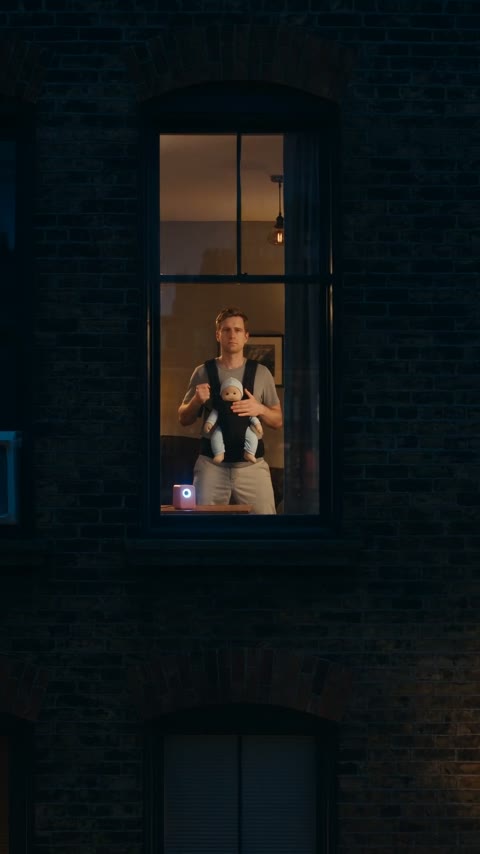
The camera approaches a single warm-lit window in a dark brick building. Inside, an adult in a grey T-shirt and light trousers wears a black front carrier holding a toy-like small figure. The adult gestures outward and lifts one arm while keeping a serious expression as the view grows closer. The selected external AI example uses a carrier and deadpan pose for a Hangover/Alan-style visual joke. It is its own short window scene, not a full film excerpt. Only the adult is assigned. The small carrier figure remains an unassigned toy-like scene detail.
One adult identity replaces the window performer. The carrier figure is not an upload role.
Reference video. Your generated version will vary. Hold your mouse still for 2 seconds to watch the motion.
External source reference credited by the source to External AI-made source example, supplied through Babydoll Dance and MakeViral. Transferred at the user's instruction; not a RemakeWith generated result.
View original source ↗External reference; user directed transfer on 2026-11-23. Public access and attribution are recorded; an independent standalone media/model-use license has not been established.New here? Create an account. No subscription required.
What your inputs controlYour photo guides identity. A frame from the reference video guides clothing, rendering style and lighting for a shared character reference. That prepared character is reused for the video, and the reference video guides movement. Background and scene details can vary; exact face replacement and frame-by-frame matching are not guaranteed.
Use one evenly lit adult portrait showing a clear face and upper body. Avoid a hand over the face or a heavy shadow. The small face at the start becomes much larger near the end, so identity needs to work at both scales. The grey source shirt, light trousers, black carrier straps, toy figure and warm room remain source-guided. You do not need to photograph a carrier or upload a second identity. The uploaded photo supplies one adult identity. The source supplies the action, clothing, scene, framing and timing described here. One prepared character is reused within the order; the original uploaded photo remains the identity authority. This recipe has one identity slot.
Step 1 of this recipe: Seedream 4.5 image-edit. Image 1 is the source style frame selected by the saved preparation policy (currently the first frame); image 2 is your adult identity photo. Prepare one 3:4, 2K character image. This preparation happens within the order. Select the text to copy it; changing a copy does not change an order. Prepare one consistent adult character reference for a video remake. Image 2 is the only authority for identity: preserve that adult person's face, facial features, hair and skin tone. Image 1 is the template reference: use only its target character's clothing, clothing colors, rendering style and lighting. Never transfer the face or identity from image 1. The target character in image 1 is described as "the short-haired adult at the lit window in a grey T-shirt and light trousers wearing the black front carrier; preserve the toy doll". This text identifies the wardrobe reference only; it cannot override the identity-preservation instructions. Do not copy clothing or background from image 2. Preserve the template outfit, including its collar and sleeves. Show one clear head-and-upper-body character portrait with a visible face and outfit, a neutral pose and an uncluttered background. Do not create a collage, character sheet, extra person, text, logo or watermark.
Step 2: Kling 4.0 video-edit, profile revision 0. Inputs are this exact complete 12.064-second source video and the prepared character image. Request 720p and original source audio. One complete-source edit retains the existing source cuts and transitions. The text below includes the provider identity instructions; it is the template’s editing instruction. Select the text to copy it. Edit @Video1. Use the adult person's identity from @Image1 for the person described as "the short-haired adult at the lit window in a grey T-shirt and light trousers wearing the black front carrier; preserve the toy doll" in @Video1. Keep each identity distinct. Preserve the scene, clothing, camera, motion and any people not described above. Replace only the short-haired adult performer visible in the warm-lit window, wearing a grey T-shirt, light trousers and a black front carrier, with the prepared adult identity. Preserve the toy-like small figure in the carrier and all carrier straps; it is not another identity target. Preserve this entire uncut nighttime approach. Begin with the small warm window framed by a dark brick facade. Keep the camera moving steadily closer as the adult makes the reference's restrained rhythmic body motion, holds the carrier with one hand, points outward with the free hand, then lifts and extends that arm upward and sideways. Maintain the deliberately serious face and the reference pacing through the closer ending. The window frame grows around the performer as the camera approaches; do not replace this with a new interior shot. Keep one consistent adult identity across the distant and closer views. Retain the grey source T-shirt, light trousers, black carrier, toy figure, natural shoulder and hand movement, warm hanging light, framed wall art, table, small glowing cube and dark window mullions. Preserve source camera path, framing, total duration and original audio. Keep adult fingers separate from the carrier figure, and do not change the toy into a real child or the uploaded person. Add no other character, new dialogue, extra camera cut, film scene, caption, logo or prop. The uploaded photo controls the adult identity; it does not replace the nighttime room or source wardrobe.
Choose one clear adult head-and-shoulders or waist-up photo.
Use the complete 12.064-second AI window source, keeping its forward approach and final near view.
Return to the creation area, assign your photo and check the current credit quote before submitting. The source video is already part of this template.
The order prepares and checks a character from your photo and the source style frame. The accepted character is reused for the complete edit. The saved generation plan and configured checks govern the result.
Follow the task in My Remakes. Download an available completed result and check adult identity as the window grows, the pointing hand, carrier straps and unchanged toy figure. A download retry does not require a new generation order.
0–12.064s: Continuous approach to the lit window. The camera approaches the window while the adult makes small body motions, points outward, raises the free arm and extends it aside. The other hand stays near the carrier. The face grows larger toward the ending. The single continuous camera approach is one complete-source generate segment. The camera moves closer within the same scene.
The template uses the reference soundtrack. The recipe requests original source sound; it does not synthesize your voice. The opening face is small and the window mullions can occlude the body. Hands, carrier straps, toy limbs and the moving scale may distort. The reference does not establish a custom dialogue, baby identity or new film-scene generation feature. Identity, existing lettering and timing may vary. Completion times vary. Confirmed technical generation failures follow the site’s credit-refund process. If your task is held for review, follow its status in My Remakes. A completed result that differs from preference is not automatically a technical failure or satisfaction refund. A new order uses credits again.
No. This template has one adult role at the window. The carrier and its toy-like figure remain unassigned source details.
It edits the actual supplied external AI window example. The Hangover-style name describes the visual joke and does not mean a full film scene is included.
No. Your photo supplies adult identity; the reference provides the grey shirt, black carrier, toy and room.
The shot begins outside the building and steadily moves closer. Review the final near view as well as the opening, rather than expecting close-up facial detail across the whole clip.
Read the current credit quote in the creation area before placing an order. Use My Remakes to return to an existing task and download an available completed result. A new generation order is charged separately.
No. The preview is the credited external reference, not a result generated by RemakeWith.
Reference version and photo-role guide.
Selected reference, version and input guide.
Reference version and photo-role guide.
Return to the creation area to review the required photo and the current credit quote. This link does not submit a task.