26.4s
Remake this scene with your photo.
Remake this video435 credits per remakeRecast the solo red-jacket dancer in the empty color-lit room, following knee bounces, loose arm motions, a hand-to-ear gesture and an approaching finish.
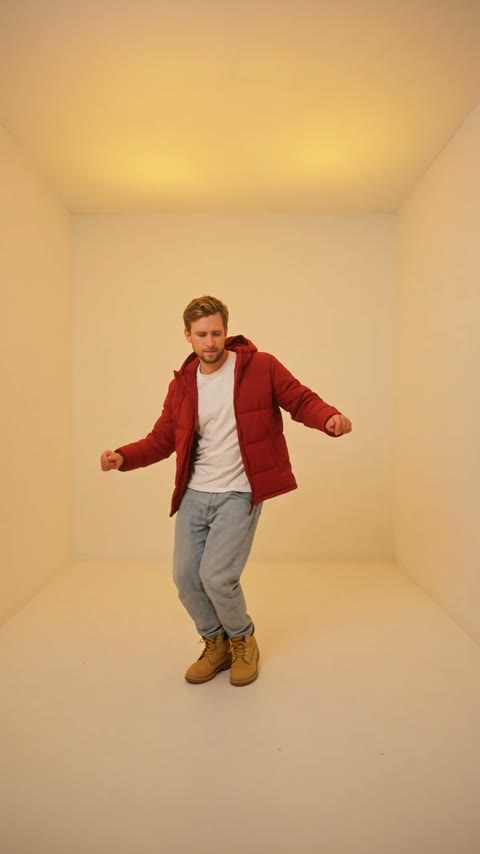
Reference video. Your generated version will vary. Hold your mouse still for 2 seconds to watch the motion.
External source reference credited to External AI-made source example in the captured Babydoll Dance / MakeViral record. Not a RemakeWith-generated result.
View original source ↗No reusable media license is stated in the captured source. The owner explicitly directed reference copying to R2 on 2026-11-23; independent public-display and model-use permission verification is not recorded.New here? Create an account. No subscription required.
What your inputs controlYour photo guides identity. A frame from the reference video guides clothing, rendering style and lighting for a shared character reference. That prepared character is reused for the video, and the reference video guides movement. Background and scene details can vary; exact face replacement and frame-by-frame matching are not guaranteed.
The red jacket remains the visual anchor while the room shifts through warm, green, blue and lavender light. A phone-like hand gesture and small knee bounces lead into a closer finish. This is the selected external AI-made color-room reference; the recipe does not reconstruct the full original music video.
Upload one sharp adult portrait with visible eyes, hairline and face. Even light is more useful than trying to match the colored room. The source supplies the red puffer, shirt, jeans, boots and dance; your photo supplies identity. Do not upload a picture holding a phone over the face: the selected source gesture has no separate phone prop.
Automatic character preparation: Seedream 4.5 image-edit, one image, 3:4, 2K. The source opening style frame is image 1; your uploaded adult photo is image 2. One prepared identity reference is reused across this order. Prepare one consistent adult character reference for a video remake. Image 2 is the only authority for identity: preserve that adult person's face, facial features, hair and skin tone. Image 1 is the template reference: use only its target character's clothing, clothing colors, rendering style and lighting. Never transfer the face or identity from image 1. The target character in image 1 is described as "the single adult dancer in the red puffer jacket, white T-shirt, light jeans and tan boots inside the empty color-lit room". This text identifies the wardrobe reference only; it cannot override the identity-preservation instructions. Do not copy clothing or background from image 2. Preserve the template outfit, including its collar and sleeves. Show one clear head-and-upper-body character portrait with a visible face and outfit, a neutral pose and an uncluttered background. Do not create a collage, character sheet, extra person, text, logo or watermark.
Video operation: Kling V4 video-edit, 720p, original source audio. @Video1 is the supplied reference segment; @Image1 is the prepared adult identity. Only the assigned lead changes. The current provider wrapper is: Edit @Video1. Use the adult person's identity from @Image1 for the person described as "the single adult dancer in the red puffer jacket, white T-shirt, light jeans and tan boots inside the empty color-lit room" in @Video1. Keep each identity distinct. Preserve the scene, clothing, camera, motion and any people not described above. Edit the complete supplied color-room dance reference as one continuous shot. Replace only the single adult in the red puffer jacket with the prepared uploaded identity. Maintain that person's facial features, hair and skin tone; do not retain the source face or add another dancer. Follow the small knee bounces and steps, loose arms, the hand rising beside the ear like a phone, the other hand near the chest, then the forward bend and return upright. Follow the later small hand gestures and the approach toward the camera, finishing with the closer upper-body view. Preserve the source order and smooth framing changes instead of cutting to a separate music-video scene. Keep the red puffer, plain white shirt, pale jeans and tan work-style boots as source wardrobe. Preserve the bare room and its wall and ceiling corners while their illumination moves from yellow and pink through green and cyan to blue and lavender. Lighting color changes are continuous source events, not new locations. Keep contact between boots and floor, fingers near the ear and chest, natural arm separation and one coherent body. Do not add a phone prop, new captions, logos or background dancers. Keep the source recording for final assembly without generating new lyrics or cloning the user's voice.
0–10.031s · Bounce, phone gesture and approach: Early knee bends and steps lead to a hand by the ear around the 2–3s samples. The adult leans down around 5.5–6s, straightens and makes smaller hand gestures, then approaches into a closer lavender-lit finish. The edit follows the continuous performance, lighting and camera changes.
Use one adult portrait with a clear face and no sunglasses, mask or phone covering the features. Keep another person out of the frame.
Open the creation area, sign in and upload your photo to Red-jacket solo dancer. The complete selected source supplies the action, outfit and scene; your image supplies identity.
Review the shown duration, resolution, photo assignment and credit amount before submitting. The automatic workflow prepares one consistent character reference, edits the confirmed source timeline, assembles the result and checks it.
Follow the existing task in your account. When completed, review the face, anatomy and effect before downloading the MP4. A second new generation uses another quoted charge.
Colored light can change apparent skin tone. Hands at the ear and chest can obscure facial detail, and boots or jacket folds may distort during the bounce. The source hairstyle and beard are not identity requirements; uploaded identity guides those features. The template uses the reference soundtrack. The workflow requests original-source audio and assembles the supplied recording. It does not clone your voice, write new speech or authenticate source speech. The source does not state a reusable media license; the credited reference is shown separately from RemakeWith output. Check source and music rights before sharing. The live creation area supplies the current credit amount. A new generation is a new charged request. Technical failure follows the platform failure-refund process; a completed result that looks different is not an automatic refund promise. Check the existing task before starting again. Downloading a completed result does not start a new generation. No reliable completion-time promise is available.
No. The selected reference supplies the red puffer outfit. The photo’s role is the adult identity.
This recipe follows the source progression of room lighting. It does not include a connected color selector or independent lighting editor.
No phone prop is assigned. The source hand position suggests a phone gesture near the ear and should remain a hand gesture.
No. It uses the selected roughly ten-second external AI-made reference, with its own body motions and color changes.
Return to the same account’s task history, open the existing remake and download its completed MP4. Check the task status before submitting another paid generation.
Read the current credit quote in the creation area before submitting. Each new generation is separately charged. Technical failures use the existing failure-refund process; visual differences in a completed result do not establish refund eligibility.
Selected reference, version and input guide.
Reference version and photo-role guide.
Reference version and photo-role guide.
Return to the creation area to review your photo assignment and current credit quote.