15.7s
Remake this scene with your photo.
Remake this video570 credits per remakeRecast one adult running through a flower meadow and climbing a mossy rise in the complete 15-second working reference. The pullback begins a giant-creature reveal; later action is outside this file.
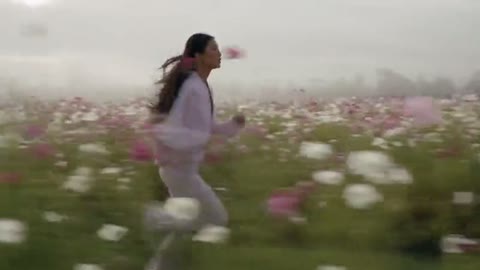
Reference video. Your generated version will vary. Hold your mouse still for 2 seconds to watch the motion.
External source reference credited to External source reference, supplied via Babydoll Dance / MakeViral. User-directed transfer on 2026-11-23; not a RemakeWith generated result.
View original source ↗External reference copied at the user's direction on 2026-11-23. Attribution and public access are recorded; a separate media/model-use license has not been established.New here? Create an account. No subscription required.
What your inputs controlYour photo guides identity. A frame from the reference video guides clothing, rendering style and lighting for a shared character reference. That prepared character is reused for the video, and the reference video guides movement. Background and scene details can vary; exact face replacement and frame-by-frame matching are not guaranteed.
A pale-pink-clad adult runs through flowers, reaches a mossy rise and pauses. The camera draws back to show an enormous reptile-like head beneath the climber before a final face close-up. This version is the wide 15-second excerpt; it does not include all later action from the longer reel. The preview is an external reference, not a RemakeWith-generated result.
Use one clear adult portrait with readable eyes, hairline and shoulders. Full body or knees up can help the running silhouette, but the source supplies the pink outfit and meadow. Upload one clear consenting adult identity photo, with one person and an unobstructed face. The photo supplies identity; the exact source clip supplies action, wardrobe, scenery, edit timing and visual treatment. Other people and props stay in their source roles. This entry has one identity slot and no pet, multi-person, object or background editor. One consistent character is prepared from your photo and a source style frame, checked, then reused within this order.
Automatic character preparation: Seedream 4.5 image-edit, one 3:4 image at 2K. Image 1 is the selected source style frame; Image 2 is your uploaded adult portrait. The prepared character is reused within your order. Select and copy the complete instructions below. Prepare one consistent adult character reference for a video remake. Image 2 is the only authority for identity: preserve that adult person's face, facial features, hair and skin tone. Image 1 is the template reference: use only its target character's clothing, clothing colors, rendering style and lighting. Never transfer the face or identity from image 1. The target character in image 1 is described as "the single long-dark-haired adult in pale pink who runs through the flower meadow and climbs the mossy rise; preserve the giant creature". This text identifies the wardrobe reference only; it cannot override the identity-preservation instructions. Do not copy clothing or background from image 2. Preserve the template outfit, including its collar and sleeves. Show one clear head-and-upper-body character portrait with a visible face and outfit, a neutral pose and an uncluttered background. Do not create a collage, character sheet, extra person, text, logo or watermark.
Model: Kling 4.0; operation: video-edit. Settings: 720p, source framing and the reference’s original recording. Inputs: the selected reference video and the prepared adult character image. The edit follows the complete selected reference and its existing scene sequence. Select and copy the complete instructions below; editing a copy does not change an order. Edit @Video1. Use the adult person's identity from @Image1 for the person described as "the single long-dark-haired adult in pale pink who runs through the flower meadow and climbs the mossy rise; preserve the giant creature" in @Video1. Keep each identity distinct. Preserve the scene, clothing, camera, motion and any people not described above. Replace only the same adult climber in the pale pink outfit throughout this complete wide source. Use the prepared adult character for identity; keep the pale pink source clothing and its soft fabric motion. Preserve the flower meadow, mist, mossy rise and giant creature as environment, not identity targets. 0–1.583s: preserve the side view running through flowers. 1.583–2.542s: keep the close view of running feet and trouser legs. 2.542–4s: preserve the front upper-body pause and breath-like movement. 4–5.417s: preserve the rear view moving toward the rise. 5.417–6.208s: keep the feet stepping onto moss. 6.208–14.25s: preserve the pause at the top and the source pullback revealing the immense reptile-like head beneath the climber. 14.25–15s: retain the closer lowered-face view at the end. These are the real source shots; retain their exact transitions and complete ending. Keep identity, hair and body coherent across side, front, rear, feet and distant views, without copying the original performer. Do not replace the creature, make it into the uploaded person, or invent the longer original reel's later actions. Preserve source camera paths, landscape framing, lighting, flowers and source audio. Keep hands, feet, fabric and contact with the moss separate and natural. Add no people, shots, captions, logos or watermark.
0–1.583s side run; 1.583–2.542s running feet; 2.542–4s front upper-body view; 4–5.417s rear approach; 5.417–6.208s step onto moss; 6.208–14.25s pause and pullback to the large creature head; 14.25–15s face close-up. The seven shots follow the reference sequence. The selected file is 800 × 450, not a cropped portrait version.
Use one clear adult portrait with readable eyes, hairline and shoulders. Full body or knees up can help the running silhouette, but the source supplies the pink outfit and meadow.
Open the creation area, sign in, and upload the one intended adult photo to the named role.
Review the source reference, photo assignment and credit quote before submitting. The current quote and available credit packs are shown by the site.
The order prepares and checks a common character reference, then edits the full source with that character. Any saved source cuts remain within the complete edit; no identity image is shared between customers.
Use My Remakes to check progress or resume viewing an existing task. When a completed result is available, inspect the whole video and download it.
Check the climber’s small distant face, rear hair silhouette and feet on the moss, then compare identity in the final close-up. This excerpt stops at the early creature reveal; it does not include a later lift or extra scenes. The template requests the recording attached to the reference, without generating your voice or a new soundtrack. Track identity, music permissions and exact synchronization have not been independently verified; check the sound and relevant rights before sharing. Video editing is experimental. Likeness, anatomy, clothing, props and background details can vary; an exact face match or frame-for-frame copy is not guaranteed. Check the current specifications and credits in the creation area. No fixed completion time is promised. Confirmed technical failures follow the site’s credit-refund handling. A completed result that differs from your preference does not automatically qualify for a refund. Each new generation uses credits again; return to the existing task to review or download it before ordering another. The preview is an external reference, not a RemakeWith-generated result. An independent license for reusing the source media has not been established; attribution alone does not grant reuse rights.
The running and climbing views establish what appears to be a small grassy rise. The pullback changes its scale by revealing a much larger creature shape. The giant shape remains source scenery, while the uploaded identity follows only the climber.
That later action described for the longer reel is outside this selected 15-second reference. This recipe preserves the excerpt through the early reveal and final close-up.
No. The selected reference is the 800 × 450 landscape version. It is not cropped to fill a phone screen.
No. The one identity slot maps the pale-pink-clad adult climber. The creature and meadow remain scene context.
The lead becomes distant during the reveal, then returns in a close-up. Compare identity across that change in scale and angle.
No. It is the credited external source reference. No RemakeWith-generated result is shown.
Read the current credit quote in the creation area before ordering. Use My Remakes to return to the existing task and download an available completed result. A new order is charged again.
Selected reference version, scene description and photo guidance.
Template family and version information for the selected reference.
Return to the creation area to check the identity role and current quote.