15.7s
Remake this scene with your photo.
Remake this video301 credits per remakeRecast the person on a sunny rooftop as they straighten and open both arms beneath a giant eagle. Keep all birds unchanged. Complete external 6.85-second reference.
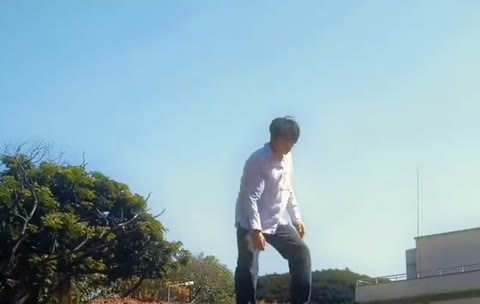
Reference video. Your generated version will vary. Hold your mouse still for 2 seconds to watch the motion.
External source reference credited to External source reference, supplied via Babydoll Dance / MakeViral. Transferred to RemakeWith at the user's direction; not a RemakeWith generated result.
View original source ↗External reference transferred at user direction on 2026-11-23. Attribution and public access recorded; an independent standalone media/model-use license has not been established.New here? Create an account. No subscription required.
What your inputs controlYour photo guides identity. A frame from the reference video guides clothing, rendering style and lighting for a shared character reference. That prepared character is reused for the video, and the reference video guides movement. Background and scene details can vary; exact face replacement and frame-by-frame matching are not guaranteed.
The rooftop person rises from a bent position and opens both arms as a giant eagle spreads its wings behind and above them. Smaller birds cross the bright sky. This template uses the complete 6.85-second rooftop source, not the separate golden-sky context reel described on the source topic page.
Choose one sharp adult photo, waist-up or full-body, with the face and hairline unobstructed and enough shoulder/body outline for the open-arm pose. Avoid another person or a bird in the identity image. Your photo is assigned to the rooftop person; the eagle and all smaller birds remain scene elements. The uploaded photo supplies identity; this exact video supplies motion, wardrobe, scene, camera and timing. One source style frame and the photo prepare a consistent character within the order. The accepted character is reused across the edit; customer identity images are not reused across orders. The preparation reference is the first source frame.
Automatic character preparation: Seedream 4.5 image-edit, one 3:4 image at 2K. Image 1 is the selected source style frame; Image 2 is your uploaded adult portrait. The prepared character is reused within your order. Select and copy the complete instructions below. Prepare one consistent adult character reference for a video remake. Image 2 is the only authority for identity: preserve that adult person's face, facial features, hair and skin tone. Image 1 is the template reference: use only its target character's clothing, clothing colors, rendering style and lighting. Never transfer the face or identity from image 1. The target character in image 1 is described as "the person in the pale shirt and dark trousers on the rooftop who opens both arms; preserve the giant eagle and smaller birds". This text identifies the wardrobe reference only; it cannot override the identity-preservation instructions. Do not copy clothing or background from image 2. Preserve the template outfit, including its collar and sleeves. Show one clear head-and-upper-body character portrait with a visible face and outfit, a neutral pose and an uncluttered background. Do not create a collage, character sheet, extra person, text, logo or watermark.
Model: Kling 4.0; operation: video-edit. Settings: 720p, source framing and the reference’s original recording. Inputs: the selected reference video and the prepared adult character image. The edit follows the complete selected reference and its existing scene sequence. Select and copy the complete instructions below; editing a copy does not change an order. Edit @Video 1. Use the adult person's identity from @Image 1 for the person described as "the person in the pale shirt and dark trousers on the rooftop who opens both arms; preserve the giant eagle and smaller birds" in @Video 1. Keep each identity distinct. Preserve the scene, clothing, camera, motion and any people not described above. Replace only the adult person in the pale button-up shirt and dark trousers in the complete 6.85-second sunny rooftop reference, using the prepared character identity derived from the uploaded adult photo. The giant eagle and every smaller bird are scene elements and must retain their source appearance; do not apply the human identity to any bird. Preserve the single continuous action: the person begins bent forward, straightens to standing, then opens both arms outward. Behind the person, the giant eagle rises/spreads its broad wings and continues wing movement while smaller birds cross the clear sky. Keep the eagle behind and above the person, with the original overlap and scale. The source video determines exact timing and camera framing; do not invent a lift-off, flight, new landing or additional shot. Keep the pale shirt, dark trousers, rooftop structures, tree line, sky, sunlight and landscape composition. Maintain the same human face, hair, body and exposed hands through the rising torso and wide-arm pose. Avoid merging human arms with feathers or creating extra hands, wings, limbs or birds. Preserve the source eagle's head, feathers, wing silhouette and movement. Keep the source audio. Add no new dialogue, text, logo or watermark. The uploaded photo provides identity only; source clothing, birds, action and setting remain the reference.
Use one clear adult portrait with readable shoulders or body outline for the rising and arms-open pose.
Confirm the pale-shirt rooftop reference. A golden-sky creator reel is separate context and is not silently substituted.
Use the normal template creation area. Confirm the required identity slot and current credit quote before submitting an order.
The order prepares and checks one consistent character from the uploaded identity photo and the selected source style frame, then reuses it in affected video segments.
The saved video-edit plan preserves the complete source timing. The configured visual checks, bounded retries and administrator review use the actual saved policy; they are not proof of perfect output.
Open My Remakes to return to the existing task and download an available completed result. Inspect the person's identity and hands, human-arm/wing separation, eagle scale and smaller-bird continuity.
Arms can merge with the eagle’s wings, feathers may distort and smaller birds may multiply. The human face can drift as the torso rises. This rooftop version ends before any flight away. The template requests the recording attached to the reference, without generating your voice or a new soundtrack. Track identity, music permissions and exact synchronization have not been independently verified; check the sound and relevant rights before sharing. Video editing is experimental. Likeness, anatomy, clothing, props and background details can vary; an exact face match or frame-for-frame copy is not guaranteed. Check the current specifications and credits in the creation area. No fixed completion time is promised. Confirmed technical failures follow the site’s credit-refund handling. A completed result that differs from your preference does not automatically qualify for a refund. Each new generation uses credits again; return to the existing task to review or download it before ordering another. The preview is an external reference, not a RemakeWith-generated result. An independent license for reusing the source media has not been established; attribution alone does not grant reuse rights.
The effect reads through alignment: one person opens their arms beneath a much larger bird, turning a simple rooftop gesture into a dramatic character introduction. The foreground human and background eagle need separate anatomy and identities. This makes bird preservation as important as the uploaded likeness. This is the rooftop version of the Jatayu scene; the separate golden-sky reference is a different clip.
No. It replaces only the pale-shirt person on the rooftop. The giant eagle and smaller birds remain unchanged scene elements.
The selected source shows standing and opening arms beneath the eagle. No flight or carrying sequence is added by this recipe.
No. The saved source is the complete 6.85-second rooftop clip. The topic's golden-sky reel is a separate context source.
Check that two human arms and hands remain distinct from the wings, the same face returns after movement, and birds have not duplicated or merged into the person.
The preview is an external reference. This recipe has no reviewed generated example. After ordering, use the existing task in My Remakes for an available completed download. Read the current quote in the creation area; a new order is separately charged.
Template family and version information for the selected reference.
Selected reference version, scene description and photo guidance.
Template family and version information for the selected reference.
Return to the creation area to check the selected reference, required photo and current quote.