7.1s
Remake this scene with your photo.
Remake this video570 credits per remakeRecast the physical foreground performer turning and moving her hair in front of the source’s giant projected eyes. The preview is an external source reference.
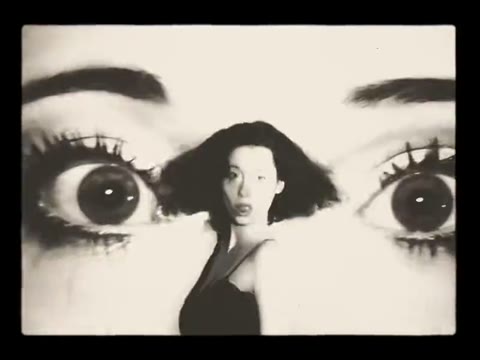
Reference video. Your generated version will vary. Hold your mouse still for 2 seconds to watch the motion.
External source credited to @christiecharm; supplied via Babydoll Dance / MakeViral. Copied to RemakeWith R2 at the user's instruction; not a RemakeWith generated result.
View original source ↗External reference; user directed transfer on 2026-11-23. Public access and attribution recorded; independent standalone media/model-use permission has not been established.New here? Create an account. No subscription required.
What your inputs controlYour photo guides identity. A frame from the reference video guides clothing, rendering style and lighting for a shared character reference. That prepared character is reused for the video, and the reference video guides movement. Background and scene details can vary; exact face replacement and frame-by-frame matching are not guaranteed.
A physical performer in a black thin-strap outfit turns between back, front and three-quarter views, tilts the head and swings the hair. Oversized animated eyes fill the wall behind the performer. The complete source is a 14.375-second 800 × 600 landscape file with a black border. The projection creates a graphic black-and-white fashion backdrop while the foreground pose supplies movement. The title identifies the source’s French-pop association; this recipe does not promise to replace the background eyes or create a new music video from text alone.
Use one sharp consenting-adult portrait with visible eyes, face and hairline. Avoid heavy hair across the eyes in the input; the source already introduces hair occlusion. A clear shoulder outline helps the preparation distinguish the person from the flat projection behind them. The uploaded adult photo supplies identity. The complete source supplies the motion, timing, scene and reference clothing. A source style frame and the photo prepare one character within your order; that accepted character is reused for the full edit. Only the physical performer changes identity. The giant eyes, projection animation and cast shadows are background context, not a second upload slot. There is one adult identity slot, with no pet or additional-person input in this recipe.
Automatic character preparation: Seedream 4.5 image-edit, one 3:4 image at 2K. Image 1 is the selected source style frame; Image 2 is your uploaded adult portrait. The prepared character is reused within your order. Select and copy the complete instructions below. Prepare one consistent adult character reference for a video remake. Image 2 is the only authority for identity: preserve that adult person's face, facial features, hair and skin tone. Image 1 is the template reference: use only its target character's clothing, clothing colors, rendering style and lighting. Never transfer the face or identity from image 1. The target character in image 1 is described as "only the physical adult in the black thin-strap outfit posing in front of the wall projection; never replace the projected eyes". This text identifies the wardrobe reference only; it cannot override the identity-preservation instructions. Do not copy clothing or background from image 2. Preserve the template outfit, including its collar and sleeves. Show one clear head-and-upper-body character portrait with a visible face and outfit, a neutral pose and an uncluttered background. Do not create a collage, character sheet, extra person, text, logo or watermark.
Model: Kling 4.0; operation: video-edit. Settings: 720p, source framing and the reference’s original recording. Inputs: the selected reference video and the prepared adult character image. The edit follows the complete selected reference and its existing scene sequence. Select and copy the complete instructions below; editing a copy does not change an order. Edit @Video1. Use the adult person's identity from @Image1 for the person described as "only the physical adult in the black thin-strap outfit posing in front of the wall projection; never replace the projected eyes" in @Video1. Keep each identity distinct. Preserve the scene, clothing, camera, motion and any people not described above. Replace only the physical foreground adult in the black thin-strap outfit throughout this complete 14.375-second source, using the prepared character reference for the uploaded adult identity. The giant projected eyes are background artwork, not another person or a second identity target. Preserve them as the source projection rather than turning them into the uploaded person's eyes. Follow the continuous performance: begin with the back and dark hair toward the camera in front of the closed projected eyes; preserve the turn into a front/three-quarter pose as the projection opens its eyes; continue the small shoulder turns, head tilts, hair swings and look-back poses. Preserve the larger hair swing and back turn around the middle, then the returning three-quarter poses and closing head movement. Exact motion and timing come from the source. Keep the high-contrast black-and-white palette, source projection animation, dark thin-strap outfit, wall shadows, camera viewpoint and 800-by-600 source composition with its existing black border. Do not stretch this landscape 4:3 reference into a portrait crop. Keep the foreground body, hair and shadows coherent; maintain the same uploaded identity as hair passes over the face. Respect natural occlusion and profile views. Do not introduce a second physical performer, change the projection into a new face portrait or add color. Preserve source audio. Add no text, logo or watermark. The source supplies projection and pose; the uploaded adult photo remains the identity authority.
0–14.375s: one continuous monochrome scene. The performer faces the projection, turns toward the camera, poses through the shoulders and swings the hair. Later, another back turn leads into three-quarter poses. The projected eyes change within the same landscape scene.
Use one sharp consenting-adult portrait with visible eyes, face and hairline. Avoid heavy hair across the eyes in the input; the source already introduces hair occlusion. A clear shoulder outline helps the preparation distinguish the person from the flat projection behind them.
Use this complete Projector-eye source. Its original 4:3 picture is retained; the recipe does not supply a separate projected-eye identity control. The preview is external reference material.
Use the template create area, assign your photo to the labeled role, and review the current credit quote before submitting.
The order combines your identity photo and a source style frame, checks the character reference and reuses it through the complete video edit. You do not need to make an extra image in a separate tool.
Open My videos and check foreground face through hair occlusion, shoulder and strap edges, cast shadows and unchanged projected-eye artwork.
Return to the same task to review and download. Check the prepared audio before posting; no fresh generation is needed just to retry a completed download.
High contrast can flatten facial detail, and hair can briefly hide the face. The projected eyes may change despite preservation instructions; replacing the foreground person does not also replace those eyes. The source has a 4:3 frame with a black border. The template requests the recording attached to the reference, without generating your voice or a new soundtrack. Track identity, music permissions and exact synchronization have not been independently verified; check the sound and relevant rights before sharing. Video editing is experimental. Likeness, anatomy, clothing, props and background details can vary; an exact face match or frame-for-frame copy is not guaranteed. Check the current specifications and credits in the creation area. No fixed completion time is promised. Confirmed technical failures follow the site’s credit-refund handling. A completed result that differs from your preference does not automatically qualify for a refund. Each new generation uses credits again; return to the existing task to review or download it before ordering another. The preview is an external reference, not a RemakeWith-generated result. An independent license for reusing the source media has not been established; attribution alone does not grant reuse rights.
No separate projected-eye role is connected. This recipe replaces the physical foreground performer and asks to preserve the source artwork.
No. The source supplies the moving projection and black-and-white look; your clear adult photo supplies identity.
The selected file is 800 × 600, or 4:3. The recipe retains that composition and black border rather than forcing a portrait crop.
Check that the face returns as the same identity, hair remains attached naturally and the shoulder/strap silhouette does not merge into the projection.
Read the current credits in the create area before ordering. A new generation is a new paid task. Confirmed technical failures follow the site’s credit refund handling; this does not promise a refund for every appearance difference.
Return to My videos in the same signed-in account, open the task and inspect the full result before downloading the MP4. Check the face, foreground face through hair occlusion, shoulder and strap edges, cast shadows and unchanged projected-eye artwork. An existing completed download does not require submitting a fresh generation.
Selected reference version, scene description and photo guidance.
Credited external source reference. Independent reuse rights have not been verified.
Return to the create area to review the selected reference, photo role and current credits.