15.7s
Remake this scene with your photo.
Remake this video435 credits per remakeCast one adult across a four-shot drama montage: a candlelit café glance, stone steps, a cream scooter ride and a quiet courtyard smile. External source reference shown; generated appearance can vary.
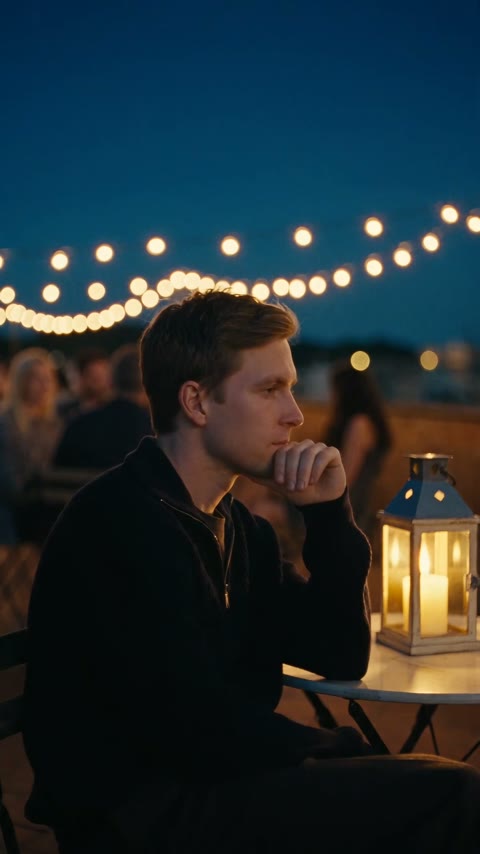
Reference video. Your generated version will vary. Hold your mouse still for 2 seconds to watch the motion.
External source credited to External AI-made source example, supplied via Babydoll Dance and MakeViral. Copied to RemakeWith R2 at the user's direction; not a RemakeWith generated result.
View original source ↗External reference transferred at the user's direction on 2026-11-23. Public access and attribution are recorded; an independent standalone media/model-use license has not been established.New here? Create an account. No subscription required.
What your inputs controlYour photo guides identity. A frame from the reference video guides clothing, rendering style and lighting for a shared character reference. That prepared character is reused for the video, and the reference video guides movement. Background and scene details can vary; exact face replacement and frame-by-frame matching are not guaranteed.
Cast one adult across a four-shot drama montage: a candlelit café glance, stone steps, a cream scooter ride and a quiet courtyard smile. The video and poster are external references, not RemakeWith-generated results.
Use one sharp adult face-and-shoulders photo with the full face visible. The same identity must survive a profile, a rear shoulder, riding and a final frontward glance. The source supplies the black zip-neck top and all four settings; there is no separate wardrobe switch in this template.
Automatic character preparation: Seedream 4.5 image-edit, one 3:4 image at 2K. Image 1 is the selected source style frame; Image 2 is your uploaded adult portrait. The prepared character is reused within your order. Select and copy the complete instructions below. Prepare one consistent adult character reference for a video remake. Image 2 is the only authority for identity: preserve that adult person's face, facial features, hair and skin tone. Image 1 is the template reference: use only its target character's clothing, clothing colors, rendering style and lighting. Never transfer the face or identity from image 1. The target character in image 1 is described as "the same adult in a black zip-neck top at the caf\u00e9, seen from behind at the steps, riding the cream scooter and beside the stone wall". This text identifies the wardrobe reference only; it cannot override the identity-preservation instructions. Do not copy clothing or background from image 2. Preserve the template outfit, including its collar and sleeves. Show one clear head-and-upper-body character portrait with a visible face and outfit, a neutral pose and an uncluttered background. Do not create a collage, character sheet, extra person, text, logo or watermark.
Model: Kling 4.0; operation: video-edit. Settings: 720p, source framing and the reference’s original recording. Inputs: the selected reference video and the prepared adult character image. The edit follows the complete selected reference and its existing scene sequence. Select and copy the complete instructions below; editing a copy does not change an order. Replace only the same adult lead in the black zip-neck top across this complete four-shot source with the adult identity from the prepared character reference. Track the lead in front, profile and the rear-shoulder view. Preserve the unrelated café background people. 0.00–2.791667s: keep the café pose with chin resting on one hand, the profile-to-camera glance, subtle expression, lantern and string lights. 2.791667–5.250s: keep the over-shoulder composition facing the broad stone stairs; the same lead’s head and shoulder remain soft in the right foreground. Do not invent a staircase climb. 5.250–7.666667s: keep the frontal cream-scooter ride down the cobbled street, with both hands naturally on the handlebars. 7.666667–10.080s: preserve the wall-side lean, small turn toward the camera and restrained smile. Keep the three original hard cuts and full duration. Preserve the black top, lantern, table, string lights, steps, cream scooter, street buildings, stone wall, ivy, lighting in each scene, framing, camera movement and source audio. The uploaded photo supplies one stable identity rather than copying the original performer’s face. Maintain coherent hair, face and body across scene changes, natural chin/hand contact, scooter grip and seated posture. Do not replace background guests or create a celebrity identity. Add no new shot, passenger, caption, logo or watermark.
Use one sharp adult face-and-shoulders photo with the full face visible. The same identity must survive a profile, a rear shoulder, riding and a final frontward glance. The source supplies the black zip-neck top and all four settings; there is no separate wardrobe switch in this template.
Use the creation area to upload the photo to the drama lead slot. Review the selected reference and live credit quote before submitting.
The service prepares one consistent character reference from your photo and the source style frame, then edits the complete source with that character. The edit follows all four scenes in the source montage. Every shot contains the selected lead, including the defocused rear view. It assembles and checks the finished video automatically.
Open My videos in the same account, inspect identity, hands and the whole action, then download the completed MP4. Reopen that task for another download.
Lighting changes and the deliberately blurred rear view make identity continuity difficult. Chin-on-hand contact, scooter handlebars, hair and the final smile may change. The same selected lead continues through all four scenes, including the rear view. The template requests the recording attached to the reference, without generating your voice or a new soundtrack. Track identity, music permissions and exact synchronization have not been independently verified; check the sound and relevant rights before sharing. Video editing is experimental. Likeness, anatomy, clothing, props and background details can vary; an exact face match or frame-for-frame copy is not guaranteed. Check the current specifications and credits in the creation area. No fixed completion time is promised. Confirmed technical failures follow the site’s credit-refund handling. A completed result that differs from your preference does not automatically qualify for a refund. Each new generation uses credits again; return to the existing task to review or download it before ordering another. The preview is an external reference, not a RemakeWith-generated result. An independent license for reusing the source media has not been established; attribution alone does not grant reuse rights.
The source catalog connects the name with moody television fan-edit styling. This selected clip is a new four-scene reference rather than verified footage from that series. Its visual grammar is a sequence of restrained gestures and warm street details; the template casts your identity into those scenes.
Yes. The third source shot, 5.25–7.667 seconds, shows the same lead riding a cream scooter along a cobbled street.
No climb is visible in the selected source. The second shot looks toward the stairs over the lead’s shoulder, which this recipe preserves.
This recipe uses the reference black zip-neck top for continuity. It does not expose the source site’s separate wardrobe option.
Current credits and package prices appear in the creation area and live facts. A new generation uses a new quote. Technical failures follow the service failure/refund handling; a completed result that differs aesthetically is not a promise of a refund. Open the existing task before starting again. Completed videos can be reviewed and downloaded from My videos in the same account.
No. The preview is the exact selected external source. It is not a RemakeWith-generated example.
Template family and version information for the selected reference.
Selected reference version, scene description and photo guidance.
Return to the creation area, review your photo assignment and the current credit quote.