15.7s
Remake this scene with your photo.
Remake this video435 credits per remakeRecast the black-hatted adult holding a chain beside a fictional winged creature on the reflective patio; the creature stays part of the source.
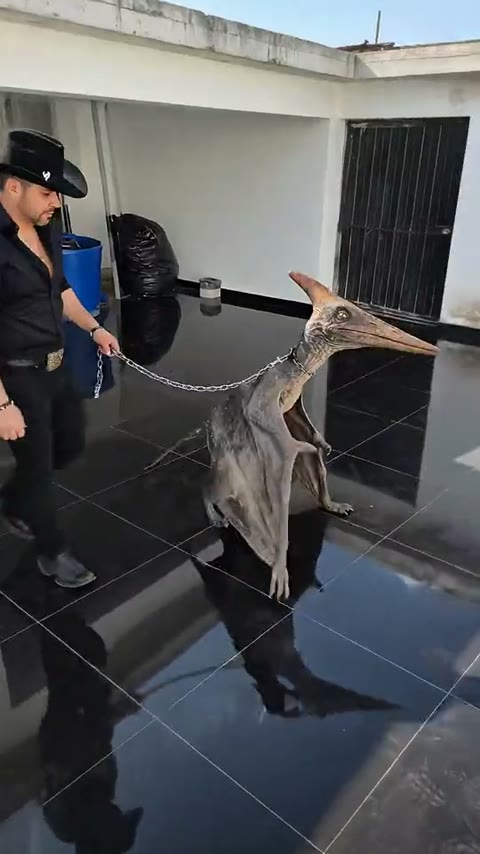
Reference video. Your generated version will vary. Hold your mouse still for 2 seconds to watch the motion.
External source reference credited to @pet.exotics in the captured Babydoll Dance source record. Not a RemakeWith-generated result.
View original source ↗No reusable media license is stated in the captured source. Public reference transferred to owner R2 at explicit user direction on 2026-11-23; independent license verification is not recorded.New here? Create an account. No subscription required.
What your inputs controlYour photo guides identity. A frame from the reference video guides clothing, rendering style and lighting for a shared character reference. That prepared character is reused for the video, and the reference video guides movement. Background and scene details can vary; exact face replacement and frame-by-frame matching are not guaranteed.
An external AI-made patio scene shows an adult in a black cowboy hat beside a large winged creature. The camera spends much of the clip near the creature’s head and wings before showing the handler more clearly again. This version recasts the human handler only. It is imagined fantasy footage and does not verify a real pterosaur sighting. External source reference credited to @pet.exotics by the source page. Not a RemakeWith-generated result.
Upload one clear adult photo with the face visible. A sharp face and useful upper-body framing help when the handler returns near the ending. Do not upload an animal for this version. The source supplies the hat, dark outfit, chain and patio. The creature remains an unchanged prop-like scene character, not a second identity slot. Your uploaded photo supplies identity: face, facial features, hair and skin tone. The exact source video supplies the scene, wardrobe, camera motion, actions and timing. This recipe has one adult identity slot. The order prepares one shared character image from your photo and the exact source first frame, reuses it for the full video edit, then assembles and checks the result. You do not need to create that intermediate image in another tool.
Automatic character preparation: Seedream 4.5 image-edit, one 3:4 image at 2K. Image 1 is the selected source style frame; Image 2 is your uploaded adult portrait. The prepared character is reused within your order. Select and copy the complete instructions below. Prepare one consistent adult character reference for a video remake. Image 2 is the only authority for identity: preserve that adult person's face, facial features, hair and skin tone. Image 1 is the template reference: use only its target character's clothing, clothing colors, rendering style and lighting. Never transfer the face or identity from image 1. The target character in image 1 is described as "the human handler in a black cowboy hat, dark shirt and dark trousers, holding the chain beside the winged creature". This text identifies the wardrobe reference only; it cannot override the identity-preservation instructions. Do not copy clothing or background from image 2. Preserve the template outfit, including its collar and sleeves. Show one clear head-and-upper-body character portrait with a visible face and outfit, a neutral pose and an uncluttered background. Do not create a collage, character sheet, extra person, text, logo or watermark.
Model: Kling 4.0; operation: video-edit. Settings: 720p, source framing and the reference’s original recording. Inputs: the selected reference video and the prepared adult character image. The edit follows the complete selected reference and its existing scene sequence. Select and copy the complete instructions below; editing a copy does not change an order. Edit the complete 10.008005-second reference as the existing continuous patio view. Use the prepared adult character image to replace only the human handler in the black cowboy hat, dark shirt and dark trousers. Keep the uploaded adult's face, facial features, hair and skin tone consistent, including visible hands and body parts at the frame edge. The large winged creature is not the identity target and must remain the source creature. Follow the original camera movement: begin with the handler on the viewer's left holding the chain, move closer to the creature as its long beak opens and wing membranes shift, then return to the handler and chain near the end. Preserve the same human identity when the face re-enters after being partly or fully offscreen. Do not generate a face on the creature, add another handler or make the animal a pet-photo replacement. Keep the chain connected to the source grip and creature, with plausible slack and tension. Preserve the black hat, dark outfit, rolled sleeves, source walking/handling gestures, glossy black tile and both human/creature reflections. Only a genuine reflection of the replaced human should follow the new identity; retain the creature reflection. Keep the white patio walls, doorway, blue bin and dark bags where they occur. Preserve the creature's elongated head, beak, wings, feet and existing motion without introducing flight, a bite, a new animal or a new scene. Keep source framing, daylight, duration and timing. Do not add captions, logos, new spoken lines or voice cloning. Retain only the selected source recording for assembly; do not claim it is an authentic animal sighting.
0.000–10.008s: Handler, creature close view and return. The adult at the left holds the chain as the camera moves toward the winged creature. Its long beak opens while the wings shift in view. The adult becomes cropped/offscreen in the middle, then is visible again handling the chain near the ending. The handler wears dark trousers. One full-source generate call preserves the continuous camera view. Even when the handler’s face is offscreen, hands, body edges or the returning identity still matter. The creature and its reflection are explicitly preserved; the handler is the only photo role.
Choose one adult photo with an unobstructed face. Check that Human handler is the intended role before ordering.
Use the creation area and upload your photo to the Human handler slot. Check that the selected reference is the version described here.
Check the current credit cost, input role and settings before submitting.
The order prepares one consistent character reference, edits the complete source video and assembles and checks the result. Follow the existing task in the same account.
Inspect the returning handler face, visible hands, chain connection, unchanged creature, hat edges and tile reflections. Download the completed MP4 from the result view.
The handler leaves much of the frame before returning, so identity may drift. Chain links, fingers, wing membranes and floor reflections can deform. The creature remains part of the source scene; only the human handler receives your identity. The template requests the recording attached to the reference, without generating your voice or a new soundtrack. Track identity, music permissions and exact synchronization have not been independently verified; check the sound and relevant rights before sharing. Video editing is experimental. Likeness, anatomy, clothing, props and background details can vary; an exact face match or frame-for-frame copy is not guaranteed. Check the current specifications and credits in the creation area. No fixed completion time is promised. Confirmed technical failures follow the site’s credit-refund handling. A completed result that differs from your preference does not automatically qualify for a refund. Each new generation uses credits again; return to the existing task to review or download it before ordering another. The preview is an external reference, not a RemakeWith-generated result. An independent license for reusing the source media has not been established; attribution alone does not grant reuse rights.
This recipe replaces the human handler only. The supplier lists a creature/pet alternative, but that is a different role and is not exposed in this adult version.
The source camera moves close to the creature and partly crops the handler. The same identity must return at the end, but the recipe does not invent a new front-facing human shot.
No. This version retains the selected recording and includes no speech-text or voice-cloning field.
No. The source is an AI-made fantasy scene. The handler edit does not authenticate any reported sighting.
Check the current server credit quote in the creation area before submitting. A new generation normally has a new charge. Confirmed technical failures follow the existing refund flow; visual differences alone do not guarantee a refund.
Open the existing task in the same signed-in account. When the result is complete, inspect the full video and download the MP4 from its result view. Check a running or uncertain task before submitting again.
Selected reference version, scene description and photo guidance.
Template family and version information for the selected reference.
Credited external source reference. Independent reuse rights have not been verified.
Review the selected reference, your photo and the current quote before creating. The source preview is an external reference.