15.7s
Remake this scene with your photo.
Remake this video570 credits per remakeRecast the interview lead across the pressure montage's close and wide views, including its short touchline ending. The selected fifteen-second preview is an external reference.
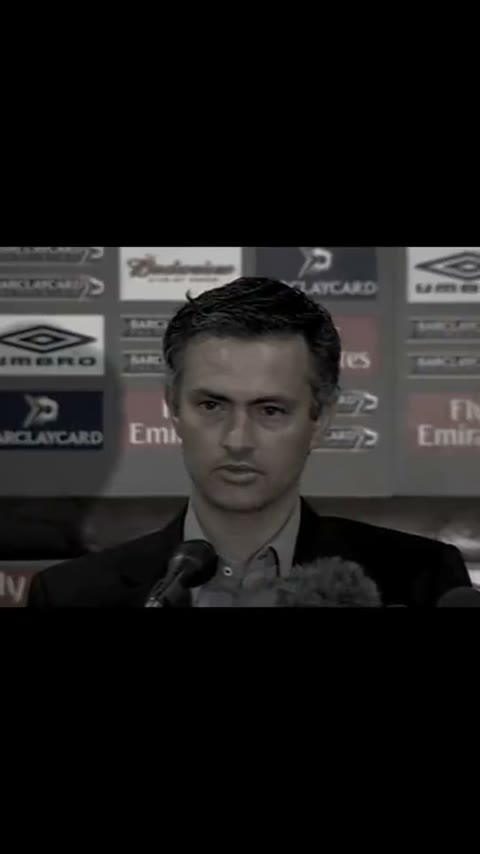
Reference video. Your generated version will vary. Hold your mouse still for 2 seconds to watch the motion.
External source reference attributed to @dodosigma3, supplied via Babydoll Dance / MakeViral. Transferred to RemakeWith R2 at the user's instruction on 2026-11-23; not a RemakeWith generated result.
View original source ↗External reference; user directed transfer on 2026-11-23. Public access and attribution recorded; an independent media/model-use license has not been established.New here? Create an account. No subscription required.
What your inputs controlYour photo guides identity. A frame from the reference video guides clothing, rendering style and lighting for a shared character reference. That prepared character is reused for the video, and the reference video guides movement. Background and scene details can vary; exact face replacement and frame-by-frame matching are not guaranteed.
The excerpt alternates between a close press-conference view and a wider room angle, returns to the close view with brief brightness flashes, then moves to a different interview backdrop. Its final fraction of a second reaches a touchline scene with the lead crouching in a dark coat. This reaction format can frame an exam, deadline or pre-match caption while retaining the source performance. This preview is the selected external source reference. No result generated by this recipe is presented as an example.
Use one evenly lit adult chest-up portrait, with a sharp unobstructed face and a modest head angle. The same identity must survive both a small wide-room view and close interview views. Avoid a microphone, phone or hand covering the face in your photo. The photo supplies the interview subject's identity, continuing to the grey-haired crouching dark-coated adult in the brief final touchline shot. Reporters in the room, the interviewer's microphone and the tracksuit-wearing staff behind the touchline lead are not assigned identities. The source supplies the original clothing, existing speech and edit.
Automatic character preparation: Seedream 4.5 image-edit, one 3:4 image at 2K. Image 1 is the selected source style frame; Image 2 is your uploaded adult portrait. The prepared character is reused within your order. Select and copy the complete instructions below. Prepare one consistent adult character reference for a video remake. Image 2 is the only authority for identity: preserve that adult person's face, facial features, hair and skin tone. Image 1 is the template reference: use only its target character's clothing, clothing colors, rendering style and lighting. Never transfer the face or identity from image 1. The target character in image 1 is described as "the seated male interview subject across all cuts, then the grey-haired crouching adult in the dark overcoat in the final touchline shot; preserve staff". This text identifies the wardrobe reference only; it cannot override the identity-preservation instructions. Do not copy clothing or background from image 2. Preserve the template outfit, including its collar and sleeves. Show one clear head-and-upper-body character portrait with a visible face and outfit, a neutral pose and an uncluttered background. Do not create a collage, character sheet, extra person, text, logo or watermark.
Model: Kling 4.0; operation: video-edit. Settings: 720p, source framing and the reference’s original recording. Inputs: the selected reference video and the prepared adult character image. The edit follows the complete selected reference and its existing scene sequence. Select and copy the complete instructions below; editing a copy does not change an order. Edit @Video1. Use the adult person's identity from @Image1 for the person described as "the seated male interview subject across all cuts, then the grey-haired crouching adult in the dark overcoat in the final touchline shot; preserve staff" in @Video1. Keep each identity distinct. Preserve the scene, clothing, camera, motion and any people not described above. Replace only the same interview lead across this complete 15-second pressure montage with the uploaded adult identity from the prepared character reference. The target is the seated male subject behind microphones in the press conference and later interview, continuing as the grey-haired crouching adult in the dark overcoat in the final brief touchline shot. Preserve reporters, interviewers and tracksuit-wearing staff; never transfer the uploaded face to them. 0-2.333333 seconds: preserve the close press-conference view, microphones and sponsor backdrop. 2.333333-4.958333 seconds: preserve the wider room view with the lead seated at the table beyond reporters. 4.958333-8.75 seconds: retain the return to the close press-conference view, existing mouth and head movements, and brief brightness flashes without inventing extra cuts. 8.75-14.583333 seconds: preserve the different close interview view with tie, microphone and dark branded backdrop. 14.583333 seconds to the end: retain the short touchline shot, changing only the crouching dark-coated lead, not the standing staff behind. Use the source for precise cuts and timing. Maintain the same adult identity despite distance, lighting, age cues and profile turns. Preserve the embedded picture area, surrounding black canvas, source clothing, microphones and existing backdrop text. Keep natural mouth movement and head anatomy without generating a new statement. Preserve the original source audio. Add no new speech, camera shot, person, caption, logo or watermark. Do not copy the original subject's facial identity.
0.000-2.333333: close press-conference subject and microphones. 2.333333-4.958333: wide room with reporters in the foreground and the lead seated at the table. 4.958333-8.750000: return to the close angle; momentary flashes change brightness without a new composition. 8.750000-14.583333: another close interview angle with tie and a dark repeating-brand backdrop. 14.583333-15.000000: a short touchline shot with the target crouching in a dark coat and tracksuit staff standing behind. The reference supplies the movement and timing.
Choose one clear chest-up adult photo with enough face detail for both wide and close angles.
Review all interview cuts and the very short final touchline scene. Preserve reporters and standing staff as non-targets.
Use the creation area, assign the one photo, and check the current credit quote before confirming an order.
The workflow prepares and checks a character from your photo and a source frame, then reuses it for the complete source edit. The result is checked for visual problems before it is made available.
Open My Remakes to follow the task and download an available completed MP4. Inspect identity through microphone occlusion and head turns, then check the crouching touchline lead without changing the staff behind.
The template uses the reference’s existing interview audio. It does not write a new answer, clone your voice or create a genuine statement by the person in your photo. Small faces in the wide room, microphone overlap, profile views, brief flash frames and the extremely short touchline shot can cause identity drift. Source backdrop lettering and bystander details can also change. Identity, anatomy, clothing and background can change; precise synchronization, frame-for-frame matching, completion time and success rate are unverified. A confirmed technical failure follows the site’s credit-refund process. A held task remains under review. Differences in a completed result do not automatically qualify for a refund. Each new generation uses the current quoted credits; check the existing task before starting again.
No. The template edits identity using the existing picture and requests the source audio. It does not create personalized speech or a new press conference.
Only the grey-haired crouching adult in the dark overcoat continues the assigned identity. The standing tracksuit staff remain unchanged.
The recipe uses the supplied first fifteen seconds. Those exact bytes already include a short touchline tail; later portions of the longer source are not generated.
The selected source has an embedded wide picture inside a taller canvas. That presentation is preserved, rather than promising a different full-screen crop.
Use one adult identity photo with one clear face. A group photo makes the intended identity ambiguous and does not add reporter or staff slots.
Read the current credit quote in the creation area; the facts section shows published specifications and the current entry credit pack. Follow the existing task in My Remakes and download its available completed result. A new order is charged again.
Creator attribution supplied with the external reference. A separate reuse license has not been verified.
Reference version, photo guidance and scene description.
Reference version and scene context supplied by MakeViral.
Return to the creation area to check the selected reference, required photo and current quote.