14s
Remake this scene with your photo.
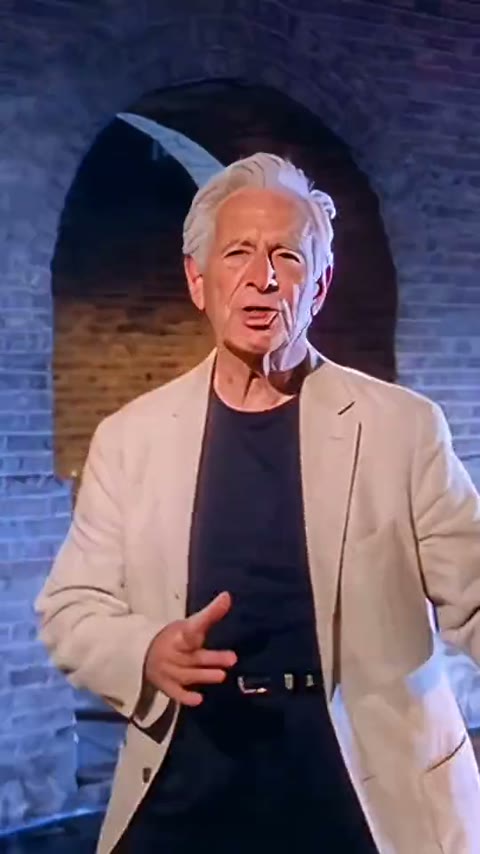
Remake this video570 credits per remakeRecast the red-nosed adult presenter across a room, palm-lined scenes and beach gestures while retaining the colorful costume and scenic inserts. Complete external 14.041667-second reference.
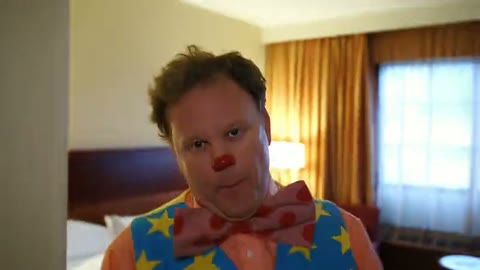
Reference video. Your generated version will vary. Hold your mouse still for 2 seconds to watch the motion.
External source reference credited to @capcutbestuktrend, supplied via Babydoll Dance / MakeViral. Transferred to RemakeWith at the user's direction; not a RemakeWith generated result.
View original source ↗External reference transferred at user direction on 2026-11-23. Attribution and public access recorded; an independent standalone media/model-use license has not been established.New here? Create an account. No subscription required.
What your inputs controlYour photo guides identity. A frame from the reference video guides clothing, rendering style and lighting for a shared character reference. That prepared character is reused for the video, and the reference video guides movement. Background and scene details can vary; exact face replacement and frame-by-frame matching are not guaranteed.
A red-nosed presenter gestures in a room, then appears among palms, under a tower and along the beach. Scenic palm and building inserts break up the performance, and the ending uses a framed beach close-up. The complete 14.041667-second reference is an externally supplied parody edit, not a television performance created by RemakeWith.
Use one sharp adult portrait with a visible face, hairline and shoulders. Head-to-knees or full-body context is useful for the outdoor shots. Keep costume accessories out of the upload if they hide facial features; the source supplies the red nose, star waistcoat and bow tie. Background beach visitors remain unassigned. The uploaded photo supplies identity; this exact video supplies motion, wardrobe, scene, camera and timing. One source style frame and the photo prepare a consistent character within the order. The accepted character is reused across the edit; customer identity images are not reused across orders. The preparation reference is the first source frame.
Automatic character preparation: Seedream 4.5 image-edit, one 3:4 image at 2K. Image 1 is the selected source style frame; Image 2 is your uploaded adult portrait. The prepared character is reused within your order. Select and copy the complete instructions below. Prepare one consistent adult character reference for a video remake. Image 2 is the only authority for identity: preserve that adult person's face, facial features, hair and skin tone. Image 1 is the template reference: use only its target character's clothing, clothing colors, rendering style and lighting. Never transfer the face or identity from image 1. The target character in image 1 is described as "the same red-nosed adult presenter in the blue star waistcoat and spotted bow tie across room and outdoor shots; preserve bystanders". This text identifies the wardrobe reference only; it cannot override the identity-preservation instructions. Do not copy clothing or background from image 2. Preserve the template outfit, including its collar and sleeves. Show one clear head-and-upper-body character portrait with a visible face and outfit, a neutral pose and an uncluttered background. Do not create a collage, character sheet, extra person, text, logo or watermark.
Model: Kling 4.0; operation: video-edit. Settings: 720p, source framing and the reference’s original recording. Inputs: the selected reference video and the prepared adult character image. The edit follows the complete selected reference and its existing scene sequence. Select and copy the complete instructions below; editing a copy does not change an order. Edit @Video 1. Use the adult person's identity from @Image 1 for the person described as "the same red-nosed adult presenter in the blue star waistcoat and spotted bow tie across room and outdoor shots; preserve bystanders" in @Video 1. Keep each identity distinct. Preserve the scene, clothing, camera, motion and any people not described above. Replace only the same adult red-nosed presenter in the blue star-patterned waistcoat, peach shirt, spotted bow tie and yellow striped trousers throughout the complete 14.041667-second source, using the prepared character identity from the uploaded adult photo. Preserve the red nose and costume as scene styling; do not apply this identity to beach visitors or anyone in the background. Preserve every original shot and transition: indoor medium/close views of the presenter making finger-counting and palm gestures; a blurred transition to the presenter among palms; a low-angle presenter view with a tower behind; a palm-tree scenic insert; a full-body palm/beach setting; a seaside close-up; a scenic building-and-palms insert; a full-body shore performance; and the framed final beach close-up moving down toward the presenter's gesturing hands. Keep the original sequence, exact source cuts, borders and timing. Do not turn quick camera motion or blur into extra shots. Maintain one consistent presenter identity across indoor light, outdoor sun, face close-ups and full-body views. Keep the star waistcoat, bow tie, shirt, striped trousers, room furnishings, palm trees, tower, beach, sea, scenic building and all bystanders unchanged. Preserve hand-count gestures without extra fingers, and keep the red nose separate from the face anatomy. Retain original source audio; do not generate a new voice, new rap or exact lip-sync promise. Add no person, replacement of background faces, shot, text, logo or watermark. Uploaded identity is the authority; do not copy the source presenter's face.
Choose one clear adult identity photo with a readable face and body outline.
Confirm the room-and-palms montage with the same star-waistcoat presenter. It is an external parody reference.
Use the normal template creation area. Confirm the required identity slot and current credit quote before submitting an order.
The order prepares and checks one consistent character from the uploaded identity photo and the selected source style frame, then reuses it in affected video segments.
The saved video-edit plan preserves the complete source timing. The result is checked for visual problems before it is made available.
Open My Remakes to return to the existing task and download an available completed result. Compare indoor and beach identity, count hand fingers and inspect the red nose, bow tie, bystanders and framed ending.
The template uses the reference’s existing audio. It does not clone your voice or translate speech. The source’s soundtrack label has not been independently verified. Costume accessories can obscure the face. Hand-counting may distort fingers; identity can change between room and beach lighting; background visitors may accidentally change. The scenic inserts contain no replacement target but remain part of the complete source edit. No exact rap lip sync or different-song selector is promised. This video-editing method is experimental. Likeness, movement and timing can vary. A confirmed technical failure follows the site’s credit-refund process. A held task remains under review. Differences in a completed result do not automatically qualify for a refund. Each new generation uses the current quoted credits; check the existing task before starting again.
The blue stars, red nose and spotted bow tie identify the continuing presenter while quick location changes create the joke. Indoor counting gestures, wide outdoor poses and close seaside expressions need the same requested identity, even though framing and light differ. Palm and building inserts should stay scenic, without an invented face. The source describes this as an AI-made parody and labels the recording Man’s Not Hot. That soundtrack attribution has not been independently verified. The clip is an external parody reference, not an original broadcaster performance.
No. It is an external parody reference credited by the source page. The template requests an identity edit of that source, not a new television appearance.
No. Only the red-nosed star-waistcoat presenter is assigned. Bystanders and scenic inserts should remain unchanged.
This recipe follows the supplied recording and requests original source audio. A photo does not provide a voice or a new song performance.
They are the source styling that joins the locations. Your uploaded photo guides identity, while the source still supplies the presenter costume and movement.
The preview is an external reference. After ordering, use the existing task in My Remakes for an available completed download. Read the current quote in the creation area; a new order is separately charged.
Creator attribution supplied with the external reference. A separate reuse license has not been verified.
Reference version, photo guidance and scene description.
Reference version and scene context supplied by MakeViral.
Return to the creation area to check the selected reference, required photo and current quote.