6.5s
Remake this scene with your photo.
Remake this video469 credits per remakeRecast the main diner in the complete restaurant sponge joke: payment gesture, pouch reveal, escort and kitchen ending. The date and waiter remain supporting source characters.
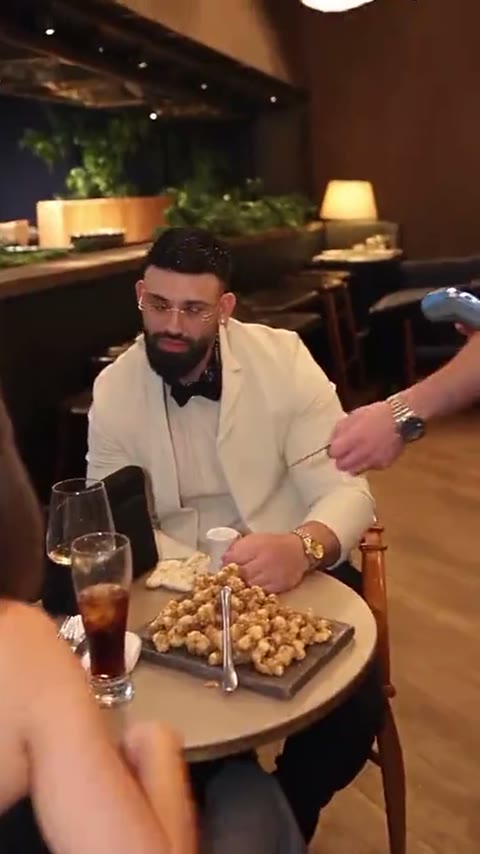
Reference video. Your generated version will vary. Hold your mouse still for 2 seconds to watch the motion.
External source reference credited to @s.nemz, supplied via Babydoll Dance / MakeViral. User-directed transfer on 2026-11-23; not a RemakeWith generated result.
View original source ↗External reference copied at the user's direction on 2026-11-23. Attribution and public access are recorded; a separate media/model-use license has not been established.New here? Create an account. No subscription required.
What your inputs controlYour photo guides identity. A frame from the reference video guides clothing, rendering style and lighting for a shared character reference. That prepared character is reused for the video, and the reference video guides movement. Background and scene details can vary; exact face replacement and frame-by-frame matching are not guaranteed.
The light-jacketed diner stops a payment gesture, opens a dark pouch and reveals a yellow-and-green sponge. A waiter then guides the same diner away from the table to a kitchen filled with dishes. The joke follows one mapped lead across the restaurant and kitchen cuts. This is an external source reference. It is not a RemakeWith-generated result.
Use one sharp consenting adult portrait with visible eyes, face and hairline. Shoulders help the light-jacket character preparation. Avoid a hand over the face because the pouch insert already requires separate hand-and-prop review. Upload one clear consenting adult identity photo, with one person and an unobstructed face. The photo supplies identity; the exact source clip supplies action, wardrobe, scenery, edit timing and visual treatment. Other people and props stay in their source roles. This entry has one identity slot and no pet, multi-person, object or background editor. One consistent character is prepared from your photo and a source style frame, checked, then reused within this order.
Automatic character preparation: Seedream 4.5 image-edit, one 3:4 image at 2K. Image 1 is the selected source style frame; Image 2 is your uploaded adult portrait. The prepared character is reused within your order. Select and copy the complete instructions below. Prepare one consistent adult character reference for a video remake. Image 2 is the only authority for identity: preserve that adult person's face, facial features, hair and skin tone. Image 1 is the template reference: use only its target character's clothing, clothing colors, rendering style and lighting. Never transfer the face or identity from image 1. The target character in image 1 is described as "the main diner in the light jacket and dark neckwear, who opens the pouch, reveals a sponge and is led to the kitchen; preserve date and waiter". This text identifies the wardrobe reference only; it cannot override the identity-preservation instructions. Do not copy clothing or background from image 2. Preserve the template outfit, including its collar and sleeves. Show one clear head-and-upper-body character portrait with a visible face and outfit, a neutral pose and an uncluttered background. Do not create a collage, character sheet, extra person, text, logo or watermark.
Model: Kling 4.0; operation: video-edit. Settings: 720p, source framing and the reference’s original recording. Inputs: the selected reference video and the prepared adult character image. The edit follows the complete selected reference and its existing scene sequence. Select and copy the complete instructions below; editing a copy does not change an order. Edit @Video1. Use the adult person's identity from @Image1 for the person described as "the main diner in the light jacket and dark neckwear, who opens the pouch, reveals a sponge and is led to the kitchen; preserve date and waiter" in @Video1. Keep each identity distinct. Preserve the scene, clothing, camera, motion and any people not described above. Replace only the main adult diner wearing the light jacket and dark neckwear throughout this complete restaurant source. Use the prepared adult character as the identity reference. Keep the date at the table, the dark-shirted waiter and other restaurant figures as unchanged supporting people. The same mapped diner continues into the kitchen. 0–3.292s: preserve the table interaction, the diner declining the offered payment gesture and reaching for the small dark pouch. 3.292–4.833s: preserve the close insert of the pouch unzipping to show the yellow-and-green kitchen sponge; keep hands and object positions coherent with the diner. 4.833–5.958s: preserve the closer seated reaction with the pouch. 5.958–7.708s: retain the wider table view and interaction with the waiter. 7.708–9s: keep the rear view of the waiter guiding the same light-jacketed diner away. 9–11.333s: preserve the kitchen reveal with piled dishes and the diner's reaction. Preserve every actual source cut and the complete ending. Maintain the same identity through front, side, rear and kitchen views. Keep fingers separate from the pouch zipper and sponge, preserve the date and waiter identities, warm restaurant lighting, tableware, payment device, kitchen equipment and source audio. Do not add a second identity slot, new dialogue, a new payment story, extra scenes, captions, logos or watermark. The uploaded adult photo is the identity authority.
0–3.292s table and payment gesture; 3.292–4.833s zipper-and-sponge insert; 4.833–5.958s nearer seated reaction; 5.958–7.708s wider waiter interaction; 7.708–9s escort from the table; 9–11.333s kitchen and dirty dishes. The reference supplies the movement and transitions.
Use one sharp consenting adult portrait with visible eyes, face and hairline. Shoulders help the light-jacket character preparation. Avoid a hand over the face because the pouch insert already requires separate hand-and-prop review.
Open the creation area, sign in, and upload the one intended adult photo to the named role.
Review the source reference, photo assignment and credit quote before submitting. The current quote and available credit packs are shown by the site.
The order prepares and checks a common character reference, then edits the full source with that character. Any saved source cuts remain within the complete edit; no identity image is shared between customers.
Use My Remakes to check progress or resume viewing an existing task. When a completed result is available, inspect the whole video and download it.
The template uses the reference’s existing audio. Track identity and synchronization have not been independently verified. It does not generate new speech or clone your voice. Inspect the diner identity after the cut to the kitchen, hands around the zipper and sponge, and the waiter's guiding arm. The source metadata describes an AI-made joke; it is not a claim about a real diner, payment dispute or restaurant event. This video-editing method is experimental. Appearance, anatomy, props, scene details and edit timing can change. Exact likeness, frame-for-frame matches, delivery time and success rate are unverified. A confirmed technical failure follows the site’s credit-refund process. A held task remains under review. Differences in a completed result do not automatically qualify for a refund. Each new generation uses the current quoted credits; check the existing task before starting again.
The source sets up a conventional offer to pay, then substitutes a dishwashing sponge for money. The final kitchen scene supplies the visual payoff. Replacing the diner keeps that existing sequence; it does not customize the date, waiter, dialogue or restaurant.
This recipe has one main-diner identity slot. The supporting date, waiter and other figures remain unchanged.
No. It is the same scene and the same diner's prop action. Inspect hand continuity, zipper and sponge without creating another identity slot.
No new speech or voice cloning is requested. The recipe retains the source recording; its actual sound has not been listened to in this template.
It completes the sponge joke and tests whether the same diner identity remains after changes in light, angle and background.
No. It is the credited external source reference. It is not a RemakeWith-generated example.
Read the current credit quote in the creation area before ordering. Use My Remakes to return to the existing task and download an available completed result. A new order is charged again.
Reference version, photo guidance and scene description.
Creator attribution supplied with the external reference. A separate reuse license has not been verified.
Return to the creation area to check the identity role and current quote.