26.4s
Remake this scene with your photo.
Remake this video469 credits per remakeRecast the foreground hoodie dancer through hand gestures, quick frame exits, a friend’s appearance and the closing run. The preview is an external source reference.
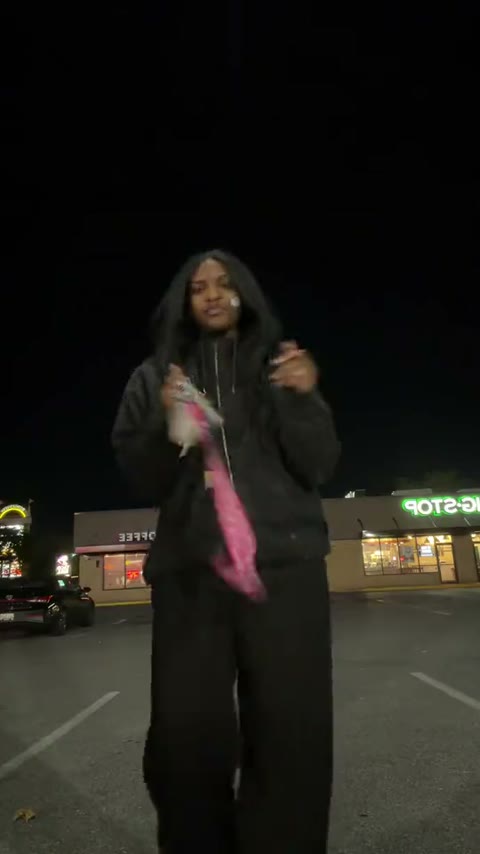
Reference video. Your generated version will vary. Hold your mouse still for 2 seconds to watch the motion.
External source credited to @2tii.red; supplied via Babydoll Dance / MakeViral. Copied to RemakeWith R2 at the user's instruction; not a RemakeWith generated result.
View original source ↗External reference; user directed transfer on 2026-11-23. Public access and attribution recorded; independent standalone media/model-use permission has not been established.New here? Create an account. No subscription required.
What your inputs controlYour photo guides identity. A frame from the reference video guides clothing, rendering style and lighting for a shared character reference. That prepared character is reused for the video, and the reference video guides movement. Background and scene details can vary; exact face replacement and frame-by-frame matching are not guaranteed.
The foreground dancer in a dark hoodie gestures with a bright pink strap, briefly leaves and returns to the frame, turns toward a friend, then returns to front-facing gestures and runs across the parking lot. The closing view shows the lead turned away. The reference lasts 11.708333 seconds. The quick exit and return timing can suit a “how fast I leave” style caption. The selected Parking-lot lead variant assigns only the lead; the friend appearing in the middle remains part of the original scene.
Choose one clear adult portrait with unobstructed eyes, hairline and shoulders. A fuller photo can help describe the person, but the source supplies the hoodie and dance. Avoid dark sunglasses: the parking-lot source already has low facial light. The uploaded adult photo supplies identity. The complete source supplies the motion, timing, scene and reference clothing. A source style frame and the photo prepare one character within your order; that accepted character is reused for the full edit. The friend in the graphic top and gray trousers keeps the source identity, even during the middle exchange. The bright pink strap is a source prop, not a separate upload. There is one adult identity slot, with no pet or additional-person input in this recipe.
Automatic character preparation: Seedream 4.5 image-edit, one 3:4 image at 2K. Image 1 is the selected source style frame; Image 2 is your uploaded adult portrait. The prepared character is reused within your order. Select and copy the complete instructions below. Prepare one consistent adult character reference for a video remake. Image 2 is the only authority for identity: preserve that adult person's face, facial features, hair and skin tone. Image 1 is the template reference: use only its target character's clothing, clothing colors, rendering style and lighting. Never transfer the face or identity from image 1. The target character in image 1 is described as "the main foreground adult in the dark hoodie and flared dark trousers holding a bright pink strap; preserve the friend in gray trousers". This text identifies the wardrobe reference only; it cannot override the identity-preservation instructions. Do not copy clothing or background from image 2. Preserve the template outfit, including its collar and sleeves. Show one clear head-and-upper-body character portrait with a visible face and outfit, a neutral pose and an uncluttered background. Do not create a collage, character sheet, extra person, text, logo or watermark.
Model: Kling 4.0; operation: video-edit. Settings: 720p, source framing and the reference’s original recording. Inputs: the selected reference video and the prepared adult character image. The edit follows the complete selected reference and its existing scene sequence. Select and copy the complete instructions below; editing a copy does not change an order. Edit @Video1. Use the adult person's identity from @Image1 for the person described as "the main foreground adult in the dark hoodie and flared dark trousers holding a bright pink strap; preserve the friend in gray trousers" in @Video1. Keep each identity distinct. Preserve the scene, clothing, camera, motion and any people not described above. Replace only the main foreground adult in the dark hoodie and flared dark trousers throughout this complete 11.708333-second source. Use the prepared character reference for the uploaded adult identity. Preserve the separate friend in the dark graphic top and gray trousers; do not apply the uploaded identity to that person. Retain the source's fixed nighttime parking-lot framing and exact action sequence: the lead starts near the camera with small fist-pump and hand gestures while a bright pink strap swings from one hand; the source includes quick exits from the visible frame and returns. Keep the middle back-facing exchange when the friend is visible behind the lead, the return to front-facing gestures and wide arms, and the later fast run across the lot followed by the lead turning away. Preserve every brief empty-frame interval and the original return timing. Do not invent a face or body in frames where the lead is absent, and do not turn those intervals into new scenery. Keep the pink strap and attached small object, hoodie, flared trousers, parking lines, parked cars, illuminated storefronts and dark sky. Maintain the same uploaded identity in front, side and back views, with natural hands, legs and body continuity through the quick exits and run. Preserve the friend and all background details as source context. Keep the existing source audio. Add no new person, dance step, caption, logo or watermark. The uploaded photo remains the identity authority; the source supplies movement, prop and location.
0–11.708333 s: one fixed parking-lot viewpoint. The sequence includes opening hand gestures, several brief frame exits/empty intervals, a middle back-facing exchange with the friend, a return to front-facing gestures, and the fast run before the final turned-away view. These are events within the same visible setting. Their original timing is retained by a complete-source edit rather than a fabricated series of new camera scenes. The reference supplies the movement and timing.
Choose one clear adult portrait with unobstructed eyes, hairline and shoulders. A fuller photo can help describe the person, but the source supplies the hoodie and dance. Avoid dark sunglasses: the parking-lot source already has low facial light.
Use the Parking-lot lead reference credited to @2tii.red. Only the main dancer is an uploaded identity role; no second-person selector is added. The preview is external reference material.
Use the template create area, assign your photo to the labeled role, and review the current credit quote before submitting.
The order combines your identity photo and a source style frame, checks the character reference and reuses it through the complete video edit. You do not need to make an extra image in a separate tool.
Open My videos and check lead identity after each frame return, pink strap contact, the running legs and the friend’s unchanged face. Review the completed video before sharing.
Return to the same task to review and download. Check the prepared audio before posting; no fresh generation is needed just to retry a completed download.
Low light, fast movement and temporary exits make identity continuity harder to judge. The strap can merge with fingers, and the run can produce blurred or inconsistent feet. Brief empty frames are part of the supplied edit; the model should not fill them with an invented extra person. The selected file has an audio track. This recipe requests its existing audio; no personal voice, new song or exact lyric synchronization is generated. Track identity has not been independently verified. Review the sound and any music permissions before sharing. The route is experimental video editing. Identity, hands, wardrobe, backgrounds and existing text can change. No precise likeness or frame-for-frame match is guaranteed. A confirmed technical failure follows the site's credit refund handling; visual dissatisfaction alone is not a promise of a refund. A fresh generation uses the current quoted credits. Review the existing task and download before starting another order. No reliable completion-time promise is available. This is an external reference with the credited source below. A separate reuse license has not been verified.
This recipe has one main-dancer role. The friend in gray trousers is explicitly preserved; a second identity upload is not connected.
No. A bright pink strap with a small attached object is visible in the source and is preserved as a prop. It does not control the hoodie color.
The source includes quick exits and returns. This complete-source edit retains those intervals rather than inserting a new scene or person.
No. Your adult portrait supplies identity, while this exact reference supplies the gestures, friend exchange, run and nighttime setting.
Read the current credits in the create area before ordering. A new generation is a new paid task. Confirmed technical failures follow the site’s credit refund handling; this does not promise a refund for every appearance difference.
Return to My videos in the same signed-in account, open the task and inspect the full result before downloading the MP4. Check the face, lead identity after each frame return, pink strap contact, the running legs and the friend’s unchanged face. An existing completed download does not require submitting a fresh generation.
Reference version, photo guidance and scene description.
Creator attribution supplied with the external reference. A separate reuse license has not been verified.
Return to the create area to review the selected reference, photo role and current credits.