15.7s
Remake this scene with your photo.
Remake this video435 credits per remakeRecast one cartoon lead from a blue-bottle sniff through the fictional flame reveal into a cap, sunglasses and magenta coat. Complete external 10.566009-second reference.
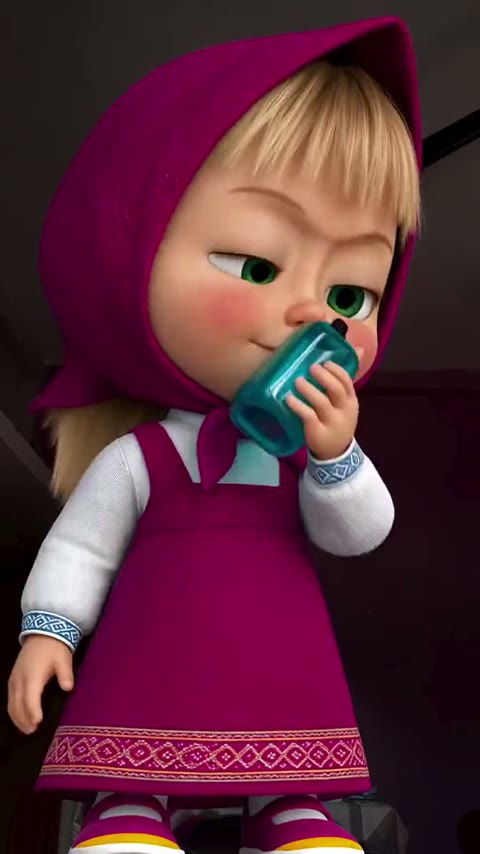
Reference video. Your generated version will vary. Hold your mouse still for 2 seconds to watch the motion.
External source reference credited to @ramod1n.g, supplied via Babydoll Dance / MakeViral. Transferred to RemakeWith at the user's direction; not a RemakeWith generated result.
View original source ↗External reference transferred at user direction on 2026-11-23. Attribution and public access recorded; an independent standalone media/model-use license has not been established.New here? Create an account. No subscription required.
What your inputs controlYour photo guides identity. A frame from the reference video guides clothing, rendering style and lighting for a shared character reference. That prepared character is reused for the video, and the reference video guides movement. Background and scene details can vary; exact face replacement and frame-by-frame matching are not guaranteed.
One cartoon lead sniffs a blue bottle, then a near-camera lighter and bright flame conceal a change into a flat cap, sunglasses, dark suit and magenta coat. Short pose cuts end with the character leaning in and lowering the glasses. This is a stylized source-video identity edit; no cartoon-style switch or outfit editor is added.
Use one clear adult photo with visible face, eyes and hairline, preferably waist-up. Avoid glasses or hands hiding the face in the uploaded image; the source later adds a cap and sunglasses. One identity spans the pink hood and magenta coat. Stylized source proportions can limit how closely the uploaded adult likeness is represented. The uploaded photo supplies identity; this exact video supplies motion, wardrobe, scene, camera and timing. One source style frame and the photo prepare a consistent character within the order. The accepted character is reused across the edit; customer identity images are not reused across orders. The preparation reference is the first source frame.
Automatic character preparation: Seedream 4.5 image-edit, one 3:4 image at 2K. Image 1 is the selected source style frame; Image 2 is your uploaded adult portrait. The prepared character is reused within your order. Select and copy the complete instructions below. Prepare one consistent adult character reference for a video remake. Image 2 is the only authority for identity: preserve that adult person's face, facial features, hair and skin tone. Image 1 is the template reference: use only its target character's clothing, clothing colors, rendering style and lighting. Never transfer the face or identity from image 1. The target character in image 1 is described as "the single cartoon lead in the pink hood, continuing after the flame into the flat cap, sunglasses and magenta coat; preserve foreground props". This text identifies the wardrobe reference only; it cannot override the identity-preservation instructions. Do not copy clothing or background from image 2. Preserve the template outfit, including its collar and sleeves. Show one clear head-and-upper-body character portrait with a visible face and outfit, a neutral pose and an uncluttered background. Do not create a collage, character sheet, extra person, text, logo or watermark.
Model: Kling 4.0; operation: video-edit. Settings: 720p, source framing and the reference’s original recording. Inputs: the selected reference video and the prepared adult character image. The edit follows the complete selected reference and its existing scene sequence. Select and copy the complete instructions below; editing a copy does not change an order. Edit @Video 1. Use the adult person's identity from @Image 1 for the person described as "the single cartoon lead in the pink hood, continuing after the flame into the flat cap, sunglasses and magenta coat; preserve foreground props" in @Video 1. Keep each identity distinct. Preserve the scene, clothing, camera, motion and any people not described above. Apply the prepared adult character identity from the uploaded adult photo only to the same continuing cartoon lead throughout the complete 10.566009-second reference. Adapt that adult identity to the source stylized rendering without copying the original cartoon face. The pink-hooded opening character and the later cap-and-magenta-coat character are one identity, not two cast slots. Preserve the foreground hand holding the lighter/bottle as a source prop; do not place a face or identity on it. Keep the source order and exact cuts: the lead holds and sniffs a blue perfume bottle, a lighter appears close to the low camera, a bright fictional flame fills the image and conceals the costume change, then the same lead appears in a dark flat cap, sunglasses, dark suit and long magenta coat. Preserve subsequent short poses: thumbs-up, arm sweep, sunglasses touches and lowering/raising, collar adjustment, and the final lean toward the lens with glasses lowered enough to show the eyes. Keep the complete ending. The flame is a video effect already present in the source; no real-world performance is required. Preserve the source room, ceiling fan, blue bottle, lighter, costume colors, stylized proportions, low viewpoint and all original timing. Maintain consistent requested identity on both sides of the reveal and behind the cap/glasses without inventing exposed eyes through opaque lenses. Avoid duplicated fingers, merged bottle/lighter shapes, changing face anatomy at the flash or extra characters. Keep original source audio. Add no new fire sequence, person, shot, caption, logo or watermark. The uploaded photo supplies identity, while the reference supplies the action, props and clothing.
Choose one clear adult identity photo, with both eyes and hairline readable.
Confirm the blue-bottle cartoon source, including the cap-and-coat ending. You only upload a photo; no physical bottle, flame or reenactment is needed.
Use the normal template creation area. Confirm the required identity slot and current credit quote before submitting an order.
The order prepares and checks one consistent character from the uploaded identity photo and the selected source style frame, then reuses it in affected video segments.
The saved video-edit plan preserves the complete source timing. The result is checked for visual problems before it is made available.
Open My Remakes to return to the existing task and download an available completed result. Compare identity before/after the flash, then inspect bottle/lighter edges, cap, sunglasses, fingers and the final visible eyes.
The template uses the reference’s existing audio, without voice cloning or translated speech. Track identity has not been independently verified. The source is strongly stylized, so adult likeness can be simplified. The flash hides the face and can cause identity reset; cap/glasses obscure it afterward. Bottle, lighter and fingers can merge. Cartoon likeness can vary, and this template does not provide a separate costume control. This video-editing method is experimental. Likeness, movement and timing can vary. A confirmed technical failure follows the site’s credit-refund process. A held task remains under review. Differences in a completed result do not automatically qualify for a refund. Each new generation uses the current quoted credits; check the existing task before starting again.
The flash is an occlusion that joins two looks. Keeping a single identity through it is the key task; treating the post-flash figure as a new person would break the premise. Later glasses and collar gestures show off the new look while the low camera and room keep visual continuity. The source describes one continuing character and a supplied fictional spray/flame edit. Its action explanation helps distinguish the input identity from source props. No origin date, first creator or popularity claim is independently established by this template.
No. The fictional source supplies the bottle, lighter and flame effect. This workflow takes a photo; it does not ask for a real reenactment.
No. The same continuing character changes costume. One uploaded adult identity is requested across both looks.
The saved recipe follows the source magenta coat, cap, sunglasses and stylized scene. No separate outfit picker or style control is connected.
Identity is requested consistently, but stylization, flash occlusion and dark lenses limit visible likeness. Check the face before the reveal and the final lowered-glasses view.
The preview is an external reference. After ordering, use the existing task in My Remakes for an available completed download. Read the current quote in the creation area; a new order is separately charged.
Reference version and scene context supplied by MakeViral.
Reference version, photo guidance and scene description.
Reference version and scene context supplied by MakeViral.
Return to the creation area to check the selected reference, required photo and current quote.