7.1s
Remake this scene with your photo.
Remake this video402 credits per remakeTurn one adult portrait into the red-waves beauty reveal: a towel-turban opening, a hand-hidden transition and a close-up with long crimson hair. External source reference shown; generated appearance can vary.
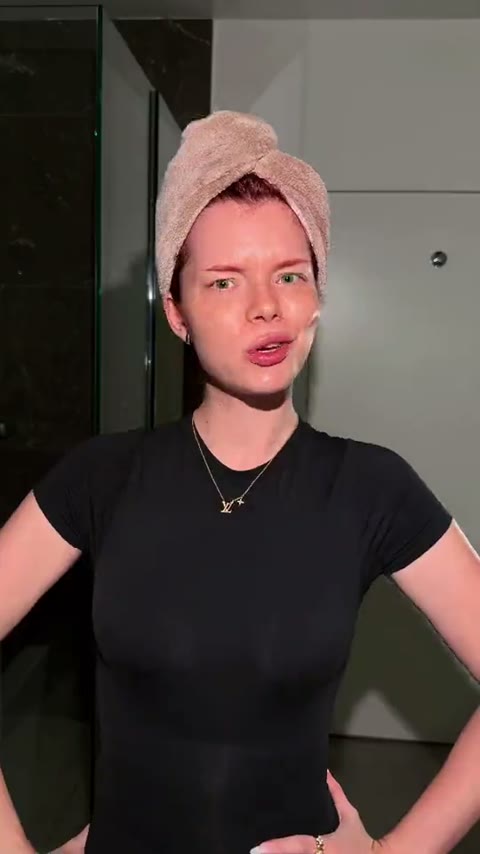
Reference video. Your generated version will vary. Hold your mouse still for 2 seconds to watch the motion.
External source credited to @anastasile, supplied via Babydoll Dance and MakeViral. Copied to RemakeWith R2 at the user's direction; not a RemakeWith generated result.
View original source ↗External reference transferred at the user's direction on 2026-11-23. Public access and attribution are recorded; an independent standalone media/model-use license has not been established.New here? Create an account. No subscription required.
What your inputs controlYour photo guides identity. A frame from the reference video guides clothing, rendering style and lighting for a shared character reference. That prepared character is reused for the video, and the reference video guides movement. Background and scene details can vary; exact face replacement and frame-by-frame matching are not guaranteed.
Turn one adult portrait into the red-waves beauty reveal: a towel-turban opening, a hand-hidden transition and a close-up with long crimson hair. The media above and this poster are external source references, not proof of a RemakeWith generation.
Use one clear adult head-and-shoulders photo with both eyes visible and no hand covering the face. A neutral expression helps the opening and final pose share one identity. The photo supplies identity; the source supplies the black shirt, towel-to-hair change, hand timing and room. You do not need to upload a before/after pair.
The automatic workflow prepares one shared character reference with Seedream 4.5 before video editing. Image 1 is a style frame from the selected source; image 2 is your adult portrait. Settings: one 3:4 image, 2K. You do not need to run a separate tool. Prepare one consistent adult character reference for a video remake. Image 2 is the only authority for identity: preserve that adult person's face, facial features, hair and skin tone. Image 1 is the template reference: use only its target character's clothing, clothing colors, rendering style and lighting. Never transfer the face or identity from image 1. The target character in image 1 is described as "the woman in the black fitted shirt and towel turban who reveals deep-red waves after the hand cover". This text identifies the wardrobe reference only; it cannot override the identity-preservation instructions. Do not copy clothing or background from image 2. Preserve the template outfit, including its collar and sleeves. Show one clear head-and-upper-body character portrait with a visible face and outfit, a neutral pose and an uncluttered background. Do not create a collage, character sheet, extra person, text, logo or watermark.
Kling 4.0 video-edit; administrator profile revision 0; 720p; one prepared portrait and the complete source video; source audio requested. These are the template video-edit instructions, not the original creator’s prompt or proof of a tested output. Text is selectable for manual copying; changing a copy does not alter the website recipe. Replace only the same adult woman throughout the complete source with the adult identity from the prepared character reference. Keep the same identity before and after the reveal; the uploaded photo remains the identity authority. 0.00–5.00s: keep the frontal black-shirt opening, towel turban, necklace, expressive head and mouth movements, and the hands sweeping and reaching toward the lens. Preserve the strong hand occlusion and the source timing. At 5.00s preserve the concealed beauty edit. 5.00–9.311s: reveal long deep-red glossy waves and the reference glamour makeup, then retain the raised-arm release, hair-framing movement and direct-camera poses. Hair and makeup change deliberately at the reveal; facial identity must remain coherent. Preserve the original black outfit, gray door, dark wall, close framing, lighting changes, full clip length and source audio. Keep the original motion and cut, natural hands and fingers, stable eyes and teeth, and continuous head shape when hands obscure the face. Do not transform into an animal or add tiger face paint: this selected variant is a red-hair glow-up. Add no person, caption, logo or watermark.
Use one clear adult head-and-shoulders photo with both eyes visible and no hand covering the face. A neutral expression helps the opening and final pose share one identity. The photo supplies identity; the source supplies the black shirt, towel-to-hair change, hand timing and room. You do not need to upload a before/after pair.
Use the creation area to upload the photo to the glow-up lead slot. Review the selected reference and live credit quote before submitting.
The service prepares one consistent character reference from your photo and the source style frame, then edits the complete source with that character. The edit follows the existing hand-hidden transition. It assembles and checks the finished video automatically.
Open My videos in the same account, inspect identity, hands and the whole action, then download the completed MP4. Reopen that task for another download.
The local reference is 9.311 seconds, 540 × 960 pixels. The video is requested at 720p. See the current specifications above. The template uses the reference soundtrack. Check the soundtrack before sharing. The recipe requests source audio, not a new song or voice performance. No fixed completion time is promised. Check identity on both sides of the hand cover, nails and rings near the lens, eyes, teeth and the red-hair silhouette. The model may soften the concealed edit, alter hair or makeup, or drift when the face is hidden. Exact face replacement, wardrobe and frame-by-frame matching are not guaranteed. Current credits and package prices appear in the creation area and live facts. A new generation uses a new quote. Technical failures follow the service failure/refund handling; a completed result that differs aesthetically is not a promise of a refund. Open the existing task before starting again. Completed videos can be reviewed and downloaded from My videos in the same account. An independent reuse license for the source has not been established.
The recognizable device is a hand-hidden before-and-after reveal. This selected red-waves variant has no tiger face paint.
No. This template uses the red-waves glow-up source. It preserves a towel opening and a glamorous red-hair finish; the separate tiger-paint sources are not selected here.
This saved recipe asks for the reference deep-red waves. The page does not include a separate hair-color editor, and editing copied prompt text does not change the submitted recipe.
No. One adult photo guides identity across both looks. The source supplies the before/after styling and hand-hidden transition.
Current credits and package prices appear in the creation area and live facts. A new generation uses a new quote. Technical failures follow the service failure/refund handling; a completed result that differs aesthetically is not a promise of a refund. Open the existing task before starting again. Completed videos can be reviewed and downloaded from My videos in the same account.
No. The preview is the selected external reference, not a RemakeWith result.
Source credit listed with the selected reference.
Selected reference, version and input guide.
Return to the creation area, review your photo assignment and the current credit quote.