6.5s
Remake this scene with your photo.
Remake this video697 credits per remakeRecast the passenger arriving at the hotel in the peach convertible: drop the heels, step out, add the white blazer and walk toward the entrance, keeping the valet unchanged.
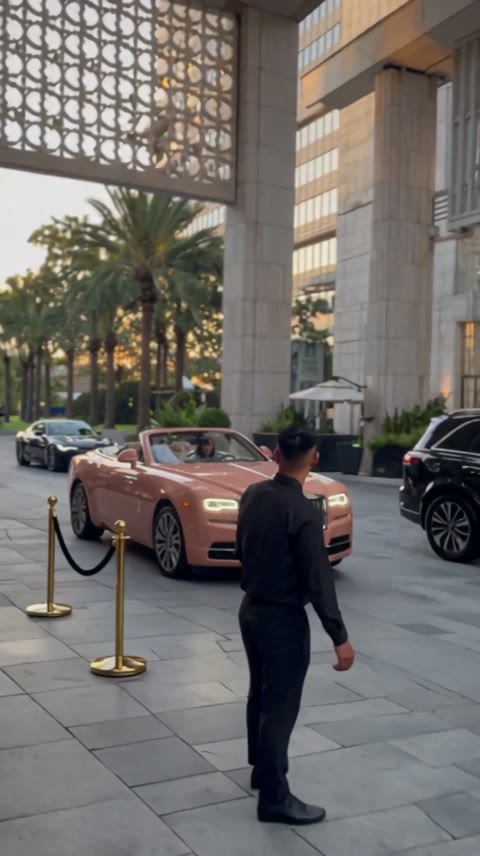
Reference video. Your generated version will vary. Hold your mouse still for 2 seconds to watch the motion.
External source reference credited to External AI-made source example in the captured Babydoll Dance / MakeViral record. Not a RemakeWith-generated result.
View original source ↗No reusable media license is stated in the captured source. The owner explicitly directed reference copying to R2 on 2026-11-23; independent public-display and model-use permission verification is not recorded.New here? Create an account. No subscription required.
What your inputs controlYour photo guides identity. A frame from the reference video guides clothing, rendering style and lighting for a shared character reference. That prepared character is reused for the video, and the reference video guides movement. Background and scene details can vary; exact face replacement and frame-by-frame matching are not guaranteed.
The passenger drops a pair of white heels from the peach convertible, steps out, adds a blazer and walks toward the hotel. The source uses several cuts to carry the arrival through its stages. One adult identity replaces the passenger throughout. The valet stays part of the scene; this is a fictional identity remake of an external AI-made example.
Choose a sharp full-body adult photo with a clear face, separate arms and visible shoes. A large unobstructed face is still the priority. Your photo supplies identity, while the source supplies the grey knit top, white trousers, later white blazer and heels, car, valet and hotel. Do not upload a second image for the valet. The shorter red-car salute source is a separate version and is not used here.
Automatic character preparation: Seedream 4.5 image-edit, one 3:4 image at 2K. Image 1 is the last frame of the selected video segment; Image 2 is your uploaded adult portrait. The prepared character is reused within your order. Select and copy the complete instructions below. Prepare one consistent adult character reference for a video remake. Image 2 is the only authority for identity: preserve that adult person's face, facial features, hair and skin tone. Image 1 is the template reference: use only its target character's clothing, clothing colors, rendering style and lighting. Never transfer the face or identity from image 1. The target character in image 1 is described as "the arriving adult passenger in the grey knit top, white trousers and white heels, later adding the white blazer; exclude the black-clad valet and hotel staff". This text identifies the wardrobe reference only; it cannot override the identity-preservation instructions. Do not copy clothing or background from image 2. Preserve the template outfit, including its collar and sleeves. Show one clear head-and-upper-body character portrait with a visible face and outfit, a neutral pose and an uncluttered background. Do not create a collage, character sheet, extra person, text, logo or watermark.
Model: Kling 4.0; operation: video-edit. Settings: 720p, source framing and the reference’s original recording. Inputs: the selected reference video and the prepared adult character image. The segment prompts below follow the reference cuts and reuse the same prepared character. Select and copy the complete instructions below; editing a copy does not change an order. Edit @Video1. Use the adult person's identity from @Image1 for the person described as "the arriving adult passenger in the grey knit top, white trousers and white heels, later adding the white blazer; exclude the black-clad valet and hotel staff" in @Video1. Keep each identity distinct. Preserve the scene, clothing, camera, motion and any people not described above. The following complete prompts apply to their matching source segments: s01 · 0.000000–6.100000s Edit this hotel-arrival opening segment. Replace only the passenger seated in the peach convertible with the prepared adult identity. Keep the black-clad valet unchanged as the door opens. Preserve the passenger in the grey knit top and white trousers, the two white heels being lowered/dropped from the car onto the pavement, cream seat, hanging white blazer, car and hotel approach. Keep each shoe and hand coherent and the passenger identity visible through the windshield and door framing. No new person, salute or captions. Preserve source audio. s02 · 6.100000–9.100000s Edit this exit segment with the same prepared passenger identity only. Preserve the rise from the cream seat, the feet finding the white pointed heels on the pavement and the body straightening beside the open peach-car door. Keep the grey knit top, white trousers, small white cup and source glasses; the blazer has not yet been fully put on. Maintain leg/door and heel/ground contacts. Leave the valet and background people unchanged. Do not add steps, a salute, new text or a different car. Preserve source audio. s03 · 9.100000–11.400000s Edit this blazer segment with the same uploaded passenger identity. Follow the source white blazer going onto the grey knit top and white trousers, the hands adjusting the lapels and sleeves and the small turn beside the car. Keep the white cup, pointed heels, cream seat and open peach-car door. Allow the source wardrobe addition; do not freeze the grey top as the only visible outer layer. Preserve the passenger through front, side and partial back views and leave other people unchanged. No captions, new garments or added companion. Preserve source audio. s04 · 11.400000–14.977007s Edit this final walking segment using the same prepared adult identity for the passenger in the white blazer, white trousers and heels. Preserve the small white cup, the walk alongside and past the peach convertible toward the hotel, the brief look back and the final back view. Keep the source closed-door state after the cut; do not re-open it or invent a missing door-closing action. Leave the black-clad valet, hotel staff, ropes and parked vehicles unchanged. Keep the heel steps and hand/cup contact coherent. Do not switch to a red car or salute, add text or new people. Preserve source audio.
0.000000–6.100000s · Door opening and seated shoe drop: The camera approaches the peach convertible as the black-clad valet opens the door. The passenger in a grey knit top remains seated and drops one white heel then the other onto the pavement. A white blazer hangs over the seat behind. 6.100000–9.100000s · Step out and into the heels: After the 6.1s cut the passenger rises from the seat, places the feet into the white heels and stands beside the open door, holding a small white cup. 9.100000–11.400000s · White blazer reveal and adjustment: The 9.1s cut jumps to the passenger raising/putting on the white blazer, adjusting it and turning partly toward the car with the cup still present. 11.400000–14.977007s · Walk past the car toward the hotel: The 11.4s cut shows the completed white-blazer outfit beside a now-closed car door. The passenger walks along the convertible and past its front, briefly looks back and continues toward the hotel in side/back view. One prepared identity is shared across the four shots, including the later white blazer. The valet and hotel staff stay unchanged.
Choose one well-lit full-body adult image with a readable face and unobstructed limbs. No car, cup, heels or formal suit is needed in the upload.
Open the creation area, sign in and upload your photo to Arriving passenger. The complete selected source supplies the action, outfit and scene; your image supplies identity.
Review the shown duration, resolution, photo assignment and credit amount before submitting. The automatic workflow prepares one consistent character reference, edits the confirmed source timeline, assembles the result and checks it.
Follow the existing task in your account. When completed, review the face, anatomy and effect before downloading the MP4. A second new generation uses another quoted charge.
The source already makes continuity jumps while exiting the car, adding the blazer and closing the door. An identity edit preserves those stages rather than creating unseen connective actions. Heels, knees crossing the door sill, fingers, cup and sleeves are difficult contacts and may distort. The small face in the first view and back-view ending offer limited identity detail. The template uses the reference’s existing audio. It does not clone your voice or write new speech. Track identity and music permissions have not been independently verified. The source does not state a reusable media license. Its attribution is listed below; music and commercial reuse permissions have not been established. The live creation area supplies the current credit amount. A new generation is a new charged request. Technical failure follows the platform failure-refund process; a completed result that looks different is not an automatic refund promise. Check the existing task before starting again. Downloading a completed result does not start a new generation. No reliable completion-time promise is available.
No. It replaces the passenger who drops the white heels, exits the peach car and walks toward the hotel. The black-clad valet and hotel staff remain unchanged.
The actual selected file starts with a grey knit top and white trousers. The passenger adds the white blazer later. This recipe preserves that visible progression throughout the scene.
No. The selected roughly fifteen-second hotel-arrival file is distinct from the short red-supercar salute file. This recipe does not add a salute.
The source cuts between arrival stages. By the final walking shot the door is already closed; the recipe keeps that cut and does not invent an unseen closing motion.
Return to the same account’s task history, open the existing remake and download its completed MP4. Check the task status before submitting another paid generation.
Read the current credit quote in the creation area before submitting. Each new generation is separately charged. Technical failures use the existing failure-refund process; visual differences in a completed result do not establish refund eligibility.
Reference version, photo guidance and scene description.
Reference version and scene context supplied by MakeViral.
Reference version and scene context supplied by MakeViral.
Return to the creation area to review your photo assignment and current credit quote.