26.4s
Remake this scene with your photo.
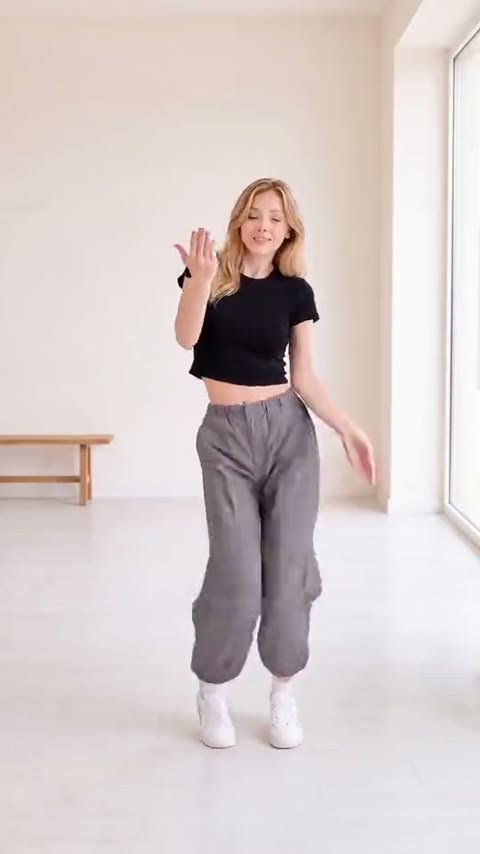
Remake this video570 credits per remakeRecast one dancer in a light-blue cropped shirt through bouncy steps, raised arms and face-framing gestures against a sunlit wall. External source reference; no RemakeWith generation sample is claimed.
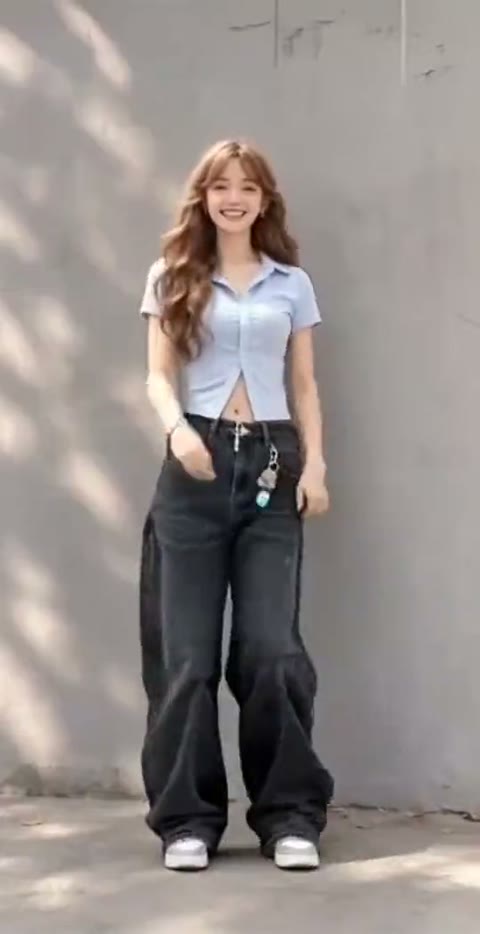
Reference video. Your generated version will vary. Hold your mouse still for 2 seconds to watch the motion.
External reference credited by the source to @ai.lanamoves, supplied through Babydoll Dance / MakeViral. Transferred to RemakeWith R2 at the user's direction; not our generated result.
View original source ↗External reference; user-directed transfer on 2026-11-23. Independent media/model-use license unknown; public availability is not a license.New here? Create an account. No subscription required.
What your inputs controlYour photo guides identity. A frame from the reference video guides clothing, rendering style and lighting for a shared character reference. That prepared character is reused for the video, and the reference video guides movement. Background and scene details can vary; exact face replacement and frame-by-frame matching are not guaranteed.
Recast one dancer in a light-blue cropped shirt through bouncy steps, raised arms and face-framing gestures against a sunlit wall. This is the complete Sunny-wall solo reference,. It is a different performance from the family’s Christmas-tree duo, which has two people and a cat. The source page credits this clip as AI-made. Its sunny wall and everyday clothing remain part of this version; the seasonal title does not imply snow, a tree or Christmas pajamas. The preview is an external source reference credited to @ai.lanamoves; it is not a result generated by RemakeWith. The selected variant is Sunny-wall solo.
Use one clear adult photo showing the face and, ideally, the full body from head to shoes. Keep the arms and legs distinct, both eyes visible, and another person out of the image. Your photo supplies the one solo dancer’s identity; the selected source supplies the blue shirt, jeans, dance sequence, wall and lighting.
Inputs: one uploaded adult identity photo and the complete selected source video. The source supplies movement, timing, outfit, setting and existing edits. A source frame and your photo first prepare one shared character with Seedream 4.5 (3:4, 2K). The video stage uses Kling v4, video-edit, profile revision 0, 720p, video orientation and original-audio setting. The complete source is edited as one segment. The system checks and assembles the result and makes the prepared MP4 available in your task. Exact output framing and completion time are not promised.
Prepare one consistent adult character reference. Image 2 alone supplies identity: preserve the uploaded adult's face, facial features, hair and skin tone. Image 1 is a frame from this template and supplies only the selected character's outfit, outfit colors, rendering style and lighting; never copy its face. Use the target description below only to locate that outfit. Do not take clothes or background from Image 2. Keep the template collar and sleeves. Make one clear head-and-upper-body portrait, visible face and outfit, neutral pose and uncluttered background. Do not make a collage, character sheet, extra person, text, logo or watermark. Target wardrobe locator: the single AI-made long-haired dancer in the light-blue cropped shirt and dark wide-leg jeans against the sunny wall
Edit the complete supplied video, changing only the solo dancer described as: the single AI-made long-haired dancer in the light-blue cropped shirt and dark wide-leg jeans against the sunny wall. Use the prepared character reference for the uploaded adult identity, not the source performer's identity. Keep this one identity across every appearance. 0.00–about 2.0: retain the clear front-facing full-body opening, low open palms and light knee bounces. About 2.0–4.5: preserve the alternating lifted/crossing steps and low hand sweeps. About 4.5–7.5: keep the bent elbows and raised hands, then the single-hand lift beside the head. About 7.5–10.5: retain the chest-level arm sweeps, small steps and hip shifts. About 10.5–12.5: preserve the brief raised/crossed forearms in front of the face and their lowering. About 12.5–14.542: keep the chest-level hand phrase, both open hands framing the face and the final knee bend. These are events within one continuous shot; exact movement timing comes from the complete selected source. Keep One dancer in the light-blue cropped shirt and dark wide-leg jeans, Full-body view including the feet and hanging waist charm, Existing hand gestures, alternating steps and knee bends, Plain sunny wall, ground and dappled shadows. Preserve all other people and props, source shot order, framing, camera changes and original audio. Let actual occlusions remain; do not paint a face through hair, hands or objects. Maintain coherent face, hands and limbs. Add no new shot, person, title, logo or watermark.
0.00–about 2.0: retain the clear front-facing full-body opening, low open palms and light knee bounces. About 2.0–4.5: preserve the alternating lifted/crossing steps and low hand sweeps. About 4.5–7.5: keep the bent elbows and raised hands, then the single-hand lift beside the head. About 7.5–10.5: retain the chest-level arm sweeps, small steps and hip shifts. About 10.5–12.5: preserve the brief raised/crossed forearms in front of the face and their lowering. About 12.5–14.542: keep the chest-level hand phrase, both open hands framing the face and the final knee bend. These are events within one continuous shot; exact movement timing comes from the complete selected source. One long-haired dancer faces the camera with the full body visible. Low outward-facing palms accompany small knee bounces and alternating steps. The elbows lift and bend, one hand rises beside the head, and the forearms cross or sweep across the chest. Near the ending both hands rise beside the face and the knees bend; the same dancer and wall remain in view throughout. The same selected character is edited throughout the complete reference.
Use one clear adult photo showing the face and, ideally, the full body from head to shoes. Keep the arms and legs distinct, both eyes visible, and another person out of the image. Your photo supplies the one solo dancer’s identity; the selected source supplies the blue shirt, jeans, dance sequence, wall and lighting.
Open the creation area and upload the portrait into the labeled role. Check that the selected reference is the version described here.
Read the current credit quote before starting. The automatic workflow prepares one shared character, edits the source-guided sequence, checks it and assembles the MP4.
Check the full result, especially Review fingers beside the cheeks, brief forearm occlusion over the face, hair edges, the hanging waist charm and each foot during lifted/crossing steps. Keep the knees and wide jeans coherent through the ending bend. Download from the saved task when ready.
Check fingers beside the cheeks, forearms crossing the face, hair edges, the hanging waist charm and each lifted or crossing foot. Knees and wide jeans may distort during the ending bend. The template requests the recording attached to the reference, without generating your voice or a new soundtrack. Track identity, music permissions and exact synchronization have not been independently verified; check the sound and relevant rights before sharing. Video editing is experimental. Likeness, anatomy, clothing, props and background details can vary; an exact face match or frame-for-frame copy is not guaranteed. Check the current specifications and credits in the creation area. No fixed completion time is promised. Confirmed technical failures follow the site’s credit-refund handling. A completed result that differs from your preference does not automatically qualify for a refund. Each new generation uses credits again; return to the existing task to review or download it before ordering another. The preview is an external reference, not a RemakeWith-generated result. An independent license for reusing the source media has not been established; attribution alone does not grant reuse rights.
No. This template uses the separate sunny-wall solo variant with one dancer, a light-blue shirt and dark jeans. It has one adult identity slot and no cat.
The selected solo is the complete 14.542-second source. The family’s separate duo uses a different fifteen-second excerpt; its roles and measurements are not used here.
The fixed reference supplies a sunlit plain wall and the blue-shirt outfit. This recipe does not include a snow, background or wardrobe selector.
Read the current credit quote in the creation area before submitting. A confirmed technical failure follows the existing credit-release/refund handling. Visual preference is not a promise of a refund. Starting another generation uses the quote for that new task.
Return to your generation task in the same signed-in account, check the finished video and use its download action. Review the existing task before starting another generation; a download retry does not require a new generation.
Selected reference version, scene description and photo guidance.
Template family and version information for the selected reference.
Return to the creation area to check the selected role, availability and current quote.