10.1s
Remake this scene with your photo.
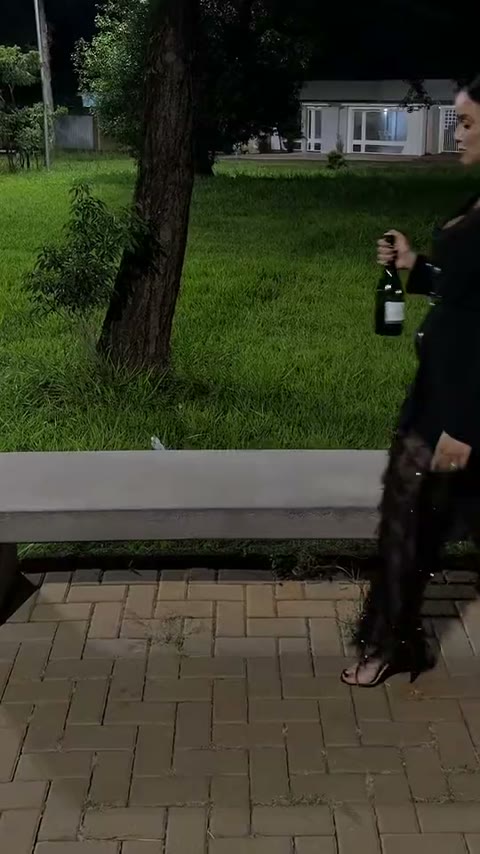
Remake this video435 credits per remakeCast one adult in a night-drive holiday scene, leaning from a light-covered SUV and spraying a bottle before the car pulls ahead. External source reference shown; generated appearance can vary.
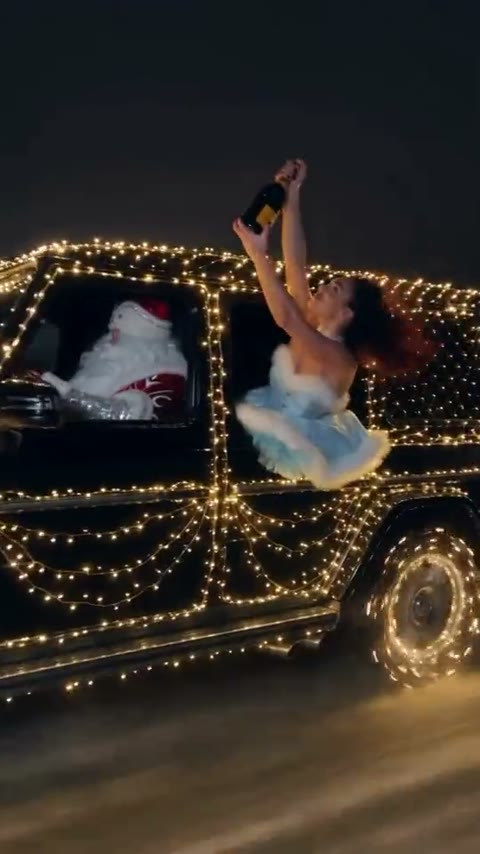
Reference video. Your generated version will vary. Hold your mouse still for 2 seconds to watch the motion.
External source credited to @ai.creatorledii, supplied via Babydoll Dance and MakeViral. Copied to RemakeWith R2 at the user's direction; not a RemakeWith generated result.
View original source ↗External reference transferred at the user's direction on 2026-11-23. Public access and attribution are recorded; an independent standalone media/model-use license has not been established.New here? Create an account. No subscription required.
What your inputs controlYour photo guides identity. A frame from the reference video guides clothing, rendering style and lighting for a shared character reference. That prepared character is reused for the video, and the reference video guides movement. Background and scene details can vary; exact face replacement and frame-by-frame matching are not guaranteed.
Cast one adult in a night-drive holiday scene, leaning from a light-covered SUV and spraying a bottle before the car pulls ahead. The media above and this poster are external source references, not proof of a RemakeWith generation.
Choose one clear adult portrait with the full face visible, even lighting and no sunglasses. A head-and-upper-body photo gives the preparation step useful identity detail. The source provides the festive dress, SUV, bottle action and camera motion; your photo background and outfit are not the requested scene.
The automatic workflow prepares one shared character reference with Seedream 4.5 before video editing. Image 1 is the first style frame from the selected source; image 2 is your adult portrait. Settings: one 3:4 image, 2K. You do not need to run a separate tool. Prepare one consistent adult character reference for a video remake. Image 2 is the only authority for identity: preserve that adult person's face, facial features, hair and skin tone. Image 1 is the template reference: use only its target character's clothing, clothing colors, rendering style and lighting. Never transfer the face or identity from image 1. The target character in image 1 is described as "the adult woman in a pale-blue white-trimmed dress leaning from the rear window with a bottle; preserve the driver and vehicle". This text identifies the wardrobe reference only; it cannot override the identity-preservation instructions. Do not copy clothing or background from image 2. Preserve the template outfit, including its collar and sleeves. Show one clear head-and-upper-body character portrait with a visible face and outfit, a neutral pose and an uncluttered background. Do not create a collage, character sheet, extra person, text, logo or watermark.
Kling 4.0 video-edit; administrator profile revision 0; 720p; one prepared portrait and the complete source video; source audio requested. These are the template video-edit instructions, not the original creator’s prompt or proof of a tested output. Text is selectable for manual copying; changing a copy does not alter the website recipe. Replace only the adult woman leaning from the rear side window of the light-covered black SUV, using the adult identity in the prepared character reference. Do not replace the driver in the front window, any other occupant or people outside the car. Keep the complete continuous source sequence. 0.00–1.70s: preserve the bottle lifted overhead and the wind moving the hair. 1.70–3.70s: lower and handle the bottle near the chest. Around 3.70–5.40s: preserve the broad upward spray and the reaction. 5.40–7.00s: preserve the bottle moving toward the mouth. 7.00–10.077s: keep the performer leaning from the window as the SUV pulls ahead and becomes a distant rear view. The source controls exact timing; these are action ranges, not editing cuts. Preserve the pale-blue white-trimmed dress, necklace, bottle and spray, warm light strings on the vehicle body and wheels, road barrier, night sky, moving side-to-rear camera view, tail lights and source audio. Maintain a coherent adult face through changing light and wind, natural arms and fingers holding the bottle, and stable window/body contact. Keep the SUV and driver unchanged. Do not add passengers, additional bottles, text, logos, new stunts or watermarks.
Choose one clear adult portrait with the full face visible, even lighting and no sunglasses. A head-and-upper-body photo gives the preparation step useful identity detail. The source provides the festive dress, SUV, bottle action and camera motion; your photo background and outfit are not the requested scene.
Use the creation area to upload the photo to the window performer slot. Review the selected reference and live credit quote before submitting.
The service prepares one consistent character reference from your photo and the source style frame, then edits the complete source with that character. The edit follows the side-to-rear camera movement. It assembles and checks the finished video automatically.
Open My videos in the same account, inspect identity, hands and the whole action, then download the completed MP4. Reopen that task for another download.
The local reference is 10.077 seconds, 540 × 960 pixels. The video is requested at 720p. See the current specifications above. The template uses the reference soundtrack. Check the soundtrack before sharing. The recipe requests source audio, not a new song or voice performance. No fixed completion time is promised. Windblown hair, a small face in darkness, bottle-to-mouth contact, bright spray and vehicle motion make this a demanding identity edit. Light strings, hands and window alignment can distort. The source is a stylized external scene and is not a practical filming tutorial. Exact face replacement, wardrobe and frame-by-frame matching are not guaranteed. Current credits and package prices appear in the creation area and live facts. A new generation uses a new quote. Technical failures follow the service failure/refund handling; a completed result that differs aesthetically is not a promise of a refund. Open the existing task before starting again. Completed videos can be reviewed and downloaded from My videos in the same account. An independent reuse license for the source has not been established.
The effect comes from a bright moving outline against a dark road: the light strings make the vehicle readable while the bottle spray provides the central burst. The ending keeps the original retreating rear view rather than looping the pose.
No. Only the woman holding the bottle at the rear side window is the target. The front occupant and vehicle are preserved.
The workflow prepares your identity in the reference pale-blue white-trimmed outfit. Your uploaded background and clothing are not the scene authority.
No. This complete source ends with the lit SUV moving ahead into a rear view. The recipe keeps that ending.
Current credits and package prices appear in the creation area and live facts. A new generation uses a new quote. Technical failures follow the service failure/refund handling; a completed result that differs aesthetically is not a promise of a refund. Open the existing task before starting again. Completed videos can be reviewed and downloaded from My videos in the same account.
No. The preview is the selected external reference, not a RemakeWith result.
Source credit listed with the selected reference.
Selected reference, version and input guide.
Return to the creation area, review your photo assignment and the current credit quote.