10.1s
Remake this scene with your photo.
Remake this video234 credits per remakeRecast one performer through a cream scarf sweep and a turn beneath colored fireworks in the complete short reference. The preview is an external source reference.
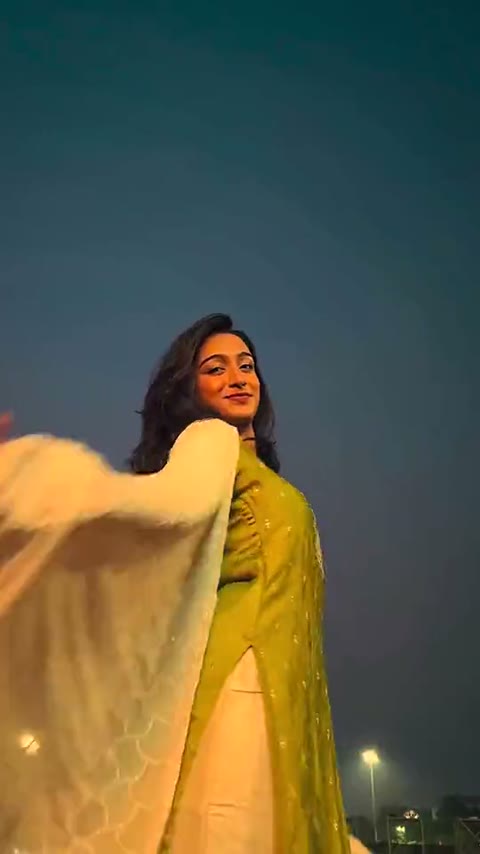
Reference video. Your generated version will vary. Hold your mouse still for 2 seconds to watch the motion.
External source credited to @curiousrakhi; supplied via Babydoll Dance / MakeViral. Copied to RemakeWith R2 at the user's instruction; not a RemakeWith generated result.
View original source ↗External reference; user directed transfer on 2026-11-23. Public access and attribution recorded; independent standalone media/model-use permission has not been established.New here? Create an account. No subscription required.
What your inputs controlYour photo guides identity. A frame from the reference video guides clothing, rendering style and lighting for a shared character reference. That prepared character is reused for the video, and the reference video guides movement. Background and scene details can vary; exact face replacement and frame-by-frame matching are not guaranteed.
One performer in a green outfit and cream dupatta sweeps the cloth across the camera. The scene reveals a fireworks-filled sky, then the performer turns away and looks back beneath pink, white and green bursts. The complete reference is 4.667 seconds. The cloth acts as the transition cover between the quieter opening and the bright festival reveal. It suits a festive outfit post. This selected creator-tutorial reference has one performer; no separate rooftop couple or custom fireworks editor is connected.
Choose a sharp adult portrait with the whole face, hairline and shoulders visible. Avoid face-covering fabric or sunglasses in the input. The reference turns away and returns in profile, so check hair continuity as well as the face. The uploaded adult photo supplies identity. The complete source supplies the motion, timing, scene and reference clothing. A source style frame and the photo prepare one character within your order; that accepted character is reused for the full edit. The scarf, fireworks, smoke and low skyline stay source context. There is no second person role. There is one adult identity slot, with no pet or additional-person input in this recipe.
Automatic preparation: Seedream 4.5 image-edit, 3:4 character portrait, 2K. Image 1 is the source style frame; image 2 is your adult identity photo. This is the preparation text for the selected role. Select the text to copy it. Prepare one consistent adult character reference for a video remake. Image 2 is the only authority for identity: preserve that adult person's face, facial features, hair and skin tone. Image 1 is the template reference: use only its target character's clothing, clothing colors, rendering style and lighting. Never transfer the face or identity from image 1. The target character in image 1 is described as "the single long-haired adult in the green outfit and cream dupatta who sweeps the scarf and turns beneath the fireworks". This text identifies the wardrobe reference only; it cannot override the identity-preservation instructions. Do not copy clothing or background from image 2. Preserve the template outfit, including its collar and sleeves. Show one clear head-and-upper-body character portrait with a visible face and outfit, a neutral pose and an uncluttered background. Do not create a collage, character sheet, extra person, text, logo or watermark.
Recipe route: Kling 4.0 video-edit, profile revision 0, requested 720p, framing from the video and source audio. Inputs: this exact complete source and the prepared adult character. The full clip is one generate segment, preserving its existing edits; the shot notes below are observation, not additional generation calls. The text below includes the provider identity wrapper. Select it to copy; changing a copied prompt does not change a RemakeWith order. Edit @Video1. Use the adult person's identity from @Image1 for the person described as "the single long-haired adult in the green outfit and cream dupatta who sweeps the scarf and turns beneath the fireworks" in @Video1. Keep each identity distinct. Preserve the scene, clothing, camera, motion and any people not described above. Replace only the single adult performer throughout this complete 4.666667-second source. Use the prepared adult character for the uploaded photo identity and retain the same person through the scarf occlusion and turn. 0–1.083333 seconds: preserve the front three-quarter pose in the green outfit and the cream dupatta sweeping across the lens against the blue evening sky. 1.083333–2.541667 seconds: preserve the scarf-led reveal to the pink and gold fireworks background while the performer turns away from the camera. 2.541667–4.666667 seconds: preserve the continuing rear and returning-profile view beneath bright white, pink and green bursts, ending with the performer looking back. Follow the precise timing and source transitions; do not add a new rooftop scene, partner or longer fireworks sequence. Preserve the green outfit, pale scarf, hair motion, arm movement, source framing, low viewpoint, buildings along the lower edge, fireworks and smoke. Keep natural scarf-to-hand contact without fusing fabric to fingers, arms or face. Maintain one body and consistent identity when the face reappears; respect the back-of-head views rather than forcing the face toward the camera. Preserve the source audio. Add no text, logo, extra person, firework shape or watermark. The source controls the effects and motion; the uploaded photo remains the identity authority.
0–1.083 s: front/three-quarter performer with the scarf moving toward and across the lens. 1.083–2.542 s: the fireworks scene is revealed behind the passing scarf; the lead turns away. 2.542–4.667 s: brighter fireworks continuation and returning head turn. The saved recipe edits the complete clip in one call and preserves these source changes. The source guides the motion and timing.
Choose a sharp adult portrait with the whole face, hairline and shoulders visible. Avoid face-covering fabric or sunglasses in the input. The reference turns away and returns in profile, so check hair continuity as well as the face.
Use the single-performer Creator tutorial reference credited to @curiousrakhi. It contains the full scarf-and-fireworks clip, without padding it to a different advertised duration. The preview is external reference material.
Use the template create area, assign your photo to the labeled role, and review the current credit quote before submitting.
The order combines your identity photo and a source style frame, checks the character reference and reuses it through the complete video edit. You do not need to make an extra image in a separate tool.
Open My videos and check fabric edges, scarf-to-hand contact, hair through the back view and the face returning under bright fireworks. Configured visual checks and bounded repair handling follow the saved order policy.
Return to the same task to review and download. Check the prepared audio before posting; no fresh generation is needed just to retry a completed download.
Fabric occlusion and strong colored flashes can blur identity or merge the scarf with an arm. Firework patterns and smoke are requested from the source and may change. The short file does not provide a separate partner slot, new costume selector or a design-your-own fireworks display. The template uses the reference soundtrack. This recipe requests its existing audio; no personal voice, new song or exact lyric synchronization is generated. Review the sound and any music permissions before sharing. The route is experimental video editing. Identity, hands, wardrobe, backgrounds and existing text can change. No precise likeness or frame-for-frame match is guaranteed. A confirmed technical failure follows the site's credit refund handling; visual dissatisfaction alone is not a promise of a refund. A fresh generation uses the current quoted credits. Review the existing task and download before starting another order. No reliable completion-time promise is available. This is an external reference with the credited source below. Its independent media/model-use license remains unverified.
No. This exact reference has one performer and one adult photo role, with the complete scarf sweep and fireworks turn.
No. Character preparation uses your photo for identity and the source frame for outfit, rendering style and light. Clothing details can still vary in the result.
The scarf hides the face and the performer turns away. The returning profile reveals whether the same identity and hair survived the transition.
This recipe follows the existing bursts and smoke. There is no connected fireworks-text or display-design control.
Read the current credits in the create area before ordering. A new generation is a new paid task. Confirmed technical failures follow the site’s credit refund handling; this does not promise a refund for every appearance difference.
Return to My videos in the same signed-in account, open the task and inspect the full result before downloading the MP4. Check the face, fabric edges, scarf-to-hand contact, hair through the back view and the face returning under bright fireworks. An existing completed download does not require submitting a fresh generation.
Selected reference, version and input guide.
Source credit listed with the selected reference.
Return to the create area to review the selected reference, photo role and current credits.