14.2s
Remake this scene with your photo.
Remake this video234 credits per remakePut one adult identity in the final coffee close-up of a silent five-second skyline-to-sidewalk flight through a Manhattan-style city scene. The preview is an external source reference.
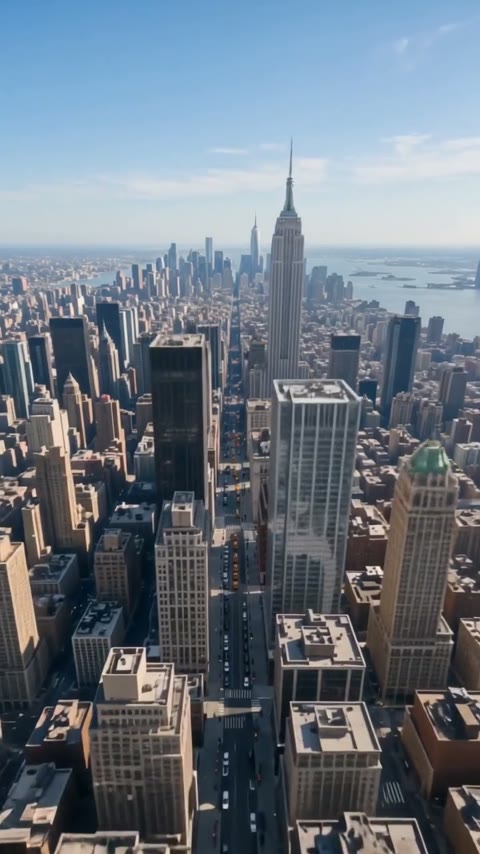
Reference video. Your generated version will vary. Hold your mouse still for 2 seconds to watch the motion.
External source reference credited to External source reference, supplied via Babydoll Dance and MakeViral. Transferred to RemakeWith R2 at the user's direction; not a RemakeWith generated result.
View original source ↗External reference transferred at user direction on 2026-11-23. Public access and attribution are recorded; a standalone license for media/model use has not been established.New here? Create an account. No subscription required.
What your inputs controlYour photo guides identity. A frame from the reference video guides clothing, rendering style and lighting for a shared character reference. That prepared character is reused for the video, and the reference video guides movement. Background and scene details can vary; exact face replacement and frame-by-frame matching are not guaranteed.
Put one adult identity in the final coffee close-up of a silent five-second skyline-to-sidewalk flight through a Manhattan-style city scene. The reveal comes from scale: a wide aerial city view becomes a fast descent between tall buildings, then a close encounter with one coffee drinker. The skyline supplies the spectacle while the identity appears near the end. This is an external cinematic reference, not proof of a real drone flight or a generated RemakeWith result. The preview is the credited external source, not a generated result from RemakeWith. No reviewed generated example is presented here.
Upload one clear adult portrait for coffee drinker. Show an unobstructed face, hairline and upper body in sharp, even light; use one person without a mask, heavy filter or sunglasses. The portrait supplies identity. The complete source supplies motion, timing, framing, wardrobe, props and setting. The prepared portrait combines that identity with the source outfit; you do not need to make a separate reference yourself. Target: the adult in the bright blue jacket over a white shirt holding a paper coffee cup in the final sidewalk approach. Preserve pedestrians. Preserve the skyline, building geometry, avenue, yellow taxis, stone sidewalk facade, pedestrians, paper cup, blue jacket and continuous descending camera path. The portrait is not a wardrobe or background replacement input. The identity is small until the final approach. Keep pedestrians unchanged, preserve the cup through its overlap with the mouth, and inspect the face after the cup lowers. Fast building motion can distort edges.
Automatic character preparation: Seedream 4.5 image-edit, one 3:4 image at 2K. Image 1 is the last frame of the selected video segment; Image 2 is your uploaded adult portrait. The prepared character is reused within your order. Select and copy the complete instructions below. Prepare one consistent adult character reference for a video remake. Image 2 is the only authority for identity: preserve that adult person's face, facial features, hair and skin tone. Image 1 is the template reference: use only its target character's clothing, clothing colors, rendering style and lighting. Never transfer the face or identity from image 1. The target character in image 1 is described as "the adult in the bright blue jacket over a white shirt holding a paper coffee cup in the final sidewalk approach". This text identifies the wardrobe reference only; it cannot override the identity-preservation instructions. Do not copy clothing or background from image 2. Preserve the template outfit, including its collar and sleeves. Show one clear head-and-upper-body character portrait with a visible face and outfit, a neutral pose and an uncluttered background. Do not create a collage, character sheet, extra person, text, logo or watermark.
Model: Kling 4.0; operation: video-edit. Settings: 720p, source framing and the reference’s silence. Inputs: the selected reference video and the prepared adult character image. The edit follows the complete selected reference and its existing scene sequence. Select and copy the complete instructions below; editing a copy does not change an order. Edit the complete supplied source video. The identity-replacement target is the adult in the bright blue jacket over a white shirt holding a paper coffee cup in the final sidewalk approach. Use the adult identity from the prepared character reference for this target only; the original uploaded portrait remains the identity authority. Do not assign this identity to any other person. Preserve pedestrians. 0.00–1.00: the view begins high above a dense city skyline and advances toward the buildings. 1.00–2.50: it descends into an avenue, moving toward the yellow taxis. 2.50–3.50: the camera veers toward the sidewalk and approaches the adult in the bright blue jacket. 3.50–5.00: the shot settles into a close view as that adult raises the paper cup to drink, lowers it and looks toward the camera. These ranges describe observed action beats, not new editing cuts; the source controls exact timing. Preserve the skyline, building geometry, avenue, yellow taxis, stone sidewalk facade, pedestrians, paper cup, blue jacket and continuous descending camera path. Keep the source bright blue jacket over a white shirt, dark trousers and pale shoes. Maintain one coherent target identity through turns, occlusion and fast movement, natural hands, continuous limbs and the original shot timing. The identity is small until the final approach. Keep pedestrians unchanged, preserve the cup through its overlap with the mouth, and inspect the face after the cup lowers. Fast building motion can distort edges. The source has no audio stream: preserve silence; do not synthesize speech, music, wind or street sound. Add no person, new shot, logo, title or watermark.
0.00–1.00: the view begins high above a dense city skyline and advances toward the buildings. 1.00–2.50: it descends into an avenue, moving toward the yellow taxis. 2.50–3.50: the camera veers toward the sidewalk and approaches the adult in the bright blue jacket. 3.50–5.00: the shot settles into a close view as that adult raises the paper cup to drink, lowers it and looks toward the camera. The camera follows one continuous simulated flight. The selected adult first appears late, so automatic character preparation must use the final source frame. The execution recipe uses one complete-source edit covering 0–5 seconds, preserving existing source transitions.
Compare the full Silent skyline-to-coffee shot source and confirm the target: the adult in the bright blue jacket over a white shirt holding a paper coffee cup in the final sidewalk approach. Preserve pedestrians.
Use your own adult photo or an adult who agreed to appear. Assign it to the single labeled role in the create area.
Check the reference, photo assignment and live credit quote before submitting. The credit pack price is separate from the cost of this video.
The order prepares a unified character reference, edits the source, then assembles and checks the result. Return to My videos in the same account to follow it.
The identity is small until the final approach. Keep pedestrians unchanged, preserve the cup through its overlap with the mouth, and inspect the face after the cup lowers. Fast building motion can distort edges. Review the complete video and audio before downloading the available MP4 from the task.
The lead appears only near the end of the fast camera approach. Check the face after the cup lowers, fingers around the cup and the cup’s overlap with the mouth. Fast building motion may distort edges or signs. This reference is silent. The template requests no new speech, music, street or wind sound. You can add separately licensed audio in your posting editor. Video editing is experimental. Likeness, anatomy, clothing, props and background details can vary; an exact face match or frame-for-frame copy is not guaranteed. Check the current specifications and credits in the creation area. No fixed completion time is promised. Confirmed technical failures follow the site’s credit-refund handling. A completed result that differs from your preference does not automatically qualify for a refund. Each new generation uses credits again; return to the existing task to review or download it before ordering another. The preview is an external reference, not a RemakeWith-generated result. An independent license for reusing the source media has not been established; attribution alone does not grant reuse rights.
The selected five-second file has no audio stream. The recipe preserves silence instead of inventing wind, traffic or music. You can add sound separately after downloading.
This is an identity edit of the selected source. The skyline, route, blue jacket and paper cup come from that file; it is not a city-route or product editor.
The target enters during the final sidewalk approach and becomes clear near the end. The opening skyline does not receive a face or a second identity.
The identity is small until the final approach. Keep pedestrians unchanged, preserve the cup through its overlap with the mouth, and inspect the face after the cup lowers. Fast building motion can distort edges. Compare the uploaded portrait with visible face angles in the finished result. A clearer photo may help a new attempt, but the reference shown is not evidence of a successful identity edit.
Review the live credit quote before creating. A separately submitted generation can use credits again. Open the current task first; rechecking or downloading it is different from starting another generation.
Return to My videos in the same signed-in account, open this task, inspect the complete result and use its available download. If it is still processing or failed, follow the status shown there.
Template family and version information for the selected reference.
Selected reference version, scene description and photo guidance.
Return to the create area to check the portrait role and current charge.