14.2s
Remake this scene with your photo.
Remake this video570 credits per remakeRecast the designated foreground traveler in the complete 15-second Switzerland working montage, preserving low-poly mountains, activity shots, captions and source scenery. External reference.
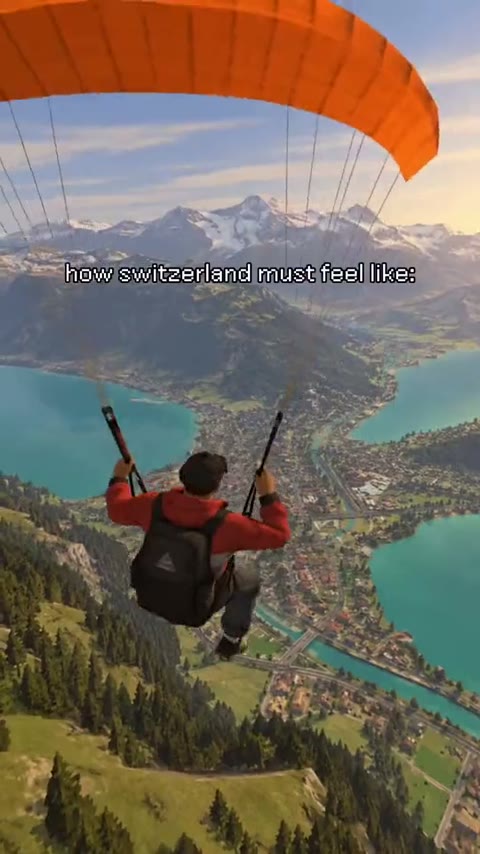
Reference video. Your generated version will vary. Hold your mouse still for 2 seconds to watch the motion.
External source reference credited to @byhato_, supplied via Babydoll Dance / MakeViral. User-directed transfer on 2026-11-23; not a RemakeWith generated result.
View original source ↗External reference copied at the user's direction on 2026-11-23. Attribution and public access are recorded; a separate media/model-use license has not been established.New here? Create an account. No subscription required.
What your inputs controlYour photo guides identity. A frame from the reference video guides clothing, rendering style and lighting for a shared character reference. That prepared character is reused for the video, and the reference video guides movement. Background and scene details can vary; exact face replacement and frame-by-frame matching are not guaranteed.
An orange paraglider opens a Switzerland montage of chalet seating, a yacht, a lounge, skiing, a waterfall balcony, an aircraft, cycling and snowmobiles. One adult photo maps the designated nearest traveler where visible. Scenery inserts and supporting travelers stay in their source roles. This is an external source reference. It is not a RemakeWith-generated result.
Use one clear adult portrait with face and hairline visible. Low-poly graphics, helmets, rear-facing poses and distant figures limit visible likeness, so a sharp photo does not guarantee recognizable facial detail in every shot. Upload one clear consenting adult identity photo, with one person and an unobstructed face. The photo supplies identity; the exact source clip supplies action, wardrobe, scenery, edit timing and visual treatment. Other people and props stay in their source roles. This entry has one identity slot and no pet, multi-person, object or background editor. One consistent character is prepared from your photo and a source style frame, checked, then reused within this order.
Automatic character preparation: Seedream 4.5 image-edit, one 3:4 image at 2K. Image 1 is the selected source style frame; Image 2 is your uploaded adult portrait. The prepared character is reused within your order. Select and copy the complete instructions below. Prepare one consistent adult character reference for a video remake. Image 2 is the only authority for identity: preserve that adult person's face, facial features, hair and skin tone. Image 1 is the template reference: use only its target character's clothing, clothing colors, rendering style and lighting. Never transfer the face or identity from image 1. The target character in image 1 is described as "nearest traveler in paraglider, chalet/balcony, ski, bicycle and snowmobile shots; preserve companions, yacht passengers and interior guests". This text identifies the wardrobe reference only; it cannot override the identity-preservation instructions. Do not copy clothing or background from image 2. Preserve the template outfit, including its collar and sleeves. Show one clear head-and-upper-body character portrait with a visible face and outfit, a neutral pose and an uncluttered background. Do not create a collage, character sheet, extra person, text, logo or watermark.
Model: Kling 4.0; operation: video-edit. Settings: 720p, source framing and the reference’s original recording. Inputs: the selected reference video and the prepared adult character image. The edit follows the complete selected reference and its existing scene sequence. Select and copy the complete instructions below; editing a copy does not change an order. Edit @Video1. Use the adult person's identity from @Image1 for the person described as "nearest traveler in paraglider, chalet/balcony, ski, bicycle and snowmobile shots; preserve companions, yacht passengers and interior guests" in @Video1. Keep each identity distinct. Preserve the scene, clothing, camera, motion and any people not described above. Use the prepared adult character only for the designated nearest foreground traveler where visible in this complete Switzerland PS2-style montage. Preserve its low-poly early-console rendering, source clothes for each activity, locations, cut order and existing captions. Keep companions and background people distinct; do not replace every face. 0–1.958s: follow the rear-facing red-jacketed paraglider beneath the orange canopy. 1.958–4s: map only the nearest chalet traveler in the yellow-and-dark outfit at the foreground bench, preserving the other ski guests. 4–6.417s: retain the yacht, lake, dock and passengers as a scenery insert without assigning a new lead. 6.417–7.875s: preserve the interior lounge, balcony view and guests as scenery. 7.875–9.667s: follow only the closest red-jacketed skier; distant skiers stay unchanged. 9.667–11.167s: map only the nearest balcony traveler in a dark top and light trousers, preserving other guests and the waterfall valley. 11.167–12.083s: retain the aircraft landing scene unchanged in meaning; no portrait is assigned to the aircraft. 12.083–13.625s: follow only the nearest mountain cyclist in the dark top; leave the cyclist ahead unchanged. 13.625–15s: follow only the nearest snowmobile rider, preserving the rider ahead. Keep one mapped identity across the designated travel shots, including rear and distant views, while retaining source helmets, safety gear and activity wardrobe. Let source perspective obscure the face where it is naturally hidden; do not invent front-facing faces on backs or helmets. Preserve mountains, snow, buildings, vehicles, original overlays and audio. Do not create a different destination, photorealistic restyle, new gameplay, extra people, shots, logos or watermark.
0–1.958s paraglider; 1.958–4s chalet; 4–6.417s yacht; 6.417–7.875s interior lounge; 7.875–9.667s skier; 9.667–11.167s waterfall balcony; 11.167–12.083s aircraft; 12.083–13.625s cyclists; 13.625–15s snowmobile. Nine real source shots remain in one full edit request. Only designated foreground traveler views receive identity guidance; yacht passengers, lounge guests, secondary travelers and aircraft are preserved as scene context. The reference supplies the movement and transitions.
Use one clear adult portrait with face and hairline visible. Low-poly graphics, helmets, rear-facing poses and distant figures limit visible likeness, so a sharp photo does not guarantee recognizable facial detail in every shot.
Open the creation area, sign in, and upload the one intended adult photo to the named role.
Review the source reference, photo assignment and credit quote before submitting. The current quote and available credit packs are shown by the site.
The order prepares and checks a common character reference, then edits the full source with that character. Any saved source cuts remain within the complete edit; no identity image is shared between customers.
Use My Remakes to check progress or resume viewing an existing task. When a completed result is available, inspect the whole video and download it.
The template uses the reference’s existing audio. Track identity and synchronization have not been independently verified. It does not generate new speech or clone your voice. Expect weak facial visibility in rear-facing, helmeted and low-poly shots. Inspect the nearest traveler separately from companions, and keep the city caption and scene order intact. This is not a still-image filter, free-text destination generator or playable game. This video-editing method is experimental. Appearance, anatomy, props, scene details and edit timing can change. Exact likeness, frame-for-frame matches, delivery time and success rate are unverified. A confirmed technical failure follows the site’s credit-refund process. A held task remains under review. Differences in a completed result do not automatically qualify for a refund. Each new generation uses the current quoted credits; check the existing task before starting again.
The blocky figures, simplified textures and scenic cuts give the supplied montage its early-console look. This selected file is the first 15 seconds of the archived Switzerland source. Bangkok is a separate recorded reference; writing another city name in a copied prompt does not switch this recipe.
This recipe uses the exact Switzerland reference. It has no free-text destination control or automatic city replacement.
No. Only the designated nearest foreground traveler is mapped in activity views. Background guests, yacht passengers, secondary cyclists and scenery stay unchanged.
The source uses low-poly graphics, small distant people, rear-facing poses and helmets. Those source views do not provide clear front-facing likeness in every shot.
It produces a video task based on this montage. It does not provide a separate still-image filter, playable level or game export.
The selected working file is exactly 15 seconds. Additional material outside this archived excerpt is not part of the recipe.
No. It is the credited external source reference. It is not a RemakeWith-generated example.
Read the current credit quote in the creation area before ordering. Use My Remakes to return to the existing task and download an available completed result. A new order is charged again.
Reference version, photo guidance and scene description.
Reference version and scene context supplied by MakeViral.
Return to the creation area to check the identity role and current quote.