10.1s
Remake this scene with your photo.
Remake this video469 credits per remakeRecast the solo adult who releases a party popper, approaches through confetti, gestures near the camera and finishes laughing. The preview is an external source reference.
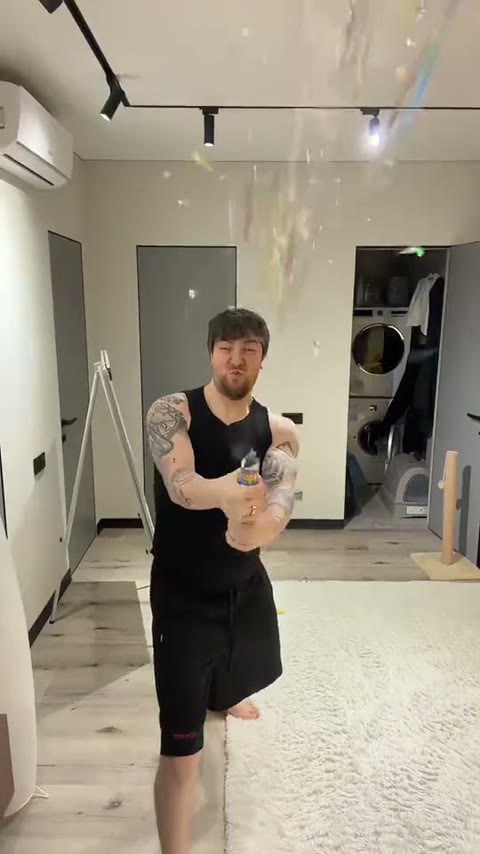
A tattooed adult in a black sleeveless top starts farther down a bright hallway, points a party popper forward and releases confetti. The adult approaches the camera, follows the existing mouth movements, gestures beside the eyes, then laughs and steps back with hands toward the face. The effect combines a simple pop-and-approach sequence with a close reaction. It suits a celebration entrance or a small-win caption. The template retains the reference’s existing audio; it does not create a new sung performance.
Use one adult identity for the hallway lead. The popper and confetti are part of the reference.
Reference video. Your generated version will vary. Hold your mouse still for 2 seconds to watch the motion.
External source reference credited by the source to @vladragovsky., supplied through Babydoll Dance and MakeViral. Transferred at the user's instruction; not a RemakeWith generated result.
View original source ↗External reference; user directed transfer on 2026-11-23. Public access and attribution are recorded; an independent standalone media/model-use license has not been established.New here? Create an account. No subscription required.
What your inputs controlYour photo guides identity. A frame from the reference video guides clothing, rendering style and lighting for a shared character reference. That prepared character is reused for the video, and the reference video guides movement. Background and scene details can vary; exact face replacement and frame-by-frame matching are not guaranteed.
Choose one sharp adult portrait with an unobstructed face and enough upper body to support the opening. The face changes from small at the start to a close-up within seconds, so use even light and keep both eyes visible. The black top, shorts, hallway, tattoos, popper and confetti are source details. You do not need a celebration background or a photo holding a popper. The uploaded photo supplies one adult identity. The source supplies the action, clothing, scene, framing and timing described here. One prepared character is reused within the order; the original uploaded photo remains the identity authority. This recipe has one identity slot.
Automatic character preparation: Seedream 4.5 image-edit, one 3:4 image at 2K. Image 1 is the selected source style frame; Image 2 is your uploaded adult portrait. The prepared character is reused within your order. Select and copy the complete instructions below. Prepare one consistent adult character reference for a video remake. Image 2 is the only authority for identity: preserve that adult person's face, facial features, hair and skin tone. Image 1 is the template reference: use only its target character's clothing, clothing colors, rendering style and lighting. Never transfer the face or identity from image 1. The target character in image 1 is described as "the single tattooed adult in a black sleeveless top and black shorts holding the party popper and approaching the camera". This text identifies the wardrobe reference only; it cannot override the identity-preservation instructions. Do not copy clothing or background from image 2. Preserve the template outfit, including its collar and sleeves. Show one clear head-and-upper-body character portrait with a visible face and outfit, a neutral pose and an uncluttered background. Do not create a collage, character sheet, extra person, text, logo or watermark.
Model: Kling 4.0; operation: video-edit. Settings: 720p, source framing and the reference’s original recording. Inputs: the selected reference video and the prepared adult character image. The edit follows the complete selected reference and its existing scene sequence. Select and copy the complete instructions below; editing a copy does not change an order. Edit @Video1. Use the adult person's identity from @Image1 for the person described as "the single tattooed adult in a black sleeveless top and black shorts holding the party popper and approaching the camera" in @Video1. Keep each identity distinct. Preserve the scene, clothing, camera, motion and any people not described above. Replace only the single adult hallway performer in the black sleeveless top and black shorts with the prepared adult identity. Keep an adult human body, the source wardrobe and the same continuous performance. Preserve the full uncut sequence: the adult starts farther down the hallway with the party popper aimed forward, releases confetti, then quickly approaches the camera. Retain the close-up smile and existing mouth movements beneath falling confetti, the hands and fingers gesturing beside the eyes, the popper tube moving near the face, the laughing reaction, then the retreat and hands covering the face near the end. Follow the source order and precise action timing; do not substitute a different celebration or invent a separate close-up cut. Keep the selected adult identity coherent as the face grows larger, turns and becomes partly covered by hands or confetti. Preserve natural hands holding the popper and gesturing, tattoo placement as source styling, black sleeveless top, shorts, rug, pale walls, wooden floor, ceiling tracks, doorway and laundry appliances. Keep confetti in front of and behind the head without fusing pieces into the eyes or mouth. Preserve source framing, total duration, camera viewpoint and original audio. Do not generate a new song, personal singing voice, additional performer, caption, logo, new popper explosion or camera shot. Do not draw an exposed face through the hands at the ending.
Use a sharp adult head-and-shoulders or waist-up photo, without hands or accessories covering the face.
The selected hallway video is one uncut sequence of about 11.052 seconds. Its source hook and gestures remain fixed.
Return to the creation area, assign your photo and check the current credit quote before submitting. The source video is already part of this template.
The order prepares and checks a character from your photo and the source style frame. The accepted character is reused for the complete edit. The saved generation plan and configured checks govern the result.
Follow the task in My Remakes. Download an available completed result and check popper hands, face beneath confetti, fingers beside the eyes and the final hands-to-face occlusion. A download retry does not require a new generation order.
0.000000–11.051995s: Uncut pop, approach and reaction. The adult releases a party popper while distant, moves into a close facial view beneath falling confetti, gestures near the eyes with both hands, smiles and laughs, then steps back and brings the hands over the face. The approach, close-up and retreat happen within one continuous shot.
The template uses the reference’s existing sound, without synthesizing your voice. Track identity and synchronization have not been independently verified. Confetti can obscure identity or become face artifacts. Hands around the popper and near the eyes may merge; teeth and laughing mouth movement may distort. No custom song or new celebration action is provided, and exact lip synchronization is not guaranteed. Identity, lettering, timing and delivery time can vary. A confirmed technical failure follows the site’s credit-refund process. A held task remains under review. Differences in a completed result do not automatically qualify for a refund. Each new generation uses the current quoted credits; check the existing task before starting again.
No. The reference provides the prop, confetti and performance. Your adult portrait supplies identity.
This recipe follows the source mouth movement and requests its existing audio. It does not have a replacement song or voice input.
The selected source is an uncut hallway performance. The adult approaches the camera and later retreats; that motion creates the changing size.
Check both eyes, mouth, face outline and the fingers near the eyes, then the final hands-to-face occlusion. The face should not be drawn through opaque hands or confetti.
Read the current credit quote in the creation area before placing an order. Use My Remakes to return to an existing task and download an available completed result. A new generation order is charged separately.
No. It is an attributed external reference. It is not a RemakeWith-generated example.
Creator attribution supplied with the external reference. A separate reuse license has not been verified.
Reference version and scene context supplied by MakeViral.
Reference version, photo guidance and scene description.
Reference version and scene context supplied by MakeViral.
Return to the creation area to review the required photo and the current credit quote. This link does not submit a task.