15s
Remake this scene with your photo.
Remake this video267 credits per remakeRecast the solo selfie reaction from a restrained opening to the wide-eyed close-up, retaining the real jump cut and rapid final head turn. External reference.
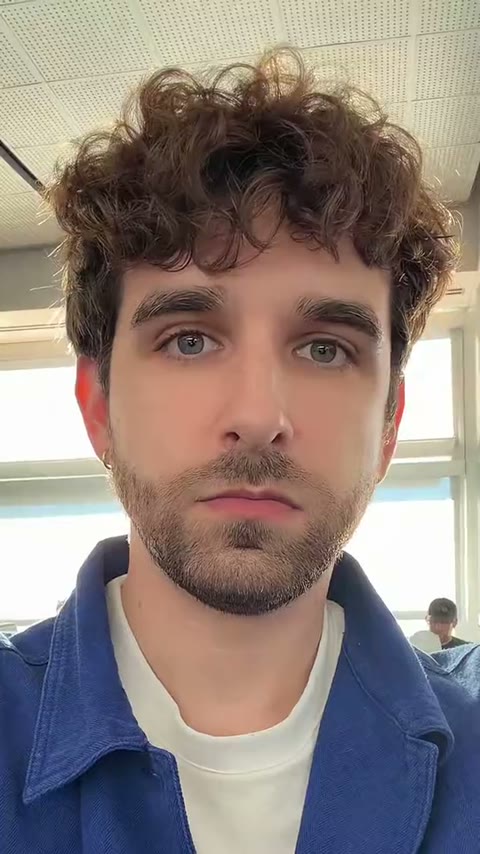
A curly-haired adult in a blue overshirt holds a restrained frontal expression in a bright room. A jump cut moves much closer to the side of the face. The eyes widen, the jaw drops and the head turns rapidly back toward the camera for the ending. This selected solo reference uses the Quesadilla reaction format associated by the source with a song fragment. The recognizable visual contrast is the quiet opening against the sudden close-up expression. It follows the existing mouth motion and does not provide a new lyric or personal voice recording.
Use one clear adult face. This is the solo selfie version, with no singer or partner role.
Reference video. Your generated version will vary. Hold your mouse still for 2 seconds to watch the motion.
External source reference credited by the source to @danieltoads, supplied through Babydoll Dance and MakeViral. Transferred at the user's instruction; not a RemakeWith generated result.
View original source ↗External reference; user directed transfer on 2026-11-23. Public access and attribution are recorded; an independent standalone media/model-use license has not been established.New here? Create an account. No subscription required.
What your inputs controlYour photo guides identity. A frame from the reference video guides clothing, rendering style and lighting for a shared character reference. That prepared character is reused for the video, and the reference video guides movement. Background and scene details can vary; exact face replacement and frame-by-frame matching are not guaranteed.
Use a sharp adult portrait that shows the entire face, eyes, brows and mouth. Even light and a near-frontal angle are helpful. The ending crops tightly and turns quickly, so glasses, masks or strong face occlusion reduce usable detail. The blue overshirt, white collar, bright room and distant background people come from the source. Only the foreground selfie adult is assigned. The uploaded photo supplies one adult identity. The source supplies the action, clothing, scene, framing and timing described here. One prepared character is reused within the order; the original uploaded photo supplies the identity. This recipe has one identity slot.
Automatic character preparation: Seedream 4.5 image-edit, one 3:4 image at 2K. Image 1 is the selected source style frame; Image 2 is your uploaded adult portrait. The prepared character is reused within your order. Select and copy the complete instructions below. Prepare one consistent adult character reference for a video remake. Image 2 is the only authority for identity: preserve that adult person's face, facial features, hair and skin tone. Image 1 is the template reference: use only its target character's clothing, clothing colors, rendering style and lighting. Never transfer the face or identity from image 1. The target character in image 1 is described as "the curly-haired adult in the blue overshirt and white T-shirt in the foreground selfie; preserve distant background people". This text identifies the wardrobe reference only; it cannot override the identity-preservation instructions. Do not copy clothing or background from image 2. Preserve the template outfit, including its collar and sleeves. Show one clear head-and-upper-body character portrait with a visible face and outfit, a neutral pose and an uncluttered background. Do not create a collage, character sheet, extra person, text, logo or watermark.
Model: Kling 4.0; operation: video-edit. Settings: 720p, source framing and the reference’s original recording. Inputs: the selected reference video and the prepared adult character image. The edit follows the complete selected reference and its existing scene sequence. Select and copy the complete instructions below; editing a copy does not change an order. Edit @Video1. Use the adult person's identity from @Image1 for the person described as "the curly-haired adult in the blue overshirt and white T-shirt in the foreground selfie; preserve distant background people" in @Video1. Keep each identity distinct. Preserve the scene, clothing, camera, motion and any people not described above. Replace only the curly-haired adult foreground selfie performer in the blue overshirt and white T-shirt with the prepared adult identity. Preserve any distant people in the bright-room background and never apply the identity to them. 0-3.875: keep the stable frontal selfie framing and restrained expression with subtle natural eye and face movement. Preserve the source blue overshirt, white collar and bright windows. At 3.875 seconds retain the actual jump cut into the much tighter side-face close-up. From that cut to the end, preserve the widening eyes, dropped jaw, visible nose and mouth, then the rapid continuous head/camera turn toward the frontal shocked ending. The motion near 5.25 seconds is a fast turn with blur, not an extra invented cut. Keep this contrast and the existing reaction timing. Maintain one adult identity through the neutral opening, side profile, exaggerated expression and frontal close-up. Keep skin and facial contours coherent without freezing the eyebrows or mouth. Preserve source framing, crop, motion blur, scene, total duration and original audio. Do not invent new lyrics, dialogue, a singing voice, a partner, a caption, a logo or a different camera shot. Teeth, eyes and nose should remain natural and distinct; no duplicate pupils, extra mouth or distorted jaw. The uploaded adult photo remains the identity authority.
Choose a sharp adult face with both eyes and the whole mouth visible; do not pre-crop into only one cheek.
Use the complete 5.875-second solo selfie clip. The separate two-person reaction is not selected.
Return to the creation area, assign your photo and check the current credit quote before submitting. The source video is already part of this template.
The order prepares and checks a character from your photo and the source style frame. The accepted character is reused for the complete edit.
Follow the task in My Remakes. Download an available completed result and check eyes, brows, nose, mouth opening, side-to-front head turn and unchanged background people. A download retry does not require a new generation order.
0–3.875s: Restrained frontal selfie. The adult looks toward the camera with a restrained expression and minimal face movement. A distant person remains visible behind. 3.875–5.875s: Jump to side close-up and shocked turn. After the jump cut the side face fills the frame, the eyes widen and jaw opens; a rapid continuous head/camera turn brings the face toward frontal with motion blur near the end. Two real source shots are retained in one complete-source edit.
The extreme crop, fast head turn, wide eyes and open mouth can distort likeness, teeth or pupils. The reference supplies the reaction and mouth motion; this template does not provide a new lyric or personal voice recording. The template requests the recording attached to the reference, without generating your voice or a new soundtrack. Track identity, music permissions and exact synchronization have not been independently verified; check the sound and relevant rights before sharing. Video editing is experimental. Likeness, anatomy, clothing, props and background details can vary; an exact face match or frame-for-frame copy is not guaranteed. Check the current specifications and credits in the creation area. No fixed completion time is promised. Confirmed technical failures follow the site’s credit-refund handling. A completed result that differs from your preference does not automatically qualify for a refund. Each new generation uses credits again; return to the existing task to review or download it before ordering another. The preview is an external reference, not a RemakeWith-generated result. An independent license for reusing the source media has not been established; attribution alone does not grant reuse rights.
This is the solo selfie clip. The two-person version is a separate source with a different duration and role layout.
A clear adult face is enough for identity. The source supplies the neutral setup, widened eyes and open-mouth timing; the model may interpret the expression differently.
The selected source jumps once at 3.875 seconds. The later blur is a fast continuous turn, which the recipe preserves.
This recipe follows the selected mouth motion and requests its existing audio. It does not offer a new lyric, personal voice synthesis or a singing script.
Read the current credit quote in the creation area before placing an order. Use My Remakes to return to an existing task and download an available completed result. A new generation order is charged separately.
No. It is an attributed external reference. It is an external reference, not a RemakeWith-generated result.
Credited external source reference. Independent reuse rights have not been verified.
Selected reference version, scene description and photo guidance.
Template family and version information for the selected reference.
Return to the creation area to review the required photo and the current credit quote.