15s
Remake this scene with your photo.
Remake this video334 credits per remakeRecast one adult across the red-jacket portrait montage and each drawn embracing counterpart, retaining its tile transitions, grey wall and existing lettering. External reference.
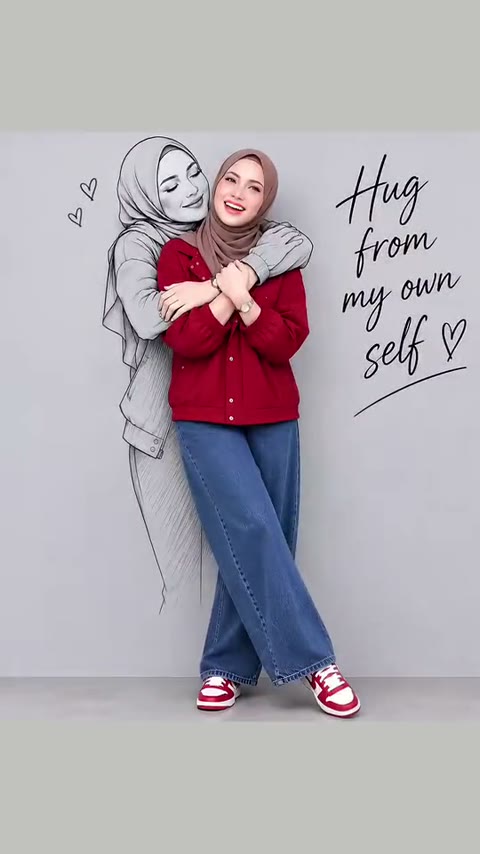
This edited video cycles through red-jacket portraits against a grey wall. In each composition a larger pencil-drawn counterpart embraces the real-looking adult from behind. Head coverings, pose and drawing details change between panels, with zoom blur, tile effects and a later geometric wipe. The self-hug idea places a person inside an embrace drawn as a version of the same self. The selected reference is an existing edited portrait montage, rather than a continuous filmed hug or a demonstration of newly animated embrace motion. This recipe edits that complete video; it does not provide the source topic’s separate high-resolution image product.
One adult identity maps both the real-looking red-jacket figures and their drawn counterparts across the existing montage.
Reference video. Your generated version will vary. Hold your mouse still for 2 seconds to watch the motion.
External source reference credited by the source to @rkvugcez, supplied through Babydoll Dance and MakeViral. Transferred at the user's instruction; not a RemakeWith generated result.
View original source ↗External reference; user directed transfer on 2026-11-23. Public access and attribution are recorded; an independent standalone media/model-use license has not been established.New here? Create an account. No subscription required.
What your inputs controlYour photo guides identity. A frame from the reference video guides clothing, rendering style and lighting for a shared character reference. That prepared character is reused for the video, and the reference video guides movement. Background and scene details can vary; exact face replacement and frame-by-frame matching are not guaranteed.
Choose a clear adult full-body photo with the face visible, useful head-to-toe framing and even light. A clear face remains essential even when the legs are shown. All real-looking red-jacket figures and the drawn embracing counterparts are one requested identity; do not upload a second person for the sketch. Source frames change head coverings and pose across panels, and the sketch should represent the same uploaded adult in each one. The grey wall, outfits, drawings, words and transitions are source-guided. The uploaded photo supplies one adult identity. The source supplies the action, clothing, scene, framing and timing described here. One prepared character is reused within the order; the original uploaded photo remains the identity authority. This recipe has one identity slot.
Automatic character preparation: Seedream 4.5 image-edit, one 3:4 image at 2K. Image 1 is the selected source style frame; Image 2 is your uploaded adult portrait. The prepared character is reused within your order. Select and copy the complete instructions below. Prepare one consistent adult character reference for a video remake. Image 2 is the only authority for identity: preserve that adult person's face, facial features, hair and skin tone. Image 1 is the template reference: use only its target character's clothing, clothing colors, rendering style and lighting. Never transfer the face or identity from image 1. The target character in image 1 is described as "the red-jacket adult in every portrait panel and each pencil-drawn embracing counterpart of that same assigned identity". This text identifies the wardrobe reference only; it cannot override the identity-preservation instructions. Do not copy clothing or background from image 2. Preserve the template outfit, including its collar and sleeves. Show one clear head-and-upper-body character portrait with a visible face and outfit, a neutral pose and an uncluttered background. Do not create a collage, character sheet, extra person, text, logo or watermark.
Model: Kling 4.0; operation: video-edit. Settings: 720p, source framing and the reference’s original recording. Inputs: the selected reference video and the prepared adult character image. The edit follows the complete selected reference and its existing scene sequence. Select and copy the complete instructions below; editing a copy does not change an order. Edit @Video1. Use the adult person's identity from @Image1 for the person described as "the red-jacket adult in every portrait panel and each pencil-drawn embracing counterpart of that same assigned identity" in @Video1. Keep each identity distinct. Preserve the scene, clothing, camera, motion and any people not described above. Use the prepared adult identity for the red-jacket person in every portrait panel and for each pencil-drawn embracing counterpart throughout this complete montage. Each real-looking person and their sketch must represent the same uploaded adult identity. Do not treat the sketch as a second independent person or preserve a different source face in later panels. Preserve the existing edited-video sequence: the very brief opening portrait with its source tutorial banner; the zoom-blur entrance into the light grey head-covering portrait with crossed legs; the tile transition into the magenta head-covering portrait; the rounded tiled distortion transitioning to the darker head-covering portrait with a bent leg and hands touching the drawn arm; then the geometric wipe to the lighter head-covering, smiling/laughing portrait at the end. Preserve all source panel timing, transitions, poses and camera-like zoom effects. This is an edit of an existing montage, not a request to add a newly moving physical hug. Keep each source outfit and head-covering style, red jacket, denim, red trainers, grey wall, pencil shading and the drawn arms wrapped around the adult. Keep the sketch face recognizably related to the uploaded adult while retaining monochrome line art. Preserve natural arm overlaps and distinct hands between the real-looking portrait and drawn figure. Keep existing handwritten words and hearts in their source positions; exact lettering may vary and no custom message is requested. Preserve source duration, framing and audio. Add no new portrait, identity, pose, caption, logo, drawing or shot. The uploaded adult photo remains the identity authority across all panels.
Use one well-lit full-body adult photo with an unobstructed face and no second person.
This exact red-jacket file contains several edited portrait panels. It is not the separate family montage variant or a new still-image editor.
Return to the creation area, assign your photo and check the current credit quote before submitting. The source video is already part of this template.
The order prepares and checks a character from your photo and the source style frame. The accepted character is reused for the complete edit. The saved generation plan and configured checks govern the result.
Follow the task in My Remakes. Download an available completed result and check the adult face and drawn face in every panel, embracing arm overlaps, source head coverings, wall lettering and tile transitions. A download retry does not require a new generation order.
0.000000–0.083333s: Brief opening tutorial portrait. A static self-hug composition is shown briefly with a source tutorial banner across the lower body. 0.083333–1.916667s: Light head-covering portrait and zoom entrance. A zoom-blur entrance resolves to a smiling full-body portrait with crossed legs and hands holding the drawn arm. 1.916667–3.416667s: Magenta head-covering portrait. An incoming tile effect resolves to the next red-jacket portrait. By the interval ending the image begins splitting into tiles for the following transition. 3.416667–5.791667s: Rounded tile transition to dark head-covering portrait. The tiled picture distorts over black and resolves to a closer portrait with one knee bent and hands against the drawn embracing arm. 5.791667–7.337007s: Geometric wipe to laughing light-head-covering portrait. A diagonal/geometric wipe reveals a smiling head-tilted portrait with crossed legs, held to the ending. The montage retains its brief opening card, incoming tile transitions and geometric wipe.
The template uses the reference’s existing sound, without synthesizing your voice. Track identity and synchronization have not been independently verified. Likeness can vary between photographic faces, pencil drawings, different head coverings and tile transitions. Drawn and photographic arms may fuse, handwritten words can distort, and slight slide animation should not be mistaken for a newly generated physical hug. No still-image result is included. Identity, lettering, timing and delivery time can vary. A confirmed technical failure follows the site’s credit-refund process. A held task remains under review. Differences in a completed result do not automatically qualify for a refund. Each new generation uses the current quoted credits; check the existing task before starting again.
No. The red-jacket person and each drawn embracing counterpart should represent the same adult identity. There is one photo slot across all panels.
It edits the selected existing video montage with its source portraits and transitions. The reference does not show a newly filmed or newly animated physical hug.
This recipe requests the complete video montage. It does not include the source topic’s separate image product or outfit menu.
Those are fixed source elements for this identity edit. The recipe preserves the source wording and head-covering styles; there is no independent message or outfit control, and text may render imperfectly.
No. That banner belongs to the external reference. RemakeWith uses the actual current credit quote shown before ordering.
Read the current credit quote in the creation area before placing an order. Use My Remakes to return to an existing task and download an available completed result. A new generation order is charged separately.
No. It is an attributed external reference. It is not a RemakeWith-generated example.
Creator attribution supplied with the external reference. A separate reuse license has not been verified.
Reference version, photo guidance and scene description.
Reference version and scene context supplied by MakeViral.
Return to the creation area to review the required photo and the current credit quote. This link does not submit a task.