15s
Create this look with your photo.
Create this image10 credits per remakeCreate a clean navy-blazer headshot with soft studio lighting, natural skin texture and a neutral background.
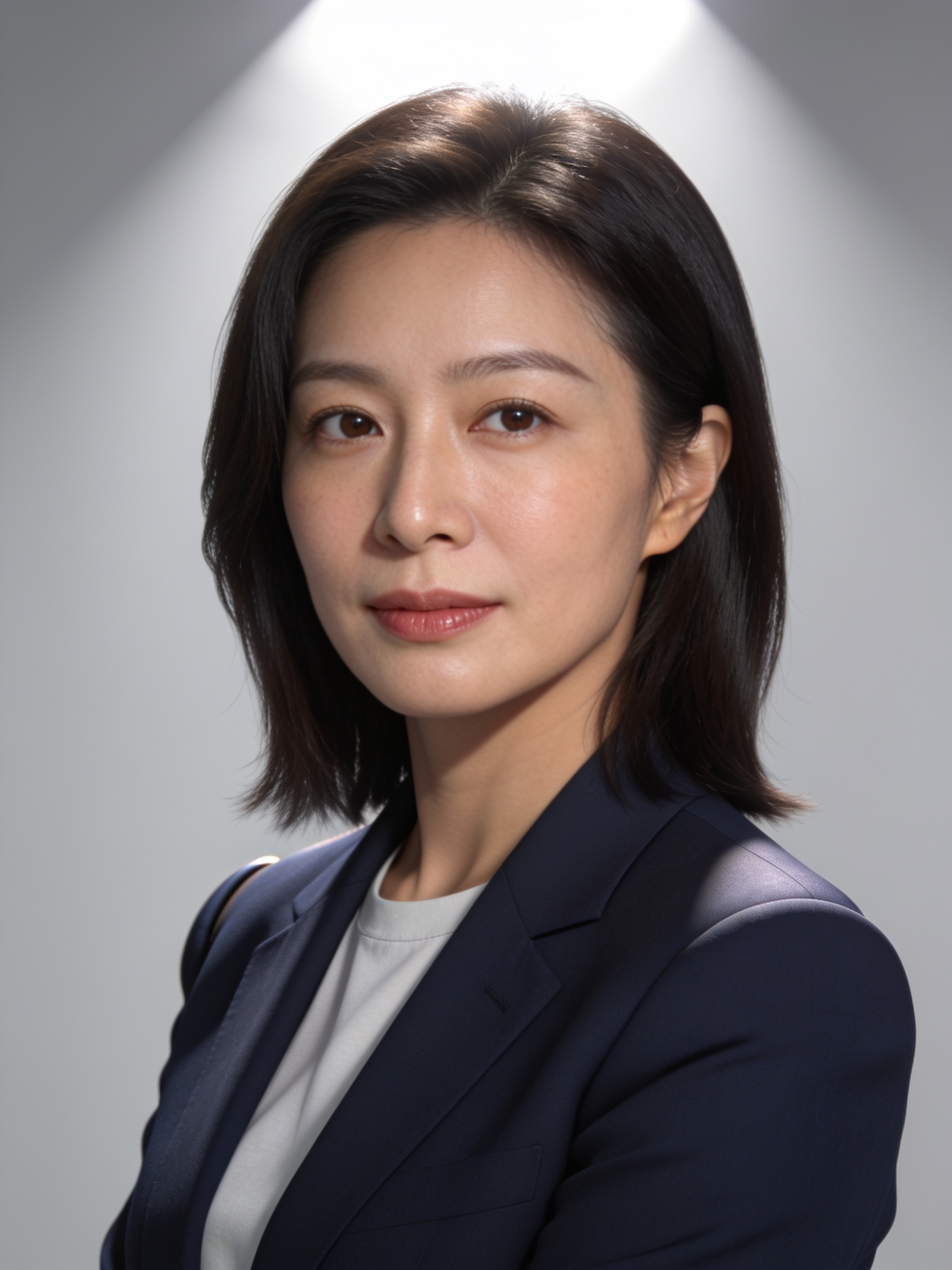
Style reference image. Your generated version will vary.
RemakeWith · AI-generated style reference · Seedream 4.5
Generated for RemakeWith under the site operator's instruction for public template-reference use. Fictional adult subject; no customer photo used. Provider terms apply.New here? Create an account. No subscription required.
What your inputs controlYour portrait guides identity. The template reference or your optional inspiration image guides the outfit, composition and lighting. Facial and style details can change.
A neutral backdrop, soft catchlights and restrained tailoring direct attention to the face. This visual headshot treatment can suit profile pages, without proving a qualification or meeting ID-photo rules. The main image is a style reference. It is not a verified result from your portrait. This template has not been generation-tested.
Upload a well-lit front-facing photo with the face, neck and shoulders visible. Avoid sunglasses, hats and strong color filters. Upload one clear photo of one adult, as a JPG or PNG up to 10 MB. You must be 18 or older and have permission to use the photo and likeness. Your portrait guides identity. The template reference or your optional inspiration image guides the outfit, composition and lighting. Facial and style details can change. An optional inspiration image replaces the template reference; it does not replace your required portrait.
Method: Seedream 4.5 image editing. Image 1 is the template reference, or your optional inspiration image. Image 2 is your uploaded adult portrait. Output: one 2K image with a 3:4 aspect ratio. Edit image 2 only. Keep exactly the same adult person, face, features, hair and skin tone from image 2. Use image 1 only for outfit, composition and lighting; never use the person or face from image 1. One adult person only. Create a realistic professional headshot framed from the upper chest. Dress the subject in a well-fitted dark navy blazer over a plain light shirt and set a clean light-gray studio background. Use a large soft key light slightly above eye level, gentle fill on the shadow side and a natural catchlight in each eye. Keep normal skin texture and an approachable closed-mouth expression. Let the shoulders turn a little away from the camera while the face looks toward it. Avoid airbrushed skin, invented badges and altered facial proportions. Build a coherent finished composition with deliberate light, readable silhouette and clean separation between the subject and background. Keep facial landmarks legible within this treatment rather than adding a different person. Avoid accidental duplicate heads, fused hands, broken edges and unrelated symbols. Do not add a watermark, signature or brand logo. This text describes the template recipe. You can select and copy it. Editing a copied prompt in another tool does not change the recipe run by this page.
Upload a well-lit front-facing photo with the face, neck and shoulders visible. Avoid sunglasses, hats and strong color filters. Review what the reference controls before choosing your photo.
Sign in with a verified account, upload the adult portrait, and optionally add an inspiration image you have permission to use. Confirm the upload permissions.
The creation area shows the current quote once the required inputs are ready. If you need credits, your uploaded photos stay saved while you purchase a pack. Return here and explicitly start generation.
The task continues if you leave the page. Return here or open My remakes to see progress and download the completed image. Another version starts a separate generation with its own displayed cost.
The lighting, jacket and framing can change. A professional appearance is a visual treatment, not a verified qualification or identity document. Your photo guides the person’s appearance. The reference guides the image’s style and composition. Likeness, clothing and fine details can vary. A technical generation failure returns the job’s credits. A completed image with unwanted creative details is not automatically refunded; creating another version uses credits again. Processing time varies. No success rate or exact completion time has been measured for this template.
Upload a well-lit front-facing photo with the face, neck and shoulders visible. Avoid sunglasses, hats and strong color filters. Use one adult per upload, keep the face clear, and avoid heavy filters or a group photograph.
This is a styled headshot. It is not checked against passport, visa or other identification-photo requirements.
The lighting, jacket and framing can change. A professional appearance is a visual treatment, not a verified qualification or identity document. The reference guides an interpretation, and exact identity, style, texture or composition matching is not guaranteed.
Yes. The optional inspiration upload replaces the style reference, while the required portrait remains the identity input. Your portrait guides identity. The template reference or your optional inspiration image guides the outfit, composition and lighting. Facial and style details can change. A different reference can change how this effect is interpreted.
The creation area displays the current server-calculated credit quote before you start. Technical failures return the credits used for that job. A completed creative result is not automatically refunded, and another version uses credits again.
Open this template page or My remakes to see progress and download the finished image. Uploads and results remain associated with your account and are not automatically added to the public template gallery.
A public description of the visual effect used for concept research. It is not a RemakeWith generation result.
Return to the photo upload area, check the current credit quote, and start when your inputs are ready.